
Vendor payment automation, right inside NetSuite.
In one consistent payment workflow.
For cross-border vendor payments.
So you know the rate before you pay.
Compared to manual bank uploads.
Pay quickly, accurately and securely – without leaving your ERP

Process payments in NetSuite
Keep execution in your ERP with AP and vendor payment automation that ties to bills, approvals and payment records.
- Execute single or batch payments
- Schedule payments to run on due dates
- Track payment status without external portals
- Reduce manual handoffs across tools

Gain FX clarity and control
Run domestic and cross-border payments with clear rate visibility and more predictable costs.
- View live FX rates before you pay
- Apply rates at payment execution
- Predict costs across currencies and entities
- Support more consistent global payment runs

Stay compliant and audit-ready
Keep payment activity connected to your records so finance can defend the trail through close.
- Record approvals, payments and reconciliations in NetSuite
- Update payment records and vendor bills after execution
- Track payments through reconciliation, audits and close
- Improve accuracy and prevent fraud with built-in checks
Leading organizations automate AP with Zone & Co

“We were really slow at uploading and coding invoices. It was taking us two and a half minutes every time, resulting in over 300 hours per month.”

“We explored various options, but Zone & Co was the only one offering turnkey procure-to-pay solutions fully integrated with NetSuite. It feels like using NetSuite itself, not a separate SuiteApp. Each Zone SuiteApp is an extension of the tool we already use, not an additional layer of complexity.”

“I reviewed all the major players in the space, and Zone’s AP automation solutions were by far the most performant. They integrate seamlessly within NetSuite and work so well, you would think they were part of core NetSuite."
Get a Personalized
Demo Today
Discover how our innovative solutions are tailored to your specific business needs. Streamline your back-office operations, enhance efficiency and drive your business forward.
Put an end to payment friction
What slows down vendor payments? Too many handoffs, too little visibility and execution that happens outside the ERP. AP spends too much time managing process gaps – not moving payments forward.
Payments spill into portals
Bank file uploads slow down the run
Zone AP Payments removes the manual file-upload handoff. By executing directly from the ERP, your team eliminates the "middleman" steps and the risk of file format errors.
Approvals don’t match the payment run
Zone AP Payments supports approving and executing the payment run directly in NetSuite. This aligns your internal controls with your actual cash out.
Cross-border payments add steps
Zone AP Payments handles domestic and cross-border payments in the same NetSuite workflow. You can scale into new markets without adding new processes.

FX rates are unknown at payment time
Zone AP Payments provides visibility into live foreign exchange rates before you click pay. Finance sees the exact cost before funds are ever released.
Reconciliation requires follow-up
Zone AP Payments automatically creates and updates payment records in NetSuite. When a payment is confirmed by TransferMate, the vendor bill is updated to "Paid" in real time, making reconciliation effortless.
Get a personalized demo today

Pay with precision, confidence and control
Zone AP Payments brings AP and payment automation into one NetSuite workflow – letting finance teams run vendor payments faster and with better control through close.
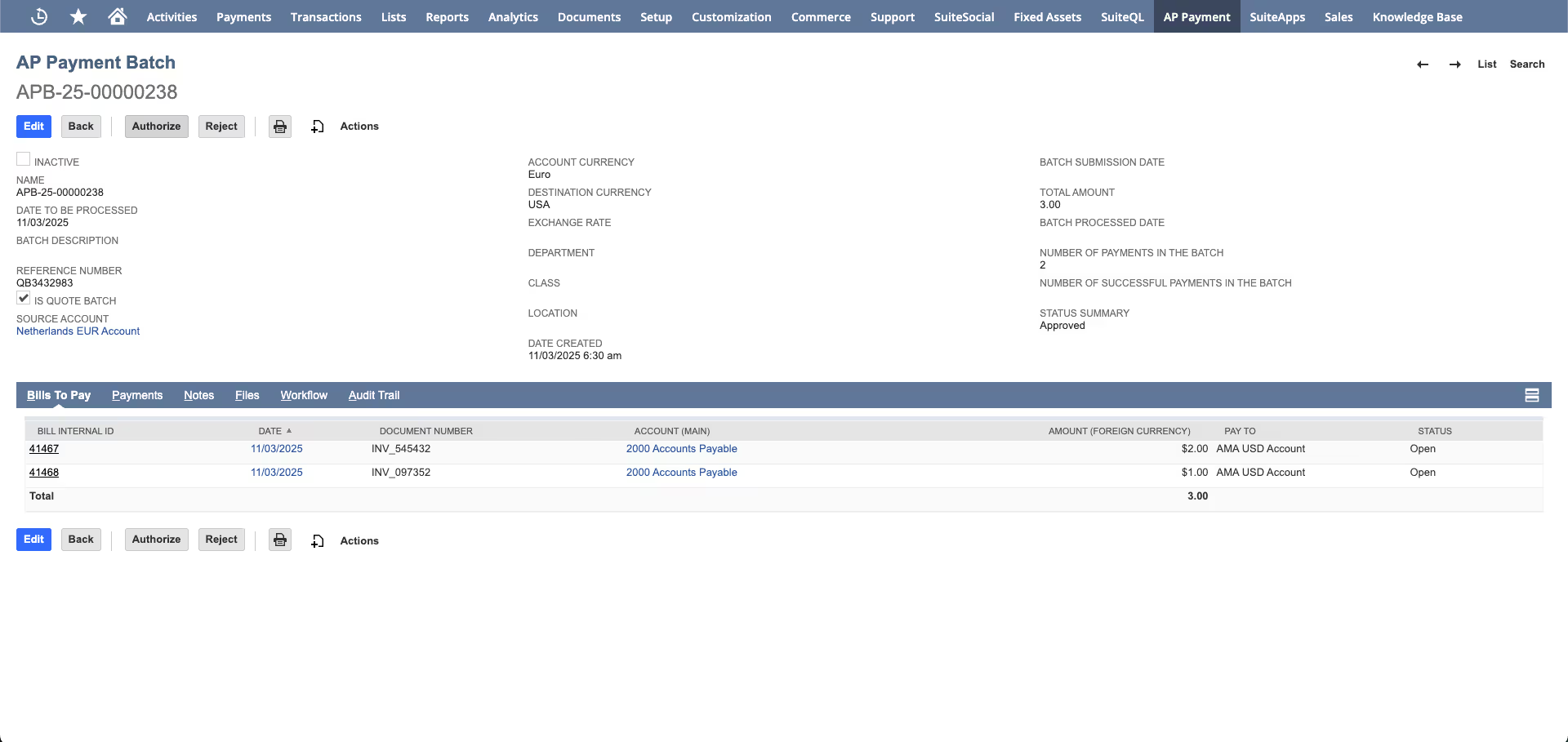
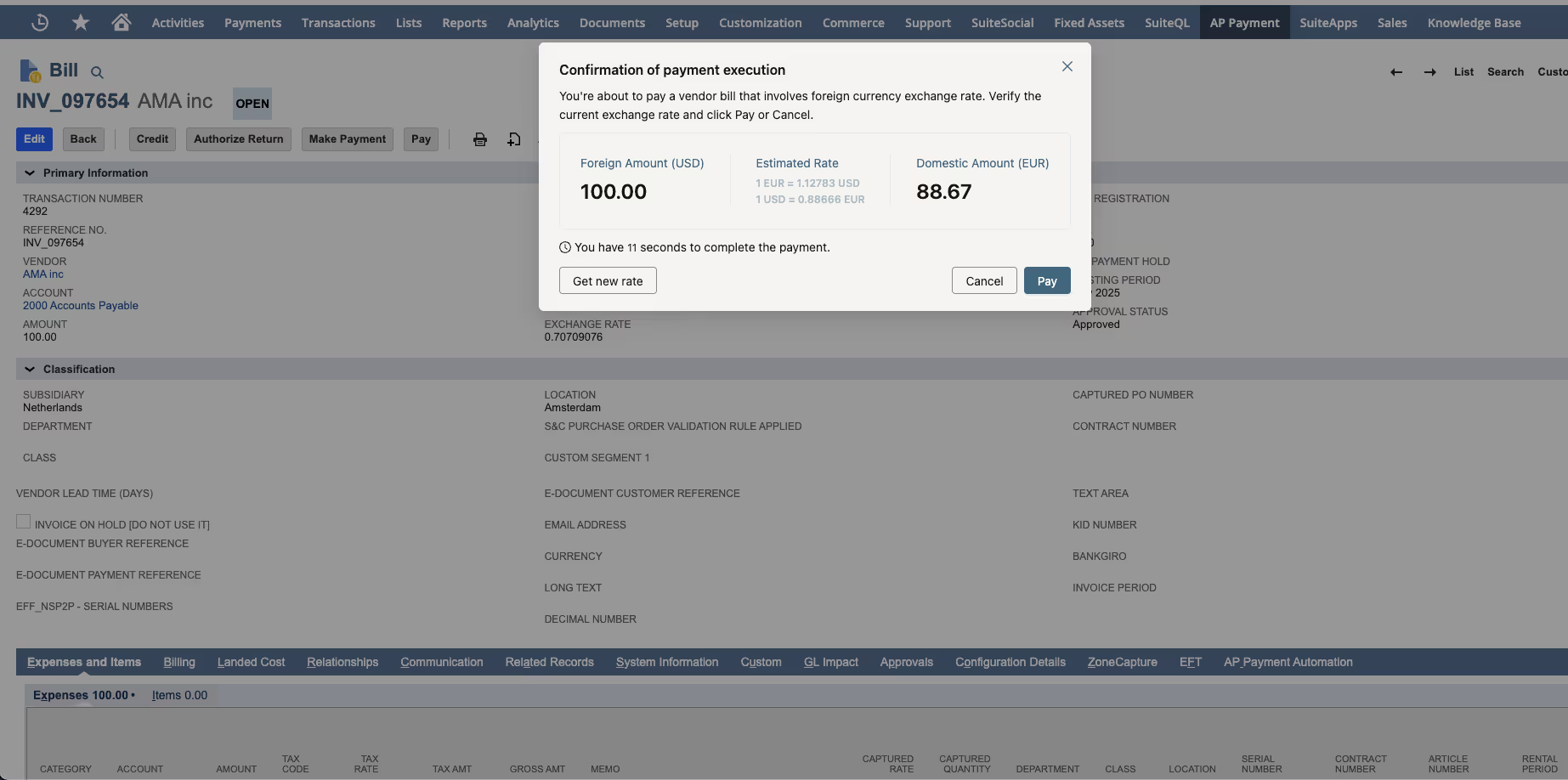
Multi-currency and FX transparency
Cross-border payments add execution complexity and FX surprises at the point of release. Zone AP Payments can run multi-currency payments in the same workflow with live FX visibility before payment, currency-based bill grouping and reconciliation after confirmation.
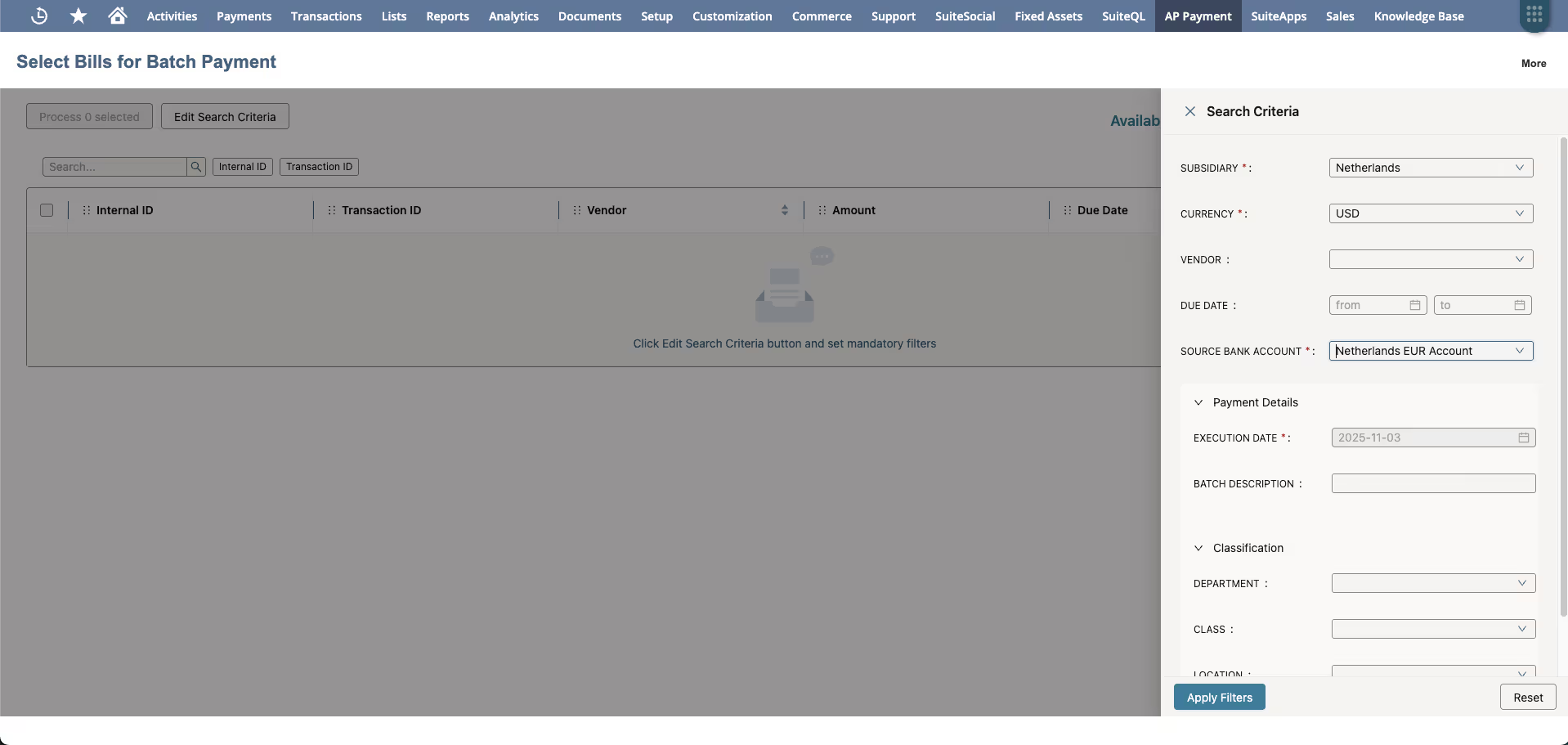
Working capital optimization
Payment timing decisions become effortless when scheduling and visibility stay in the ERP. Zone AP Payments helps you schedule payments more deliberately to support cash-flow goals, capture early-pay discounts, avoid missed bills or extend DPO – while maintaining control in NetSuite.
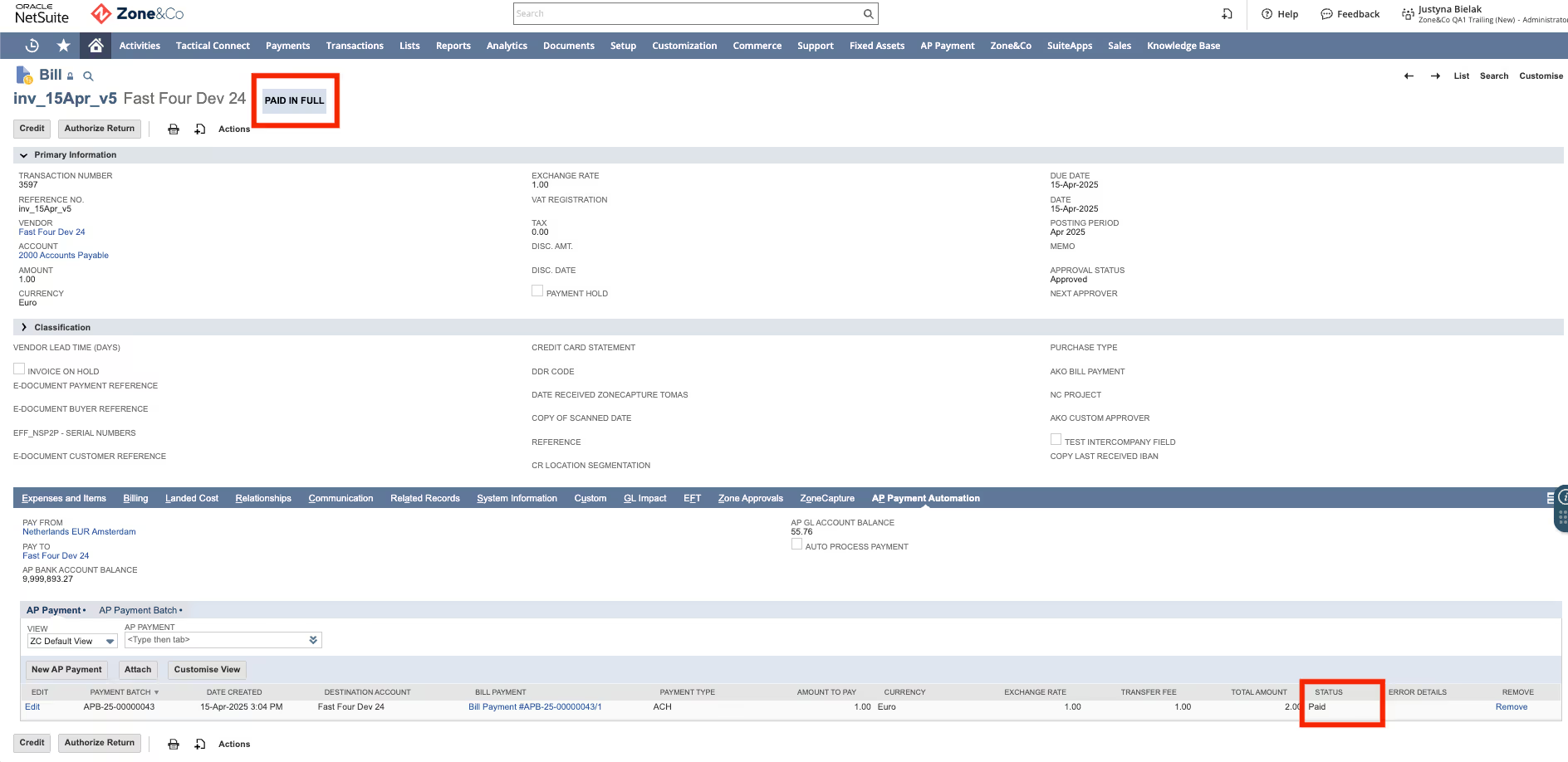
Zone delivers end-to-end AP Operations in NetSuite.
P2P Automate

P2P Control


P2P Orchestrate


Explore our AP and vendor payment automation resources








































.png)




.avif)
.avif)







%20Defined.avif)
.avif)



.avif)


.avif)
.avif)






Frequently asked questions
What is AP and payment automation?
AP and payment automation technology streamlines how finance teams capture invoices, route approvals and pay vendors without using repetitive manual tasks for each step.
Instead of chasing invoices in inboxes, keying in data by hand and following up on approvals manually, teams can use AP automation to move tasks through a structured workflow inside their ERP. That helps accounting teams save time, reduce delays and keep vendor payments moving with more control and visibility.
What are the benefits of enterprise vendor payment automation?
Payment automation solutions help enterprise finance teams handle high vendor volume, complex approval paths and tighter payment controls without adding more admin work.
The biggest benefits usually include:
- Reduced human error: Fewer manual handoffs means fewer duplicate payments, missed approvals and data entry mistakes.
- Lower processing costs: When invoice capture, approvals and payment execution move through an AP automation workflow, finance teams spend less time on repetitive work and more time on exceptions, cash planning and vendor management.
Early payment discounts: Faster routing and approval cycles make it easier to pay on time and capture discounts that often get missed when invoices sit in inboxes or wait on follow-up.
How does Zone AP Payments execute vendor payouts?
Zone AP Payments executes vendor payouts by moving approved invoices into a controlled payment process inside your ERP. Instead of relying on exports, reformatting files or disconnected tools, finance teams can schedule and send payments with more consistency and oversight. That means fewer handoffs, tighter control and a smoother path from invoice approval to vendor payment.
Are my funds protected when using Zone AP Payments?
Yes. Zone AP Payment keeps funds protected by holding them in segregated escrow accounts by our licensed payment partner, TransferMate Global Payments, under global regulatory supervision. The network meets ISO 27001, SOC 1 and SOC 2 standards – supporting enterprise-grade data protection, business continuity and audit-ready compliance.
How does Zone AP Payments connect to my existing bank accounts?
Zone AP Payments connects through our licensed global payments partner, TransferMate, to facilitate secure funding and execution of payments. Your existing business bank account is used to fund your TransferMate Global Account, which then allows payments to be initiated, approved and completed directly within NetSuite – without the need for external banking portals or manual file transfers.
Can Zone AP Payments pay vendors in any currency?
With Zone’s global vendor payment solution, you can execute transactions in more than 140 currencies and process them through local clearing systems for faster, lower-cost settlements.
Can I monitor automated vendor payments with my ERP?
Yes. With the right ERP system integration, finance teams can track vendor payment activity inside their ERP. That gives teams visibility into payment information like status, timing and approvals.
An automated payment process also supports better exception tracking, cleaner audit trails and less time spent chasing updates across spreadsheets, email and bank portals.
Who is the payment partner for Zone AP Payments?
Zone works with TransferMate Global Payments, a regulated global provider licensed to operate in more than 200 countries and 90+ jurisdictions. TransferMate provides the banking infrastructure, local payment rails and compliance framework that power Zone AP Payments.
Does Zone AP Payments replace my existing bank relationships?
No. Zone AP Payments does not replace existing relationships, and you can continue to use your existing bank for funding. Our platform provides a faster, more automated way to execute and reconcile payments across all your vendors and currencies.
Is onboarding complex?
Onboarding includes a one-time KYC process managed by TransferMate Global Payments, typically completed within 5–10 business days. Once approved, your global payment capabilities are activated in NetSuite for all future transactions – no repeated compliance steps required.
