The accounts payable (AP) clerk is keying supplier invoices into NetSuite by hand, cross-checking purchase orders in one tab and vendor records in another, while the controller waits on approvals stuck in email chains. According to PYMNTS Intelligence’s December 2025 Invoice-to-Pay Automation research, only 7% of finance organizations have fully automated AP, while 42% still rely on predominantly manual workflows, and 66% of AP teams report their manual workload has grown over the past year.
Finance leaders shortlisting NetSuite AP automation in 2026 face a sharper set of choices than two years ago. Artificial intelligence (AI) has moved from a bolt-on feature to a core evaluation criterion. Tool sprawl has become a close-time drag. Whether AP data lives inside NetSuite or syncs to it now decides if an audit trail is defensible or reconstructive. The right solution automates capture, coding, approvals and reconciliation from inside the enterprise resource planning (ERP) platform, closes AP as fast as it opens, and pays back its cost within the first year.
Key highlights:
- NetSuite AP automation removes manual work from accounts payable workflows within Netsuite, keeping the audit trail intact and allowing AP specialists to focus on exceptions and anomalies.
- Built-in-NetSuite tools remove the sync layer and extra reconciliation work that bolt-on or external tools create for AP teams.
- Manual invoice processing costs $12 to $22 per invoice, dropping to $2 to $5 with AI-powered automation, per Institute of Financial Management 2025 benchmarks.
- Zone’s NetSuite-native AP automation platform delivers 83%+ faster invoice processing, 25+ hours per week saved on AP tasks and 90%+ fewer data entry errors across its customer base.
What is NetSuite AP automation?
NetSuite AP automation is the set of software capabilities that removes manual work from the accounts payable process for finance teams running on NetSuite as their ERP. It covers the full lifecycle, including invoice capture from email or supplier portals, general ledger (GL) coding, three-way matching against purchase orders and receipts, approval routing, payment execution and bank reconciliation. Every step happens inside or connected to NetSuite, which means AP data stays where the general ledger, vendor records and audit trail already live.
The distinction between generic AP automation and NetSuite AP automation comes down to deployment model:
- A generic AP automation platform syncs data into NetSuite through an integration layer, running its workflows in a separate application that finance teams have to log into, learn and reconcile against the ERP.
- NetSuite AP automation runs the workflows themselves inside NetSuite, using the platform’s native records, permissions and audit logging
The core differences between these deployment models is where the audit trail and reconciliation work live. General AP automation platforms that sit outside of NetSuite typically sync the data back to the ERP on a schedule, but finance teams have to double check that what occurred in the platform was written correctly to NetSuite.
With built-in-NetSuite AP automation solutions, all the work is logged and written directly in the ledger, so there’s no second system to reconcile against and the audit trail stays intact.
Why does NetSuite-native AP automation outperform bolt-on tools?
NetSuite-native AP automation outperforms bolt-on tools by removing the sync layer entirely. AP data, audit trails and approval records live inside NetSuite from the moment they are created. There is no external system to reconcile, no dual audit trail to consolidate and no risk of two applications disagreeing about the status of a bill.
Bolt-on AP tools create three specific failure modes that native tools do not:
- Data drift: Every invoice, coding change and approval status has to travel across an API and stay consistent through updates on both sides. When the sync breaks during a NetSuite release, a third-party update or an unhandled edge case, AP data lands inconsistently across both systems. Controllers spend close time reconciling the two instead of closing the books.
- Split audit trails: Approval logs live in the third-party tool while posted vendor bills live in NetSuite. Auditors have to trace transactions across two applications, and every change during a sync gap is a defensibility risk.
- Dual-application tax: AP staff, controllers and auditors context-switch between NetSuite and a second interface to answer basic questions about a bill. Training time doubles and support teams have to triage between two vendors for every issue.
NetSuite-native AP automation removes all three failure modes at the architecture level.
- All AP records live in NetSuite from creation, so there is no sync layer to maintain.
- The audit trail is one continuous NetSuite log, viewable by external auditors without cross-application traces.
- AP staff work in the ERP interface they already know, with no second login and no dual training.
Bolt-on versus built-in is a crucial choice that shapes cost, close speed and audit defensibility for the life of the deployment.
NetSuite SuiteApp vs. integrated AP tool vs. standalone AP automation platform
Each carries different tradeoffs across data location, implementation time, user experience and total cost of ownership.
How is AI changing NetSuite AP automation in 2026?
AI is changing NetSuite AP automation in 2026 by shifting the workload from data entry to exception review. Modern AI handles invoice capture across any layout or language, populates GL codes based on historical decisions, matches invoices against POs and receipts at line level and surfaces only the exceptions that need human review.
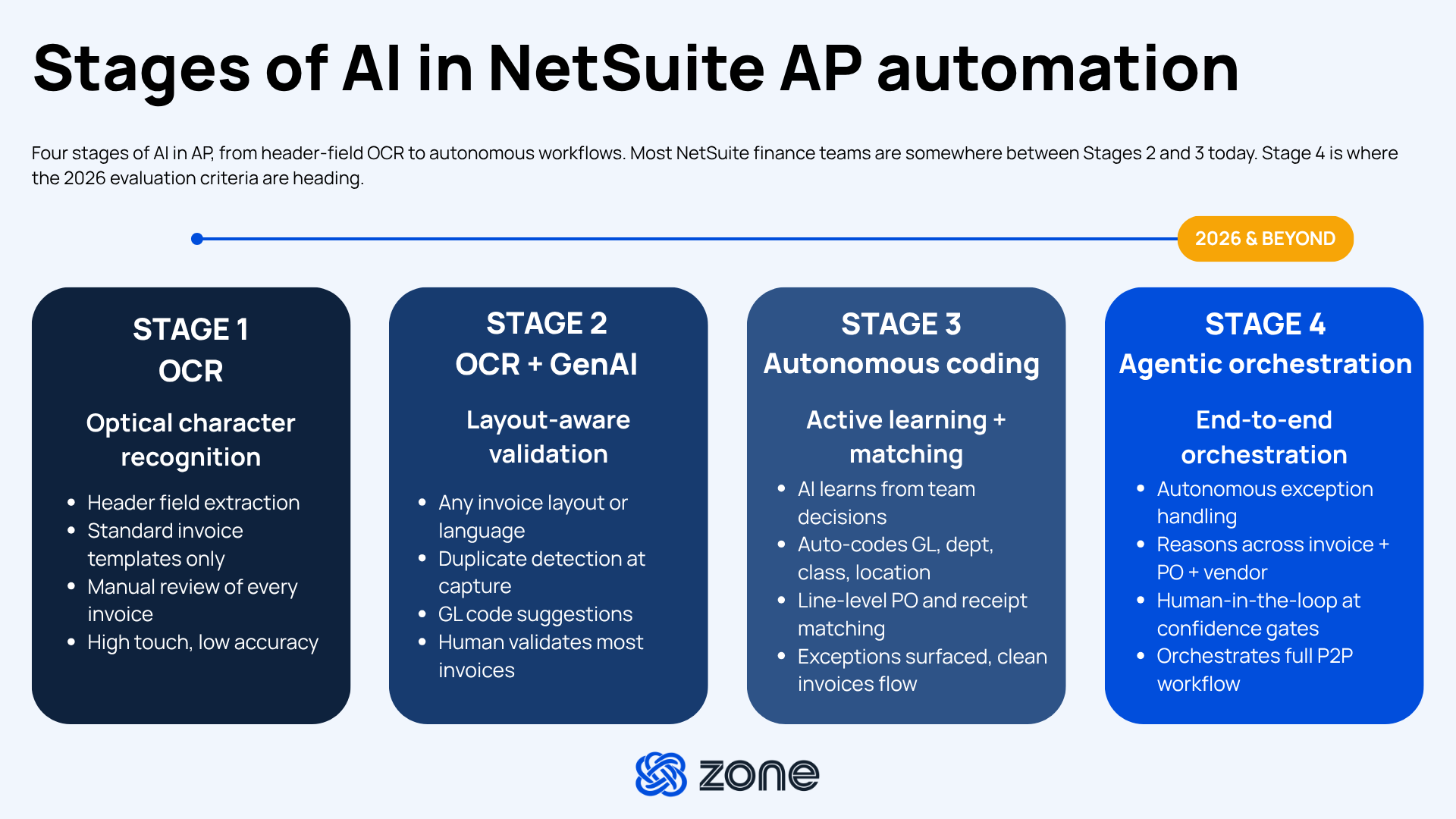
Two years ago, AI in AP meant optical character recognition (OCR) scanning invoice PDFs for header fields. Today the term covers a spectrum that runs from basic data extraction to autonomous coding and exception handling, with agentic AI beginning to remove entire categories of manual review.
Of the 565 finance professionals we surveyed in our “AI Impact vs. Hype in Finance 2026” report, 14% said accounts payable has the highest untapped potential for AI and 29% said AI has delivered real tangible benefits in accounts payable workflows.
For NetSuite AP automation buyers, that gap makes AI capability a first-tier evaluation criterion. The difference between shortlisting a modern solution and shortlisting a legacy tool with an AI label comes down to what the AI actually does inside the ERP.
What does AI do in AP today?
AI shows up across four layers of the AP workflow.
- Data extraction: OCR captures the invoice image, and generative AI reads the layout to identify fields regardless of vendor format or language.
- Validation and coding: AI matches invoices against POs and receipts, flags duplicates, and populates GL, department, class, location and project codes by learning from the coding decisions the AP team has already made.
- Exception surfacing: Instead of routing every invoice for manual review, AI isolates the ones that need attention, including variance thresholds, coding ambiguity and missing PO lines, and lets clean invoices flow through to approval.
- Autonomous handling: For well-defined workflows, AI can code, match and route without user intervention, escalating only when confidence drops below a threshold the finance team sets.
The evolution from traditional to AI-driven three-way matching illustrates how these layers work together. What used to be a manual line-by-line comparison is now a probabilistic match against multiple documents, with exceptions surfaced for human review.
How should you evaluate AI capabilities in a NetSuite AP automation solution?
Not every AI claim in the AP category is equally credible. Six questions separate genuine AI capability from marketing language.
- What is the field-level extraction accuracy on invoices the AI has never seen before?
- Does the AI learn from corrections the team makes, or does it re-suggest the same wrong code next month?
- Can autonomy be tuned per workflow, running full autonomous processing for clean invoices and human review for exceptions?
- Does the AI run inside NetSuite, or does invoice data leave the ERP for processing?
- Where does the audit trail live for AI-driven coding decisions?
- What data residency guarantees apply, especially for teams operating in the EU, UK or APAC?
The last three questions matter more than most buyers realize. AI that runs outside NetSuite creates a data movement footprint that auditors will scrutinize. AI that leaves no explainable trace creates audit exposure. AI without regional data controls creates compliance risk in regulated markets.
What should you look for in a NetSuite AP automation solution?
A NetSuite AP automation evaluation is really five evaluations stacked on top of each other. Each represents a workflow finance teams already run manually, whether capture, approvals, scale, implementation or compliance. The right solution has to earn its keep in all five. The framework below walks through what to test in each, with the questions that separate a defensible short list from a demo tour.
Error reduction
NetSuite AP automation reduces errors by catching them at three specific points in the workflow where manual AP creates predictable failures.
- Duplicate payments: The same invoice arrives twice, whether from portal and email or two versions from the same vendor, and gets paid twice. Automated duplicate detection at capture blocks the issue before it enters the approval queue.
- Coding errors: Misclassified GL, department or location codes cascade into misreported expense categories and month-end rework. AI-driven coding that learns from historical decisions cuts the rework loop.
- Reconciliation gaps: Manual matching between invoices and payments leaves timing differences and unresolved exceptions that surface at close. Automated three-way matching at line level flags variances at capture, not close..
Configurable approval workflows
Approval workflows in NetSuite AP automation should include configurable routing without SuiteScript, layered rules across amount, GL account and entity, email and mobile approval, delegation and bulk actions, and a complete audit trail inside NetSuite. Approval routing is where AP automation deployments succeed or fail after go-live. Rigid workflow logic that can’t accommodate real approval hierarchies gets abandoned within a quarter. Five questions to ask any vendor.
- Can approval workflows be configured without SuiteScript development or custom code?
- Can rules be layered, whether by amount, GL account, department, vendor or entity?
- Can approvers act from email or mobile, or must they log into NetSuite for every approval?
- Does the workflow support delegation, bulk approvals and out-of-office rerouting?
- Where does the approval audit trail live, and how does it hold up under external audit?
Point-and-click configuration matters most for teams with complex hierarchies across subsidiaries.
Scalability across entities and currencies
NetSuite AP automation scales across entities and currencies by treating each subsidiary as a first-class citizen in the ERP, not a workaround. That means:
- Consistent coding rules across subsidiaries that carry entity-specific overrides where the business unit needs them.
- Native multi-currency capture that reflects live foreign exchange rates at invoice date, not month-end approximation.
- Volume handling that doesn't degrade at peak periods, whether the peak is month-end, year-end or a new subsidiary onboarding.
A controller at a nine-entity manufacturer processing 3,000 invoices per month in five currencies needs a solution that treats each entity as a first-class citizen, not a workaround. The test is whether a solution treats multiple entities the way NetSuite does, with entity-specific rules and audit trails, not as afterthoughts bolted onto a single-tenant schema.
Implementation timeline
NetSuite AP automation takes four to eight weeks to implement as a native SuiteApp and three to six months as an integrated or standalone tool. The gap comes from what each path actually involves week by week.
A four- to eight-week SuiteApp implementation may look like this:
- Install runs from the SuiteApp Marketplace with no external integration to build.
- Configuration happens against existing NetSuite records and workflows.
- Training centers on new capabilities inside a UI the team already knows.
- Support handles NetSuite-adjacent questions natively without vendor triage.
A three- to -six-month implementation with a bolt-on tool can look like:
- Install requires an integration build, data mapping and testing against both systems’ logic.
- Configuration touches two applications and has to reconcile their permissions models.
- Training covers two applications, two UIs and two escalation paths.
- Support has to triage between the third-party vendor and NetSuite for every issue.
E-invoicing modules
A NetSuite AP automation solution needs structured e-invoicing capability that meets the specific mandates in the markets where the business operates. Global e-invoicing mandates fall almost directly onto AP teams, and those without structured capability scramble when they land.
Teams that treat e-invoicing as an afterthought are exposed at compliance deadlines. Teams that pick a NetSuite AP automation solution with e-invoicing capability native to the platform meet the mandate without adding another tool.
What’s the ROI of NetSuite AP automation?
The return on investment (ROI) of NetSuite AP automation shows up across four value drivers. Zone customers running NetSuite AP automation report 83%+ faster invoice processing, 25+ hours saved per week on AP tasks and 90%+ fewer data entry errors as the aggregate result.
- Time savings: Compound gains across every invoice, approval and reconciliation, freeing full-time equivalent (FTE) hours from data entry.
- Error reduction: Avoided duplicate payments, avoided late fees and cleaner month-end close.
- Direct cost savings: Lower cost per invoice, fewer full-time employee hours spent on manual work and reduced audit prep.
- Strategic capacity: This is the value that doesn't show up on a spreadsheet, or the AP team hours that get redirected from data entry into vendor management, working capital optimization and close analysis.
Beyond the calculator, three questions sharpen the ROI case before it goes to the CFO.
- What is the current fully loaded cost per invoice, including keying, matching, coding, exception handling and audit prep? Manual processing benchmarks currently range from $12 to $22 per invoice, according to IOFM 2025 data.
- What is the accrued cost of duplicate payments and late fees that a stronger accuracy layer would eliminate? Even a 0.2% duplicate payment rate on 1,000 monthly invoices at an $8,000 average invoice value equates to more than $190,000 in preventable annual outflows.
- What percentage of AP capacity is currently spent on work that doesn’t require a human? That is the capacity that can shift to higher-value AR and vendor management once capture, coding and matching run autonomously.
The business case for NetSuite AP automation gets stronger every quarter as invoice volume grows and manual cost scales linearly. The teams that build the strongest cases do more than count hours saved. They count the AP outcomes they can commit to leadership with confidence.
Choose an intelligent NetSuite AP automation solution
The right NetSuite AP automation solution is three things: It’s native to NetSuite, so AP data, audit trails and approval records live where the general ledger already lives. It’s AI-powered, so capture, coding and matching run without manual intervention, with the transparency and control finance teams need to trust the output. And it delivers measurable ROI, with the investment paying back within the first year.
Zone’s AP automation solution is built for that standard,empowering finance teams to:
- Stop keying invoices: ZoneCapture handles invoice capture, GL coding and three-way matching entirely inside NetSuite, with finance-native AI and AP intelligence that learns from each team's coding decisions.
- Watch bills route themselves: ZoneApprovals routes bills through configurable workflows with email approvals, delegation and a complete audit trail.
- Pay vendors anywhere without leaving the ERP: Zone AP Payments executes domestic and cross-border vendor payments directly in NetSuite with full timing visibility to help you strategize for cash flow optimization.
- Automate transaction matching: ZoneReconcile closes the payment loop with intelligent NetSuite bank reconciliation.
Bolt-on tools solve part of the problem and create a new one at every seam. NetSuite-native AP automation solves the full workflow in one system. That is the difference between an AP function that runs correctly and one that can be explained at close.