
NetSuite bill capture is a critical tool for accounts payable teams looking to reduce manual invoice processing, minimize errors and eliminate approval bottlenecks. Manual workflows slow down AP, introduce mistakes and create friction – issues that drive many organizations to consider automation inside the ERP with NetSuite invoice OCR solutions.
If you’ve ever asked, “What is NetSuite bill capture?” this guide is for you. It covers where the tool shines, where it falls short and what limitations can emerge as AP complexity grows – especially for teams managing multiple entities or global operations. You'll also see how ZoneCapture becomes a pragmatic upgrade for modern finance teams that want to standardize on NetSuite without sacrificing speed or governance.
What is NetSuite Bill Capture?
NetSuite bill capture is a native capability that uses optical character recognition (OCR) and machine learning to extract key fields from vendor bills and route them through approvals inside NetSuite. As part of NetSuite procure to pay, it helps finance teams digitize invoices, reduce manual entry and post bills faster within the enterprise resource planning (ERP) system.
In practice, NetSuite bill capture automates vendor identification, header and line-item extraction and approval routing to lower risk and improve control across accounts payable. As a category, bill capture in NetSuite refers to tools that ingest supplier invoices from email, scans or e-invoices, recognize the content and create payable transactions.
NetSuite bill capture is designed for solid OCR and approvals rather than advanced exception handling or deep analytics. Teams that need stronger artificial intelligence (AI), entity-specific rules and touchless throughput often look at a NetSuite bill capture alternative that is native to NetSuite.
Because it sits inside the ERP, controllers gain a real-time view of liabilities, cash requirements and approvals without switching systems, supporting auditability and policy compliance end-to-end.
NetSuite bill capture also anchors many organizations’ NetSuite invoice OCR strategy, especially when the goal is to standardize accounts payable operations before introducing more advanced controls. This guide explains how NetSuite bill capture helps, where it falls short and how to evaluate alternatives that match growth and compliance needs for the long term.
Top 11 alternatives to NetSuite's native Bill Capture
Organizations exploring alternatives to NetSuite bill capture often want more accurate AI extraction, touchless 3-way matching, stronger multi-entity controls and faster cycle times without integrations that increase IT overhead. The options below span native SuiteApps and connected platforms that integrate with NetSuite to extend accounts payable automation.
1. ZoneCapture
ZoneCapture is a SuiteApp that automates accounts payable directly inside NetSuite. It captures invoices using OCR, applies AI to extract data, and validates each entry against vendor records, purchase orders and receipts. This allows AP teams to manage the full process from a single platform without switching systems or losing control.
3-way invoice matching verifies each invoice against both a purchase order and a receipt. Entity-aware logic ensures routing and validations follow the right rules for each subsidiary or business unit, improving throughput without sacrificing control.
AP automation software like ZoneCapture reduces manual work, shortens cycle times and strengthens compliance. Because it’s built for NetSuite, it keeps data, controls and approvals under one roof.
Key ZoneCapture features:
- AI-powered OCR extracts data from PDFs, emails and XMLs – eliminating manual entry
- GenAI suggests GL accounts, departments and segments – accelerating coding and reducing errors
- Three-way matching between invoices, POs and receipts – closing the loop on approvals
- Learns vendor layouts over time – improving accuracy and reducing touchpoints
- Native to NetSuite – no integrations, sync issues or context switching
- Customizable workflows with audit-ready posting – built for compliance and scale
- Multi-subsidiary, multi-currency and multi-language – global-ready from day one
- Split-screen UI – faster review and fewer tab-switches during invoice matching
2. Ramp
Ramp pairs accounts payable automation with spend management and corporate cards to give controllers unified visibility over bills, reimbursements and card transactions. It suits companies that want a single interface for coding, approvals and vendor payments with robust spend controls.
Ramp pros:
- Automates invoice intake, approvals and expense categorization
- Seamless integration with ERP and accounting systems like NetSuite
- Offers multiple payment options – ACH, wire, card and check
- Real-time visibility into spend and controls across departments
- Clean user interface and responsive support
Cons of Ramp:
- Limited 3-way match support – may require custom workarounds
- Multi-entity and international capabilities are still maturing
- Advanced features (like bill pay automation) may require a paid plan
- Setup can require IT help to connect across tools and workflows
3. Tipalti
Tipalti focuses on global payables, supplier onboarding, tax and W-8/W-9 collection and cross-border payments. This makes it a fit for multi-entity and high-growth environments. It streamlines mass payouts and compliance workflows while integrating with NetSuite for accounting.
Tipalti pros:
- Global payment support across 190+ countries and 120+ currencies
- Supplier self-service portal available in 17+ languages
- Robust automation eliminates 80%+ of manual AP tasks
- Tax and compliance tools – including W-8/W-9 collection and FATCA validation
- Integrates with NetSuite, Oracle and QuickBooks
- Responsive and knowledgeable customer support
Cons of Tipalti:
- 3-way match functionality is limited or requires custom workarounds
- Onboarding and configuration can be complex for some teams
- Batch syncing and reporting processes can be slow or error-prone
- Lacks strong VAT/GST functionality in certain regions
- Pricing may be less accessible for small or midsize companies
4. AvidXchange
AvidXchange offers invoice capture, configurable approval workflows and payment execution for mid-market accounts payable teams. It integrates with many ERPs, including NetSuite, and is designed to handle high invoice volumes with centralized controls.
AvidXchange pros:
- Integrates with 200+ ERP and accounting systems
- Automates invoice capture and approval workflows
- User-friendly interface with smooth onboarding
- Reduces manual entry and drives significant time/cost savings
- Strong reporting tools and payment visibility
Cons of AvidXchange:
- Invoice status tracking post-approval is limited for reviewers/approvers
- Workflow navigation can be click-heavy or inefficient
- Some doc handling limitations (e.g., merging files)
- Delays in payment updates and occasional system latency reported
5. Stampli
Stampli emphasizes collaboration on invoices through an in-invoice communication layer and AI that learns vendor behaviors. It helps teams resolve exceptions faster by keeping approvers, buyers and accounts payable aligned in context.
Stampli pros:
- AI-driven invoice capture, coding and workflow automation
- Centralized communication inside each invoice – reduces back-and-forth
- Fast onboarding and deployment
- Supports audit trails, reminders and approvals
- Clear UI with detailed dashboards
Cons of Stampli:
- Customization of workflows and dashboards is limited
- Advanced features may require extra training to use effectively
- Mobile experience and card integration can be inconsistent
- Less common ERP systems may require manual configuration
6. Rossum
Rossum provides AI-first document recognition tuned for invoices and other semi-structured documents. Its flexible application programming interface (API) and human-in-the-loop validation can improve extraction quality for diverse formats and complex suppliers.
Rossum pros:
- Template-free AI data extraction handles a wide range of document types without manual setup
- Easy-to-use UI and fast onboarding support quick adoption
- Strong ERP integration support, including SAP and Coupa
- Multilingual recognition and handwriting support for complex supplier documents
- Built-in fraud detection and duplicate payment prevention improve financial control
Cons of Rossum:
- No mobile app limits access for users on the go
- Large file size restrictions may hinder some use cases
- Documents flagged “To Review” require manual re-extraction
- Advanced features may require customization and user training
- Setup effort may be higher for organizations with complex workflows
7. Kanverse
Kanverse delivers intelligent document processing for invoices with auto-validation, duplicate checks and rules-based approvals. It focuses on reducing exceptions and manual touches across capture and workflow.
Kanverse pros:
- Achieves up to 99.5% accuracy in data extraction
- Reduces invoice cycle time from days to seconds
- Automates verification and fraud detection
- Protects sensitive data by blurring personally identifiable information (PII)
Cons of Kanverse:
- May have a learning curve for users unfamiliar with AI tools
- Data extraction accuracy depends on invoice image quality
- Implementation and ERP integration may require time and resources
8. Basware
Basware is a global procure to pay (P2P) platform with e-invoicing networks, invoice automation and analytics. It is designed for enterprises that process large invoice volumes across multiple geographies and need compliance controls.
Basware pros:
- AI-powered touchless invoice processing streamlines high-volume AP operations
- Centralized, searchable invoice database simplifies audit and retrieval
- Smart-coding tool accelerates approval and reduces manual coding
- Strong support for global operations and multi-ERP environments
- Built-in fraud detection and compliance management tools
Cons of Basware:
- Setup and integration require significant time and resources
- Users cite workflow inflexibility and too many steps for edits
- Platform performance can be sluggish; session timeouts noted
- Support responsiveness and documentation fall short of expectations
- Pricing lacks transparency and may be cost-prohibitive for smaller organizations
9. Yooz
Yooz offers cloud-based accounts payable automation with rapid OCR setup, straightforward approval routing and ERP integrations. It targets organizations that want a quick deployment and user experience that is easy to adopt.
Yooz pros:
- Fast deployment and easy setup, including OCR and approval workflows
- Intuitive, user-friendly interface that simplifies onboarding
- Strong ERP integrations support streamlined workflows
- Mobile accessibility supports remote approvals and processing
- Competitive pricing for small and mid-sized businesses
Cons of Yooz:
- Occasional syncing issues between Yooz and ERP systems
- Some users report limited customization in reporting features
- Mobile app lacks some desktop platform functionality
- Support response times may vary
- Can struggle with complex invoice scenarios requiring manual correction
10. EasyAP365
EasyAP365 focuses on Microsoft Dynamics ecosystems with invoice capture, coding and approvals integrated into the ERP. It supports organizations standardizing accounts payable across Dynamics before or alongside NetSuite.
EasyAP365 pros:
- Seamless integration with Office 365 tools (SharePoint, Power Automate, Teams)
- Real-time ERP integration (including NetSuite) for auto-creation of records
- Flexible approval workflows and mobile app support
- OCR for invoice capture and support for multiple submission methods
- Live data sync and customizable configuration
Cons of EasyAP365:
- Requires Office 365 subscription, making it less ideal for non-Microsoft environments
- Primarily designed for Microsoft-centric businesses; limited support for non-Microsoft ERPs
- Implementation/setup may take 1–2 months in complex environments
- Per-invoice pricing can become costly for high-volume users
- Lacks user reviews and broader validation outside the Microsoft ecosystem
11. DOKKA
DOKKA combines invoice capture with document management and AI-driven organization. It suits teams that want centralized storage, rapid retrieval and streamlined audit readiness across accounts payable artifacts.
DOKKA pros:
- Extremely user-friendly UI with fast implementation in as little as 2–3 weeks
- Smart AI invoice capture with coding and PO matching
- Real-time invoice syncing with strong search and audit capabilities
- Clear approval workflows, full audit trail, and responsive customer support
Cons of DOKKA:
- Initial setup may come with a learning curve for new users
- May not support deep workflow or interface customization
- Some email attachment types require manual upload steps
- Most effective for companies already running NetSuite or similar ERPs
How does NetSuite AI Bill Capture help finance teams?
Invoicing solutions like NetSuite AI bill capture reduce manual work, accelerate approvals, improve data quality and strengthen accounts payable governance inside the ERP. When paired with broader AP Automation, finance leaders can create repeatable, audit-ready processes that scale with growth and reduce variance in coding and approvals.
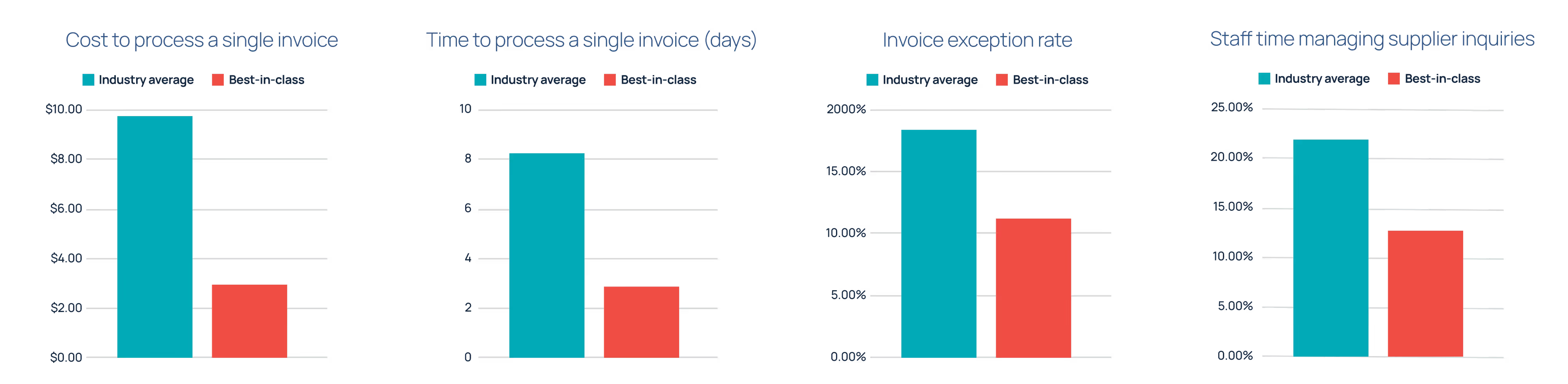
This unlocks new opportunities to streamline invoice processing and narrow the gap between average and best-in-class AP performance. Research from Ardent Partners makes this divide clear:
- The average cost to process an invoice is $9.84, while best-in-class organizations spend $2.65.
- Invoice processing time averages 8.2 days. Best-in-class teams average 2.9.
- The average invoice exception rate is 18.4%, compared to 11.1% for best-in-class companies.
- 21.9% of staff time is spent managing supplier inquiries. Best-in-class organizations reduce that to 12.8%.
Reducing manual workload
AP teams waste time on tasks like entering invoice data, downloading attachments and routing PDFs for review. As volume scales, these manual steps create friction and make it harder to maintain accuracy or keep up without hiring.
NetSuite-native AP automation reduces invoice processing time. By automating invoice data extraction and coding, teams eliminate repetitive data entry and document handling. This frees analysts to focus on higher-value work while scaling volume without increasing headcount.
- Auto-populated vendor, header and line fields reduce errors and rework
- Centralized capture and routing eliminate email back-and-forth and manual file handling
Speeding up invoice approvals
Manual routing slows approvals and creates blind spots. When AP doesn’t know who needs to review or where a bill is stuck, payment delays and late fees become routine.
NetSuite workflows route invoices to the right approver based on role, threshold or subsidiary. Alerts and status tracking keep bills moving. Approvers get clear prompts to act without back-and-forth from AP. This accelerates approvals and helps reduce late payments.
- Automated routing moves invoices instantly through the approval chain
- Alerts and status tracking help stakeholders act on time
Improving data accuracy and auditability
Errors in invoice amounts, GL coding or dates can lead to rework or audit issues. Without controls in place, these problems often aren’t noticed until after posting.
NetSuite’s AI validation flags missing or mismatched fields before a bill hits the books. Every change, review and approval is captured in a permanent system log, so AP teams don’t need to track decisions manually or chase down approvers for audit support.
- Field checks flag missing or out-of-tolerance values before posting
- Immutable logs record who viewed, edited and approved each bill
Enhancing visibility across AP
Most teams rely on spreadsheets and inbox searches to track invoice status. That makes it hard to answer supplier questions, manage liabilities or resolve blockers quickly.
With NetSuite dashboards and AP automation, finance gains real-time visibility into invoice progress, pending approvals and payment timing. You see where issues are building and who needs to act – all without leaving the ERP.
- Centralized views help identify bottlenecks and approval delays
- Trends and exception reporting spotlight recurring supplier or process issues
Supporting compliance and control
Policy enforcement can't rely on memory or email threads. Without system controls, teams may bypass approval thresholds or make changes without oversight – increasing the risk of fraud or failed audits.
NetSuite applies financial controls at the system level through approval hierarchies and access restrictions. The platform limits who can act on invoices, enforces dollar thresholds and supports compliance with built-in documentation and role-based workflows.
- System-enforced roles and limits prevent unauthorized actions
- Approval records and change logs support compliance and audit readiness
Key features and capabilities of the NetSuite invoice OCR solution
The NetSuite invoice OCR approach streamlines invoice capture and routing by keeping everything inside the ERP. For many teams, invoice automation software is the foundation of NetSuite invoice OCR maturity before adding advanced AI and matching for touchless throughput.
- AI-driven invoice recognition: Invoices are automatically scanned and interpreted using OCR and machine learning to identify vendors, amounts and invoice details. The system maps this data to the correct NetSuite fields to reduce manual entry and improve consistency.
- PO and receipt matching: NetSuite matches incoming invoices against existing purchase orders and receipts to verify accuracy before posting. This reduces exceptions and helps AP teams catch discrepancies early without toggling between systems or screens.
- Customizable approval workflows: Finance teams can create invoice routing rules based on dollar thresholds, subsidiaries or departments. Invoices flow automatically to the right approvers, speeding up reviews and reinforcing financial controls through system-enforced policies.
- Split-screen review experience: Bill Capture’s review screen displays the PDF invoice alongside extracted data in a single view. Approvers can compare the two instantly, make corrections if needed and complete approvals without leaving the NetSuite environment.
- Native NetSuite integration: The invoice capture process happens entirely inside NetSuite, with no third-party tools or exports required. That means one system of record, real-time visibility and full audit trails for every action from submission through posting.
NetSuite's built-in Bill Capture pros and cons for enterprises
NetSuite’s built-in Bill Capture helps organizations reduce manual AP work by keeping invoice data, approvals and audit history inside the ERP. While it brings strong core functionality and native simplicity, teams with global, complex or highly customized needs may find its flexibility limited. Below is a concise view of NetSuite built-in bill capture pros and cons for scaling teams.
Pros:
- NetSuite native, reducing integration risks and keeping data within a single system
- AI-powered OCR automatically extracts vendor, amount, date and line-level details
- Flexible approval routing by department, subsidiary or dollar amount
- Split-screen review interface speeds up invoice validation and correction
- Real-time visibility and system-generated audit trails simplify compliance
Cons:
- OCR may struggle with non-standard invoice formats, increasing manual correction
- Large or complex files can create inefficiencies without batch or high-volume tools
- No vendor portal means AP teams must manage submissions manually
- Global use may be limited by dependencies like SuiteTax and currency constraints
- E-invoicing often requires extra configuration or third-party support
- Partial receipts can cause matching issues without custom workflows
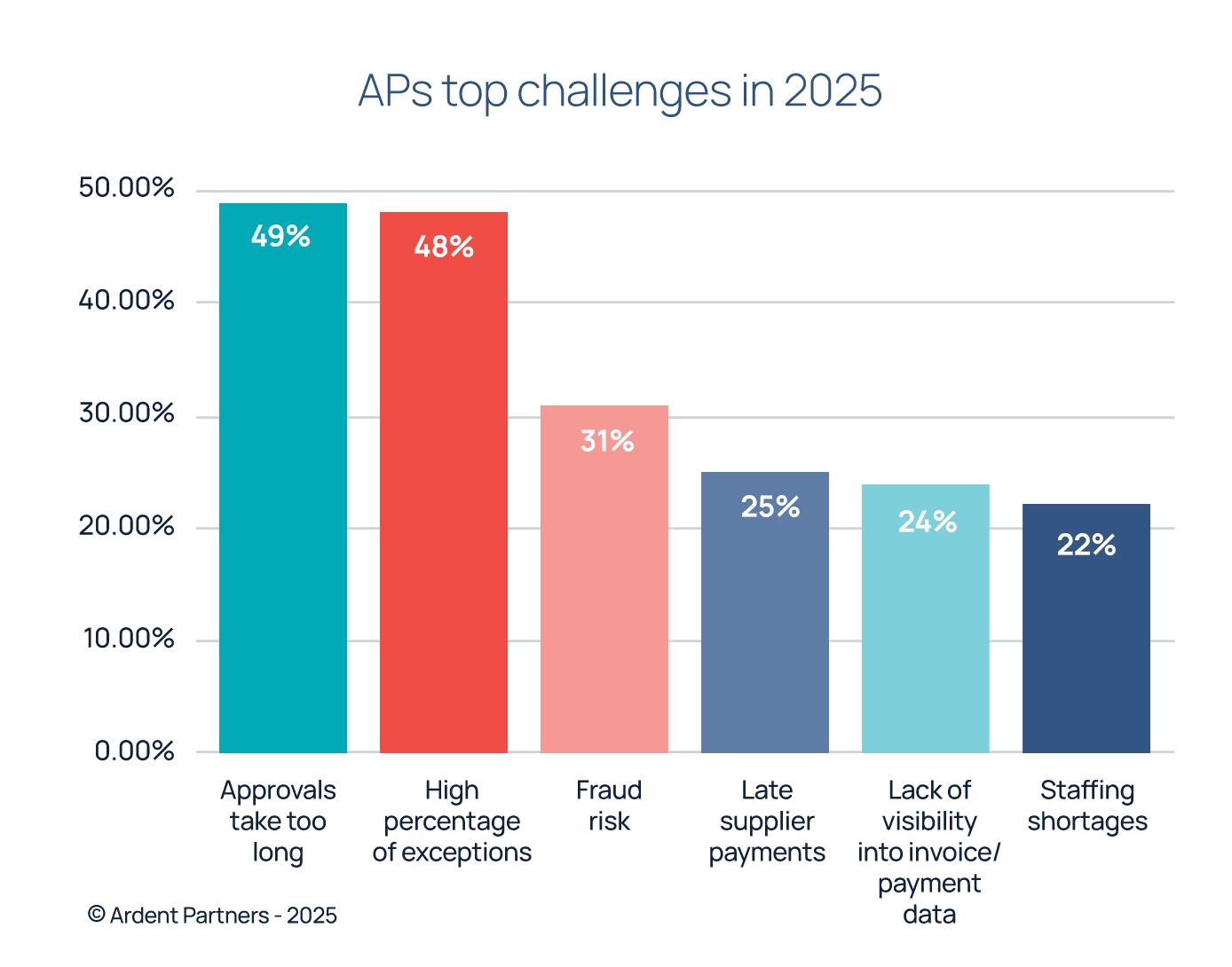
When evaluating the features for bill capture NetSuite provides, it’s helpful to keep AP’s top challenges in mind. A recent study from Ardent Partners ranks them:
Comparison of NetSuite bill capture alternatives
Understanding NetSuite Bill Capture limitations
Several NetSuite bill capture limitations affect speed, accuracy and scale. Understanding these gaps helps teams decide when to extend native tools or replace them with a more powerful SuiteApp.
OCR accuracy
NetSuite bill capture can struggle with poor-quality scans, non-standard layouts and invoices in languages other than English. Its OCR performs best on clean, conventional formats, which limits automation for global or diverse vendor bases.
How this limitation impacts AP teams: More exceptions and mismatches mean AP teams spend extra time correcting data and reprocessing invoices. This lowers throughput and delays approvals, especially when volumes spike at month-end or quarter close.
File size and type limits
With NetSuite bill capture, there are limits on file types and document size. It supports only PDFs and image files and restricts uploads to 30 pages per invoice. Large files or unsupported formats often require conversion or rerouting outside the system.
How this limitation impacts AP teams: Extra handling steps delay processing and increase the chance of errors or duplicates. These workarounds make it harder to scale AP operations efficiently.
Limited line-level custom fields
One of the most important NetSuite bill capture limitations to understand is its limited support for capturing custom fields at the line level, such as project codes, detailed tax treatments or multiple cost centers. This restricts coding accuracy in organizations with granular reporting needs.
How this limitation impacts AP teams: When critical details are missing or misallocated, AP staff must manually enter the data. This adds time, increases error risk and weakens downstream reporting and project cost tracking.
Basic reporting and analytics
Out-of-the-box reports cover standard AP metrics, but deeper insights like exception trends, cycle time bottlenecks and supplier scorecards require customization or external tools. The lack of native dashboards limits proactive decision-making.
How this limitation impacts AP teams: Without visibility into delays, root causes or vendor performance, teams can’t easily optimize the NetSuite procure to pay cycle. This makes it harder to improve SLAs, renegotiate terms or spot systemic issues.
Mobile and workflow gaps
While NetSuite supports some mobile access, its invoice review and approval experience is limited. Advanced approval scenarios – like routing based on department, region or invoice type – often require custom scripting or paid add-ons in NetSuite.
How this limitation impacts AP teams: When approvers are traveling, working remotely or managing multiple entities, limited mobile capabilities and rigid routing rules can slow down the process. This increases the risk of late payments and missed early-payment discounts.
Geographic limitations
NetSuite’s bill capture is primarily designed for U.S.-based operations. Support for multi-currency, multi-language and region-specific tax rules is limited without layering on additional modules like SuiteTax or third-party tools.
How this limitation impacts AP teams: Finance teams operating across multiple countries face more manual checks to stay compliant with local requirements. These extra steps slow down invoice processing and increase the risk of errors or missed regulatory obligations.
No built-in duplicate detection
NetSuite bill capture does not include strong native controls for catching duplicate invoices. Without additional logic or third-party enhancements, the system may allow duplicates to slip through unnoticed.
How this limitation impacts AP teams: AP staff must rely on manual review or custom scripts to prevent duplicate entries. This increases the risk of overpayment and adds extra effort during month-end close and audits.
Selecting the right NetSuite OCR Bill Capture replacement
Selecting a NetSuite OCR bill capture replacement starts with evaluating current bottlenecks and the maturity you want in 12-24 months. If you aim to go beyond simple OCR functionality toward automating invoice intelligence, prioritize accuracy, native integration and governance that scale across entities and geographies.
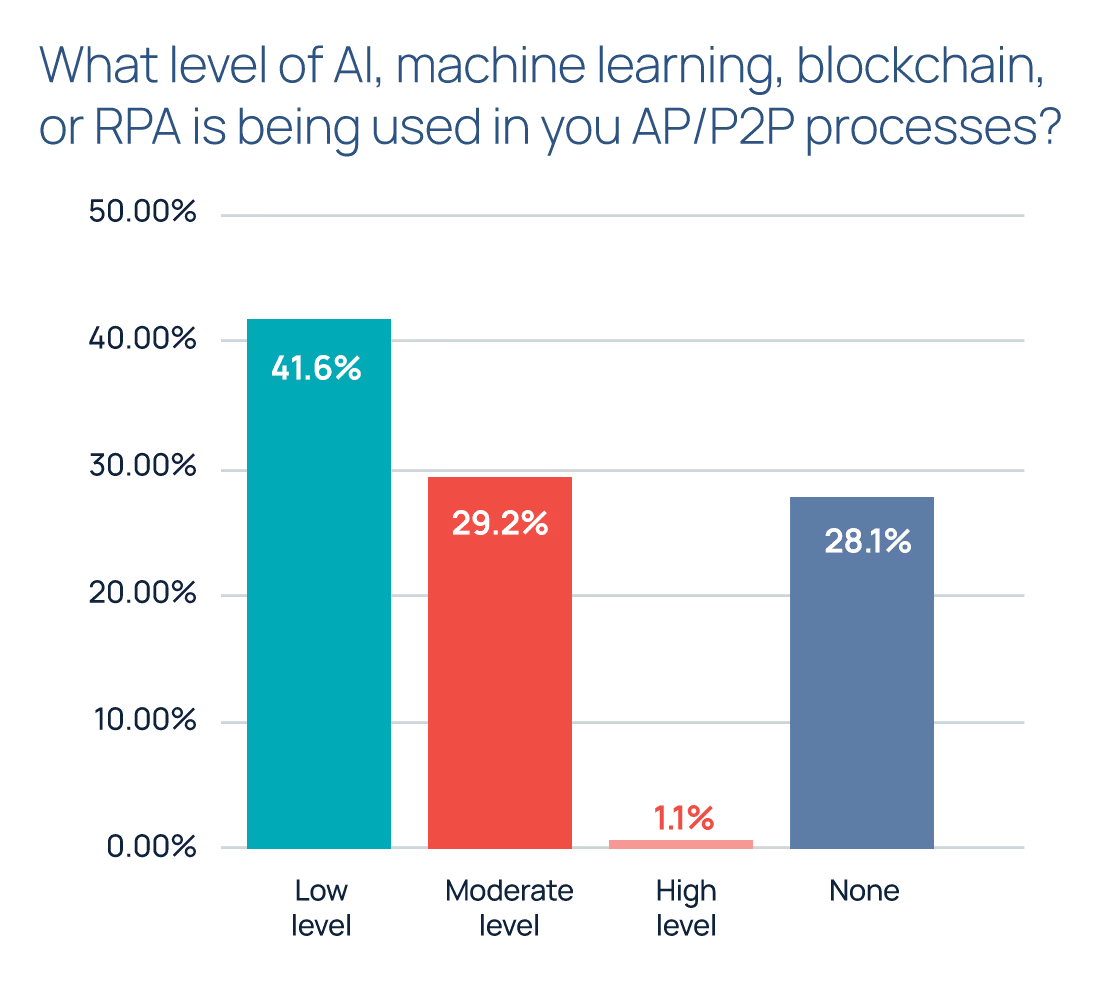
According to the Accounts Payable Association’s Industry Benchmarking Report for 2025, one of the biggest gaps in the AP ecosystem is that technology isn’t being used to its full potential. It states, “While vendors push innovation, many organisations are stuck with disconnected systems, limited data access, and cautious adoption of AI.”
The report suggests that most finance teams are in the early stages of digital transformation, with roughly 70% of respondents reporting a low level of advanced technology usage in their AP or procure-to-pay processes, or none at all.
Native integration
Look for native SuiteApps that deliver seamless NetSuite AP Automation without connectors. Native setups keep data, controls and approvals in one system, strengthen security and shorten implementation.
AI accuracy and learning
Select platforms that learn vendor formats and improve extraction over time. Higher accuracy raises touchless rates, reduces exceptions and supports consistent coding across entities.
Flexible approval workflows
Ensure the tool supports multi-level approvals, thresholds, conditional routing and entity-aware rules. Flexibility lets you adapt to policy changes and complex organizational structures.
Vendor recognition and custom field support
Advanced recognition, supplier normalization and custom fields at header and line levels simplify coding, analytics and compliance. This support reduces manual allocation and improves reporting.
Implementation speed
Favor clear onboarding, predictable timelines and packaged best practices. Quick starts reduce disruption and produce return on investment (ROI) faster for accounts payable and procurement teams and controllers.
Pricing transparency
When evaluating invoice automation, push for pricing that reflects real usage. Look for clear terms on users, AI functionality, support and expected volume. Transparent pricing helps leaders model ROI and secure buy-in with fewer surprises.
ZoneCapture meets these criteria with native NetSuite design, advanced AI and transparent packaging. For teams weighing alternatives to NetSuite native Bill Capture, it offers a path that keeps invoice data, approvals and audit trails fully inside NetSuite while improving throughput, accuracy and oversight.
As you compare each Bill Capture alternative, prioritize features that address your current bottlenecks and future growth needs. The right choice will support scale without compromising control or visibility.
ZoneCapture is one of the best Bill Capture alternatives for NetSuite
When you’re evaluating alternatives to NetSuite’s native bill capture, look for a solution that fits your ERP ecosystem, reduces complexity and scales with your operations. One solution checks all of those boxes. ZoneCapture is built for NetSuite. It captures both header and line-level data accurately. And it offers smart 3-way matching across vendors, purchase orders and receipts.
Organizations like Amigo Mobility used ZoneCapture to achieve a 75% faster bill turnaround, while cutting 700 hours of manual work per year, accelerating the month-end close process and eliminating PO line errors altogether.
The right bill capture alternative goes beyond helping you reduce invoice processing time. It helps you grow with confidence. ZoneCapture supports high-volume, multi-entity finance teams that want accuracy, audit readiness and faster turnaround – all while staying within NetSuite.
Book a demo today and see why ZoneCapture is the best NetSuite Bill Capture alternative for your enterprise.