
Finance teams outgrow manual workflows when businesses grow. First accounts payable (AP) needs help. Then billing gets more complex. Then reconciliation starts slipping into close week. Before long, the team is comparing two paths: buy a broader finance automation platform built around the enterprise resource platform, or keep adding point solutions for each pain point.
The gap between what each model promises in a demo and what it delivers at the end of a fiscal year shows up in reconciliation work, audit preparation and the hours finance spends managing the connections between tools rather than using them. Here’s a framework for controllers and finance systems leaders to compare finance automation platforms and point solutions.
Key highlights:
- Finance automation software refers to platforms that automate multiple finance workflows — AP, billing, reconciliation, reporting — through a shared data structure, typically embedded in the ERP.
- Point solutions automate one workflow well but introduce integration complexity, data reconciliation risk and admin overhead when combined with other tools.
- The hidden cost of disconnected workflow tools shows up in sync failures, audit trail gaps and the staff time required to manage connections between systems.
- Zone’s solutions span the entire financial lifecycle and deliver finance automation inside NetSuite, sharing the same data model and approval controls without middleware.
What are point solutions and finance platform automation software?
A finance automation platform embeds multiple workflows – AP processing, billing, reconciliation, reporting, payroll – directly into the enterprise resource planning (ERP). Every transaction, invoice approval and exception is recorded in the same system, using the same record structure, visible to the same audit trail. A native ERP model takes this furthest: the automation extends the ERP rather than sitting beside it.
Point solutions specialize in one workflow area. The best accounts payable tool on the market may genuinely outperform a platform's AP module on features. The question is what it costs in data integrity, integration maintenance and audit complexity to use it alongside four other best-of-breed tools covering the rest of the finance function.
Finance automation software pros and cons
Point solution pros and cons
Finance platform vs. point solution use cases
Finance automation platforms are the stronger choice in four situations:
- Multi-workflow automation: When a finance team needs to automate AP, billing and reconciliation within the same close cycle, a platform that connects those workflows through shared data eliminates the reconciliation step between them.
- Audit-intensive environments: When the audit trail needs to cover approvals, exceptions and adjustments across multiple workflow areas, a single platform produces that trail without requiring evidence aggregation from several systems.
- ERP-centric operations: When the general ledger in NetSuite is the system of record for all financial data, automation that runs inside the ERP keeps that record clean – no sync needed, no version conflicts to resolve.
- Growing transaction volumes: When transaction count is increasing faster than headcount, a platform that scales its capacity inside the ERP does so without adding integration complexity at each growth stage.
Point solutions fit a narrower set of circumstances:
- Single-function automation: A team that needs to automate only invoice capture, and has no near-term plans to automate adjacent workflows, can deploy a point tool quickly without heavy configuration investment.
- Standalone operations: A business unit that runs independently from the main ERP and doesn’t need its data in the same system of record can use a point tool without incurring integration cost.
- Proof-of-concept testing: Before committing to a platform, some teams run a point tool in one workflow area to validate the business case for broader automation.
- Legacy ERP constraints: Teams on an ERP that doesn’t support native app extensions may have no practical alternative to point tools until a migration is completed.
The hidden cost of disconnected workflow tools
Finance teams that build their automation stack tool by tool might not budget for the ongoing cost of keeping those tools connected. The upfront evaluation compares licensing costs and features but the real cost comparison shows up 18 months after implementation in the form of reconciliation hours, audit preparation work and IT time spent managing integrations that weren’t designed to work together.
Sync risk
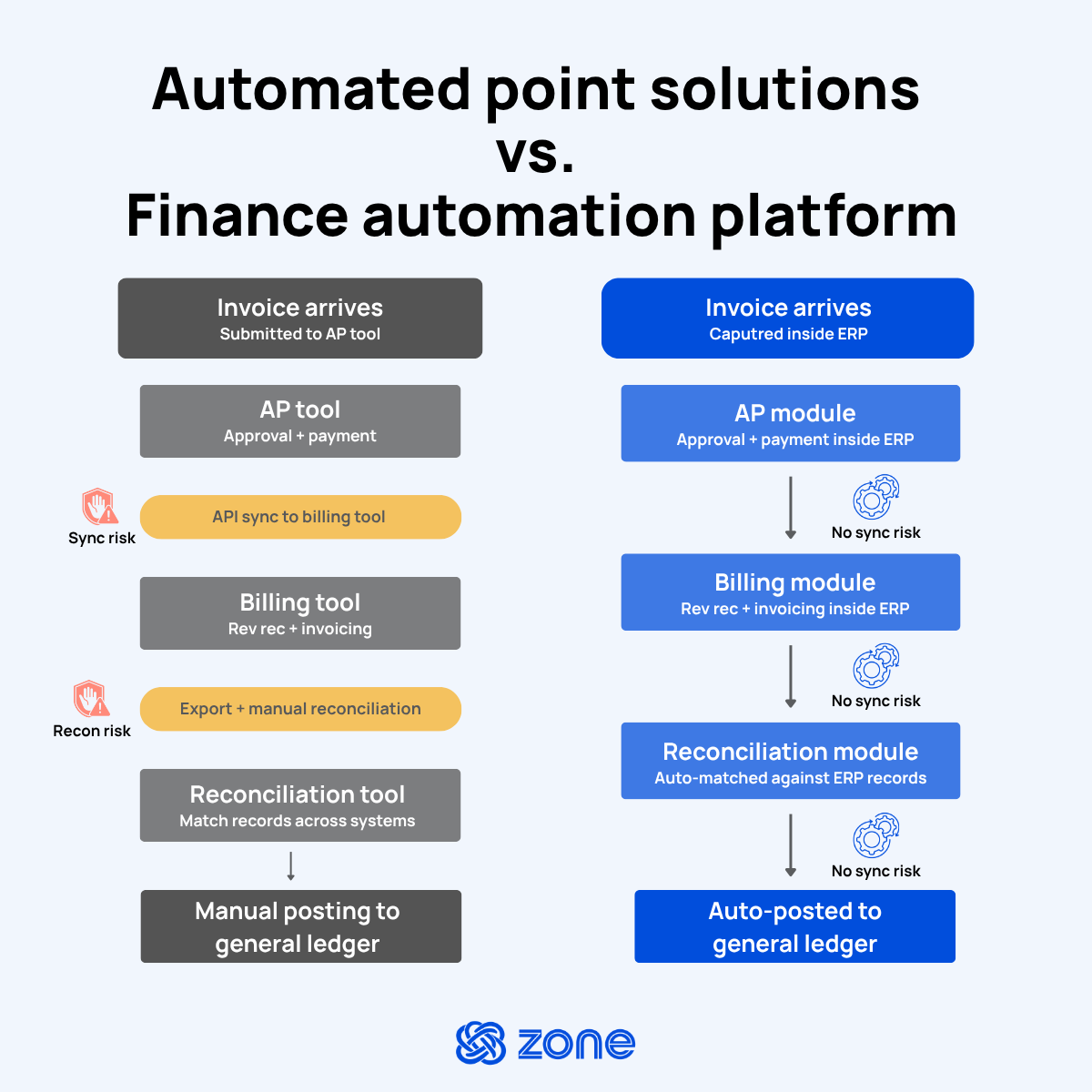
Every integration between a point tool and the ERP introduces a sync dependency: data moves between systems on a schedule, through an API or a middleware layer. When that sync works, the downside is latency because the ERP doesn’t reflect what was processed until the next sync cycle runs. When it fails, finance finds out at reconciliation time.
A sync failure between an AP automation tool and the general ledger means payment records in one system don’t match the ledger in another. Finding the discrepancy, tracing the cause and correcting the record is manual work. During month-end close, it’s work that interrupts every other close activity happening in parallel.
Platform automation that runs inside the ERP eliminates sync risk. The AP transaction, the approval record and the general ledger entry are written in the same system at the same time, reducing the man hours required to keep data synced.
Audit trail gaps
Following the audit trail for a finance operation built on point tools adds more manual work. The approval for a vendor payment might live in the AP tool. The payment record lives in the bank connector. The general ledger entry lives in the ERP. Reconstructing the full audit trail for a single transaction requires pulling records from three systems and confirming they’re consistent.
Finance automation built inside the ERP produces a single audit trail because every step from invoice to ledger posting happens in the same system. The auditor sees the full sequence in one place. Finance doesn't spend close week collecting evidence from platforms that weren’t structurally designed to talk to each other.
Data ownership
Point tools create data ownership ambiguity. When an invoice record lives in the AP tool and a summary lives in the ERP, which version is authoritative? When the two don’t match, which system gets corrected? These questions become governance problems when the discrepancy involves a material transaction, a disputed vendor payment or a period-end adjustment.
ERP-native automation preserves the ERP as the single system of record. Every transaction that flows through the automation is recorded in NetSuite using NetSuite's own data structures. Finance leaders can answer “where does this number come from?” with a single drill-back path rather than a cross-system investigation.
Admin overhead
A finance automation stack built from five point tools is five vendor relationships, five contract renewal cycles, five support channels and five configuration environments. When a process changes, like a new entity is added, an approval threshold is updated or a billing model shifts, the change needs to propagate across every tool that touches that process.
Platform automation reduces that administrative overhead. Workflow changes happen in one environment, under one vendor relationship, with one change log. Finance administrators who manage the platform can make configuration changes without needing IT support for each tool in the stack.
How to compare software architectures
Vendor demos are designed to show every tool at its best. A fair architecture comparison looks at what each model costs to operate over time, not just what it covers in a feature checklist. The table below gives finance leaders a framework for evaluating finance automation software and point solution stacks across the four dimensions that most directly affect controllership.
Finance automation platform vs. point solution considerations
When deciding between finance automation platforms and point solution stacks, consider or ask yourself the following:
- Ask whether configuration happens inside your ERP or requires a separate environment, because the answer determines how much IT involvement you carry for the life of the contract and who owns integration maintenance when something breaks.
- Identify which workflows you need to connect within the same close cycle, then ask each vendor to show you how a transaction moves between them without a manual handoff.
- If you plan to automate additional workflows in the next 12 to 24 months, ask whether the platform can extend to cover them or whether you would need to procure and integrate a separate tool.
- Ask where consolidated reporting is built and whether it requires pulling data from more than one system, then confirm whether real-time dashboards draw from a single data model or depend on scheduled syncs that affect how current your numbers are during close.
- Find out where approval logic is configured and whether the audit trail that governs a transaction lives in the same system as the transaction itself.
- If you needed to pull approval history for a single transaction across every workflow in scope, determine how many systems you would need to access and reconcile.
- Calculate the operational cost of maintaining each integration point over a three-year period, not just the upfront licensing fee, since integration maintenance tends to scale with transaction volume.
- Ask how the architecture behaves when transaction volume doubles, because a stack of point tools that performs well at current volume often introduces reconciliation and sync failures at scale.
Build your end-to-end financial cycle on one platform
Point solutions are good at meeting expectations in standalone operations or solving specific finance team needs. However, many organizations may outgrow point solutions when transaction volume increases or the business needs more clarity and auditability across workflows.
Zone’s platform solutions deliver finance automation inside NetSuite through unified operating layers designed around a shared data core. Zone & Co covers the entire finance lifecycle through the following workflow solutions:
The result is a finance function that moves faster on the work the platform handles and stays fully accountable for the decisions that require human judgment. Approval routing, exception queues and audit trails are built into every workflow. Finance administrators configure the platform directly without sustained IT involvement.
Book a personalized demo to learn how connected Zone workflow solutions support finance automation across AP, billing, reconciliation and reporting inside NetSuite.