
A vendor invoice lands in your accounts payable (AP) inbox. Your team processes it, codes it and routes it for approval. Three weeks later, accounting discovers the same invoice was paid twice – once from the original submission and again from a duplicate that slipped through. The vendor doesn’t flag it and your reconciliation catches it a month later.
According to the American Productivity & Quality Center, 1% to 2.5% of payments companies process yearly are duplicate or erroneous – so processing $500,000 worth of payments a year means $5,000 to $10,500 are duplicate payments.
Duplicate payments can be headache-inducing for the entire team, and preventing them can protect your cash, maintain vendor trust and ensure your AP controls actually work under pressure.
Key highlights:
- Duplicate payments mean the same invoice or vendor bill is processed and paid more than once.
- Manual data entry, weak validation controls and disconnected systems create the structural gaps that allow duplicate payments to occur.
- Automated invoice capture with optical character recognition (OCR), 3-way matching controls and ERP-native AP workflows eliminate the manual processes and system gaps that allow duplicate payments to occur
- Zone’s AP automation prevents duplicate payments by capturing invoices directly in NetSuite, enforcing validation rules at the line-item level and maintaining a single source of truth for all vendor bill data without external integrations that create reconciliation gaps
What is a double payment?
A double payment happens when the same vendor invoice gets processed and paid more than once within your accounts payable system. This occurs when duplicate invoice records – whether from resubmissions, data entry errors or system failures – bypass your validation controls and trigger separate payment runs for the same underlying obligation.
Sometimes the duplicate is identical, having the same invoice number, amount and vendor. Other times it's harder to spot, having slightly different invoice numbers, formatting variations or submissions through different channels that your AP system treats as unique records even though they represent the same bill.
The mechanics vary, but the outcome is the same: your company pays twice for goods or services received once.
Why dupe payments happen in AP workflows
Duplicate payments usually happen because AP workflows contain structural gaps that allow duplicates to enter the system undetected. Understanding these gaps is the first step toward closing them.
Manual data entry creates duplicate invoice records
When AP clerks manually key invoice data into your ERP, human error introduces duplicates at the entry point. Someone types the wrong invoice number, transposes digits or enters the same bill twice because they forgot they already processed it last week. Manual invoice processing amplifies this risk as invoice volume increases – the more transactions your team handles, the higher the likelihood that data entry mistakes create duplicate records.
The problem compounds when different team members process invoices without visibility into what others have already entered. One clerk enters an invoice from email, while another enters the same invoice from a paper copy that arrived later. Both records pass through your system as separate bills because there’s no automated check preventing duplicate entry at the source.
Duplicate invoices are submitted and processed more than once
Vendors resubmit invoices for legitimate reasons, including:
- Payment delays
- The invoice is updated or revised to contain new information, such as a different purchase order (PO) number or adding additional information required by your organization
- Billing system errors
- Follow-up on an already-submitted invoice
In some cases, they may also be submitted through email, vendor portals and paper mail. When this happens, your AP team may not realize they’re looking at the same invoice. Each submission gets treated as a new bill unless someone manually catches the duplication.
The timing gap makes this worse. If the original invoice is still in approval while the duplicate arrives, both might be in your system simultaneously without triggering red flags. By the time both reach payment processing, they look like two separate obligations to different stakeholders who approved them independently.
Weak validation controls fail to detect duplicate payments
Many AP systems check for exact invoice number matches,but miss near-duplicates where invoice formatting varies slightly.
A vendor might submit “INV-2024-001” one time and “INV2024001” another, or “Invoice #2024-001” a third time. If your validation logic only flags identical strings, these variations slip through as unique records even though they represent the same bill.
Without comprehensive validation that considers multiple data points – including vendor, amount, date, line items and purchase order – your controls create gaps that duplicates exploit.
Disconnected systems create gaps in invoice and payment tracking
When AP teams manage invoices in one system, approvals in another and payments in a third, reconciling across these platforms becomes a manual exercise prone to oversight.
An invoice entered in your AP automation tool might get manually re-entered in your ERP for payment because the integration failed or data didn’t sync properly. Now you have two records of the same invoice in different systems, creating bill duplicates. Each potentially triggers a separate payment.
The problem intensifies when different departments use different tools. And without a NetSuite integration connecting these workflows, duplicate detection requires manual cross-referencing that rarely happens until reconciliation. This is often after payments have already cleared.
Limited visibility makes duplicate payments hard to detect
When your AP process lacks real-time visibility into invoice status across the entire workflow, team members can't see if an invoice is already in the system. That can prevent team members from knowing an invoice has already been approved by another team member, or if an invoice is already scheduled for a different payment run.
This visibility gap extends to reporting and analytics. If your finance team can’t easily run reports showing all invoices from a specific vendor over a specific period, catching duplicates requires manual review of individual transactions. By the time duplicates surface through routine reconciliation, the payment has already processed.
The impact of a double payment on finance teams
Duplicate payments create consequences beyond the immediate financial loss. When these errors occur, they expose control weaknesses and create downstream work that consumes capacity your finance team needs for higher-value activities.
- Financial leakage: Duplicate payments represent permanent losses when not recovered within a few months. These losses flow straight through to reduced profitability and often go undetected until routine reconciliation catches them long after payment.
- Increased reconciliation effort: Each duplicate payment requires hours of investigation, vendor communication and recovery attempts. This pulls finance teams away from month-end close, variance analysis and strategic planning that actually drives business value.
- Disrupted cash flow: Duplicate payments reduce available cash and distort cash flow forecasting. When duplicates aren’t caught immediately, finance teams make decisions based on inaccurate cash position data.
- Strained vendor relationships: Many vendors don’t flag duplicate payments, especially when their accounts receivable (AR) processes are manual. Requesting refunds weeks or months later creates friction that damages relationships when what should be a straightforward correction becomes a negotiation.
- Higher compliance exposure: Duplicate payments indicate control weaknesses that auditors notice. Under SOX, SOC 2 or similar frameworks, duplicate payments become audit findings requiring remediation plans, additional testing and documentation that controls are effective.
How to prevent duplicate payments
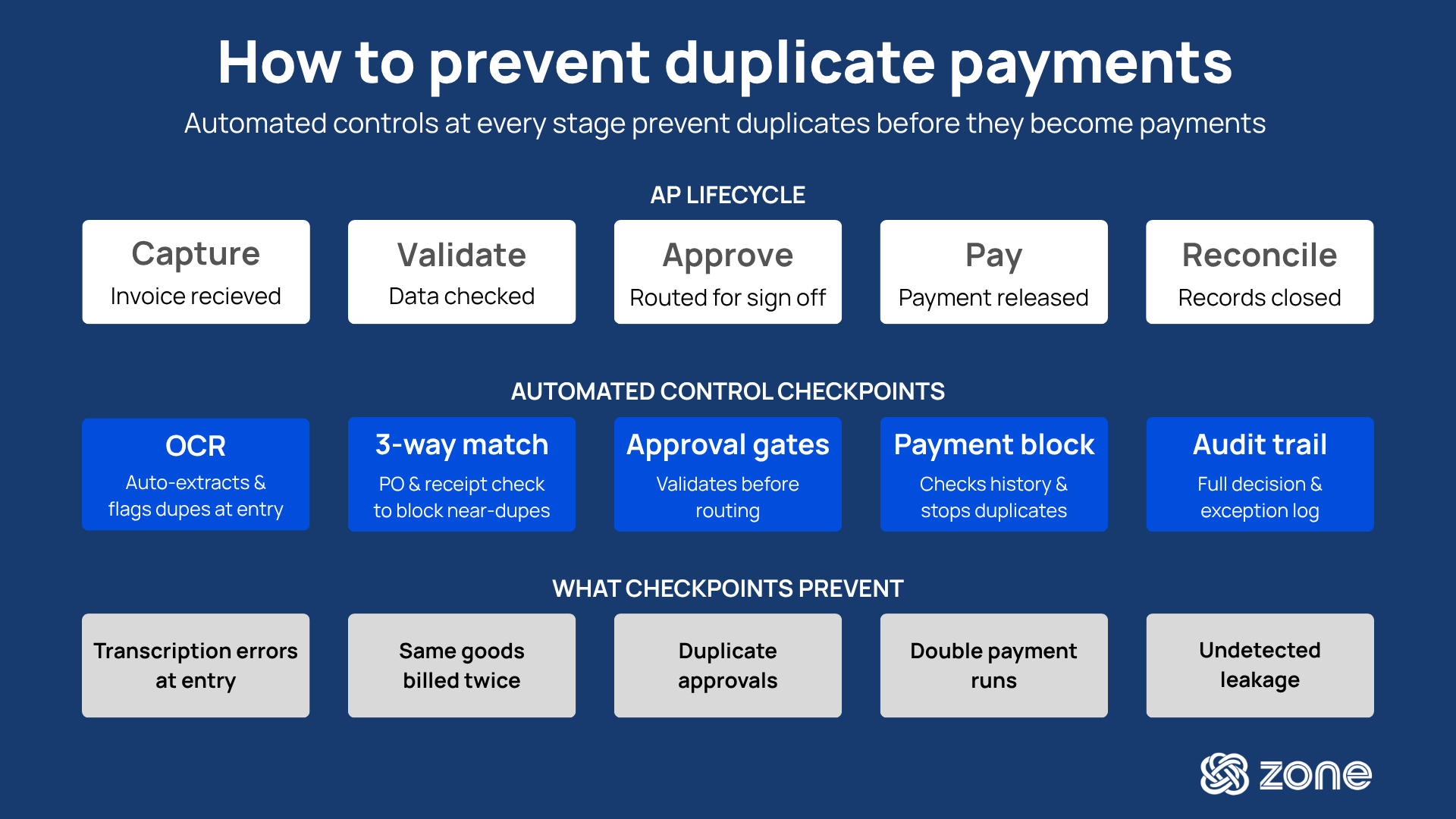
Duplicate payments are preventable when finance teams implement the right combination of automated controls, validation logic and centralized data management.
1. Automate invoice capture to prevent manual data entry errors
Manual invoice entry is the primary entry point for duplicate payments.
When AP clerks type invoice data from PDFs or paper documents, they create the conditions for duplicates, including typos in invoice numbers, inconsistent vendor name formatting and double-entry when someone forgets they already processed an invoice.
Automated bill capture using OCR eliminates this risk by extracting invoice data directly from documents and creating records in your ERP without human transcription. OCR technology reads invoice fields – vendor name, invoice number, date, amount, line items – and populates your AP system automatically.
When duplicate invoices arrive, the system immediately compares incoming data against existing records and flags potential matches before anyone manually creates a duplicate entry. Benefits include:
- Extract invoice data automatically from PDFs, emails and scanned documents
- Eliminate manual typing that introduces invoice number errors and duplicate records
- Flag potential duplicates at the capture stage before records enter your AP workflow
- Standardize vendor name formatting to improve duplicate detection accuracy
2. Use matching controls to catch duplicate invoices before payment
Three-way matching compares purchase orders, receiving reports and vendor invoices. This creates a validation checkpoint that catches duplicate payments before they process.
When an invoice arrives, your system checks whether it matches an open purchase order and whether goods were actually received. If the same invoice number already cleared against that PO, the system blocks the duplicate from proceeding to payment.
The key is automating the match at the line-item level, not just header level. Matching controls and tools to prevent duplicate invoices provide:
- Automated comparison of invoice data against purchase orders and receiving records
- Line-item validation preventing duplicate billing for the same goods or services
- Tolerance thresholds flagging invoices with amounts that vary from expected totals
- Exception handling routing mismatched invoices for manual review before payment
- Historical validation checking if the same invoice number was paid previously
See how Amigo Mobility saves $10,000 in hard costs and even more in soft costs by reducing errors, preventing duplicate entries and avoiding late fees.
3. Strengthen approval workflows to prevent duplicate processing
Automated approval routing ensures invoices follow consistent paths through your organization based on predefined rules, such as amount thresholds, cost centers and GL accounts.
When approvers receive invoices electronically with full context, they can make informed decisions instead of rubber-stamping bills they've never seen before. This prevents scenarios where the same invoice gets approved twice by different people who don't realize they're looking at duplicates.
The workflow should include validation checkpoints at each approval stage, with automated gates that prevent manual approvals from bypassing duplicate checks. Workflow controls include:
- Validate invoices for duplicates before they reach the first approver
- Run additional validation checks before invoices move from approval to payment processing
- Prevent approvers from bypassing duplicate warnings with manual overrides
- Route invoices automatically based on amount, department and approval policies
- Maintain approval history and audit trails showing who approved what and when
- Send high-value invoices through additional review layers based on thresholds
- Alert teams when unusual patterns suggest potential duplicate processing
4. Centralize invoice data to eliminate system gaps and silos
When invoice data lives in one system, approvals in another and payments in a third, detecting duplicates requires manual reconciliation across platforms. Centralizing invoice data in your ERP creates a unified environment where duplicate detection happens automatically against complete vendor transaction history.
Best-in-class ERP integration means invoice data flows directly into the same system that processes payments, without middleware that creates sync delays. With proper NetSuite integration, the system instantly compares incoming invoices against complete payment history, catching duplicates that manual processes miss.
Centralization benefits include:
- Single source of truth for all vendor invoice and payment data
- Real-time duplicate detection comparing invoices against complete transaction history
- Elimination of data sync delays and integration failures that create duplicate records
- Unified reporting showing all invoices from specific vendors across time periods
- Reduced reconciliation effort required to identify and investigate duplicates
5. Improve visibility to identify and stop duplicate payments early
Real-time dashboards showing invoice status across the entire AP workflow give finance teams the visibility they need to spot potential duplicates before payments process. When controllers can see that two invoices from the same vendor for similar amounts are both in the system, they can investigate immediately instead of discovering the duplicate during month-end reconciliation.
This visibility extends to exception management and analytics that show which invoices were flagged as duplicates, which vendors create the most risk and where controls are working. Visibility features include:
- Real-time dashboards displaying invoice status and potential duplicate flags
- Exception reports highlighting invoices requiring review for duplicate risk
- Vendor-level analytics showing patterns that indicate duplicate submissions
- Audit trails documenting how duplicate invoices were identified and resolved
- Proactive alerts notifying AP teams when potential duplicates enter the workflow
Tools to avoid duplicate payments on vendor invoices
The right tools transform preventing duplicate payments from a manual detective exercise into an automated control that operates in the background of your AP workflow. These are the different types of tools to prevent duplicate invoices:
How to choose the right duplicate payment prevention solutions
Not every AP automation tool prevents duplicate payments, and some don’t manage it well. The effectiveness depends on how deeply the solution integrates with your ERP, how comprehensive its validation logic is and whether it addresses your specific workflow gaps.
1. Evaluate how the solution detects duplicate invoices
Basic duplicate detection compares exact invoice numbers. Better solutions check multiple data points, including vendor name, invoice amount, date, line items, and PO references. That way, they can catch near-duplicates where formatting varies.
The best solutions use fuzzy matching algorithms that identify likely duplicates even when data isn’t identical. They weigh different factors, with exact invoice number matches scoring higher than similar amounts, for example. Then, they present potential duplicates to AP teams for validation before blocking or allowing the invoice to proceed.
2. Prioritize ERP integration and data consistency
Solutions that operate outside your ERP and sync data back and forth create the integration gaps that cause duplicate payments in the first place.
When invoice data lives in an external AP automation tool and payment data lives in your ERP, reconciling between them requires manual effort that often misses duplicates. Tools built natively inside your ERP maintain one version of invoice data, eliminating sync delays and ensuring duplicate checks compare against complete payment history.
ERP integration also matters for how invoices flow through your workflow. If the solution requires exporting invoices from your ERP for approval and reimporting them for payment, each handoff creates opportunities for duplicate records to appear. Native solutions keep everything in one system where validation happens automatically at each stage.
3. Assess automation across the full AP workflow
Preventing duplicate payments requires automation at every stage, from invoice through to approval routing and payment processing. Solutions that only automate part of the workflow leave gaps where duplicates can enter. If you automate invoice capture with OCR but still use manual approval processes, duplicates might be caught at capture but bypass checks during approval.
Evaluate how the solution handles exceptions and edge cases. What happens when an invoice fails validation? Does it automatically notify the AP team, or does it sit in a queue where someone might manually override duplicate warnings?
Comprehensive workflow automation includes exception handling that routes flagged invoices through proper review channels instead of allowing manual overrides that defeat the purpose of validation controls.
4. Consider scalability for invoice volume and vendor growth
Solutions that work for 500 invoices per month may not scale to 5,000 invoices per month without performance degradation or increased error rates. As invoice volume grows, the importance of automated duplicate detection increases, and manual spot-checking becomes impossible at scale.
Ask AP automation vendors how their duplicate detection performs with high transaction volumes and whether detection speed or accuracy suffers as your invoice database grows.
Scalability also applies to vendor growth and complexity. As you add vendors, each with unique invoice formats and billing practices, your duplicate detection needs to handle increasing variation in how invoice data appears. Solutions with rigid validation rules may generate too many false positives as vendor diversity increases, overwhelming AP teams with alerts about invoices that aren’t actually duplicates.
5. Review usability, controls and audit readiness
The most sophisticated duplicate detection logic fails if AP teams find the system too complex to use properly. Evaluate how the solution surfaces duplicate warnings to users.
Are potential duplicates clearly flagged with sufficient context for quick decision-making? Can AP teams easily see why the system flagged an invoice as a potential duplicate and access the comparison invoice for validation?
Audit readiness matters for compliance and control documentation. The solution should maintain complete audit trails showing when duplicate checks ran, which invoices were flagged, how exceptions were resolved and who made decisions to proceed with or block payments. This documentation proves to auditors that your duplicate payment controls are functioning and provides the evidence needed to investigate when duplicates do occur.
Prevent duplicate payments with Zone & Co
Zone’s AP automation eliminates the root causes of duplicate payments by handling invoice capture, validation and payment processing entirely within NetSuite. No external systems means no integration gaps where duplicates slip through. And with no manual data entry, you won’t find your team managing transcription errors creating duplicate records.
Every invoice that enters your NetSuite environment passes through automated validation that checks for duplicates before approvals begin.
AP automation from Zone provides:
- Automated invoice capture with OCR that extracts data from any invoice format and flags potential duplicates at entry
- Line-item 3-way matching that compares invoices against purchase orders and receiving records to prevent duplicate billing
- Native NetSuite workflows that validate invoices against complete payment history without external integrations
- Real-time duplicate detection using multiple matching criteria – vendor, invoice number, amount, date and line items
- Audit-ready documentation with complete trails showing how duplicates were identified, investigated and resolved
Book a demo today and see how Zone’s solutions can help prevent duplicate payments in NetSuite.