E-invoicing is the electronic exchange of structured invoice data between a buyer and a supplier in a machine-readable format, so invoices move directly from one accounting system to another without manual entry. Formats like XML and UBL tag every field on the invoice so the receiving system can validate and process the data automatically. Without e-invoicing, accounts payable (AP) teams key data from PDFs and paper, cross-check fields manually and chase format inconsistencies across vendors and regions.
The European Union’s VAT in the Digital Age (ViDA) framework will have Digital Reporting Requirements for all cross-border B2B transactions by July 1, 2030, according to the European Commission. Finance teams running on NetSuite need to understand what e-invoicing requires, where compliance stands and how structured invoicing fits into their enterprise resource planning (ERP) workflow.
Key highlights:
- E-invoicing replaces paper and PDF invoices with structured, machine-readable digital formats that automate validation, transmission and processing across the invoice-to-pay workflow.
- Governments worldwide are mandating e-invoicing to close tax gaps and gain transaction visibility, making compliance a regulatory requirement for businesses operating across regions.
- Successful e-invoicing implementation requires native integration in the ERP system, standardized vendor data formats and automated validation that catches compliance issues before invoices enter your system.
- ZoneCapture e-invoicing automates invoice capture, validation and compliance management directly inside NetSuite.
What is an e-invoice?
An e-invoice is a structured data set containing invoice details that’s sent over a compliant network using sender and receiver IDs. The network uses those parameters to route the invoice to the correct recipient automatically.
Unlike a PDF attachment or a scanned document, an e-invoice carries tagged data fields. The receiving system reads and processes these fields without anyone retyping information.
The delivery process is fully automated and typically completes within seconds. Depending on your business needs, you can trigger e-invoice generation with a button click or fully automate the creation and sending process within your ERP
E-invoicing requirements and key components
A compliant e-invoice is a structured data set built to specific standards that allow systems to read, validate and process it automatically. Governments and regulatory bodies define what information must be included to make invoices legally valid, tax-compliant and traceable from sender to receiver.
Here’s generally what makes up a compliant e-invoice and why each component matters when your finance team is processing hundreds or thousands of transactions each month.
Core business identifiers
E-invoices generally start with:
- Who’s sending it
- Who’s receiving it
- How to track it
These identifiers help the invoice reach the right party and get referenced throughout its lifecycle from approval to audit. They include the seller’s and buyer’s legal names, addresses and tax identification numbers. They also include a unique invoice number for tracking and reconciliation and the invoice issue date.
Without standardized identifiers, invoices get lost in the system or routed incorrectly. E-invoicing networks use these fields to validate that both parties are registered and authorized to transact.
Transaction and tax details
Tax authorities require specific fields to verify compliance. Missing or incorrect Value-Added Tax (VAT) IDs, tax rates or currency codes can trigger rejections or audits.
E-invoices need complete transaction information, which usually includes:
- Line item descriptions, quantities and unit prices
- Subtotals, tax amounts and invoice totals
- Currency codes and exchange rates for international transactions
- VAT or tax identification numbers
- Payment terms and due date for payment
Structured e-invoicing captures this data consistently across all transactions, regardless of vendor or region.
Data format and structure
E-invoices use structured data formats that machines can read, not PDFs or images that require human interpretation. XML (Extensible Markup Language) and UBL (Universal Business Language) are the most common formats. Each data element is tagged so systems know exactly what they’re processing.
Different regions and networks require specific formats. Peppol BIS (Business Interoperability Specifications) is widely adopted across Europe and parts of Asia-Pacific, while other regions may use country-specific standards. Your e-invoicing solution needs to handle the formats required by your trading partners and comply with local mandates.
Security and validation metadata
E-invoices include metadata that proves authenticity and maintains data integrity throughout transmission:
- Digital signatures verify sender authenticity
- Timestamps log invoice creation and transmission
- Validation tokens from e-invoicing networks confirm delivery
- Encryption standards protect data in transit
Finance teams can see when an invoice was sent, received and processed. This creates an audit trail that satisfies compliance requirements without manually collecting proof of delivery or acceptance.
Routing information for network delivery
E-invoicing networks need routing information to deliver invoices to the correct endpoint. This includes Peppol participant IDs for sender and receiver, electronic addressing and endpoint IDs, network access point information and country-specific routing codes where applicable.
Peppol uses unique participant identifiers registered in a central directory. When you send an e-invoice, the network looks up the recipient’s ID, validates their registration and routes the invoice to their designated access point.
How does e-invoicing work?
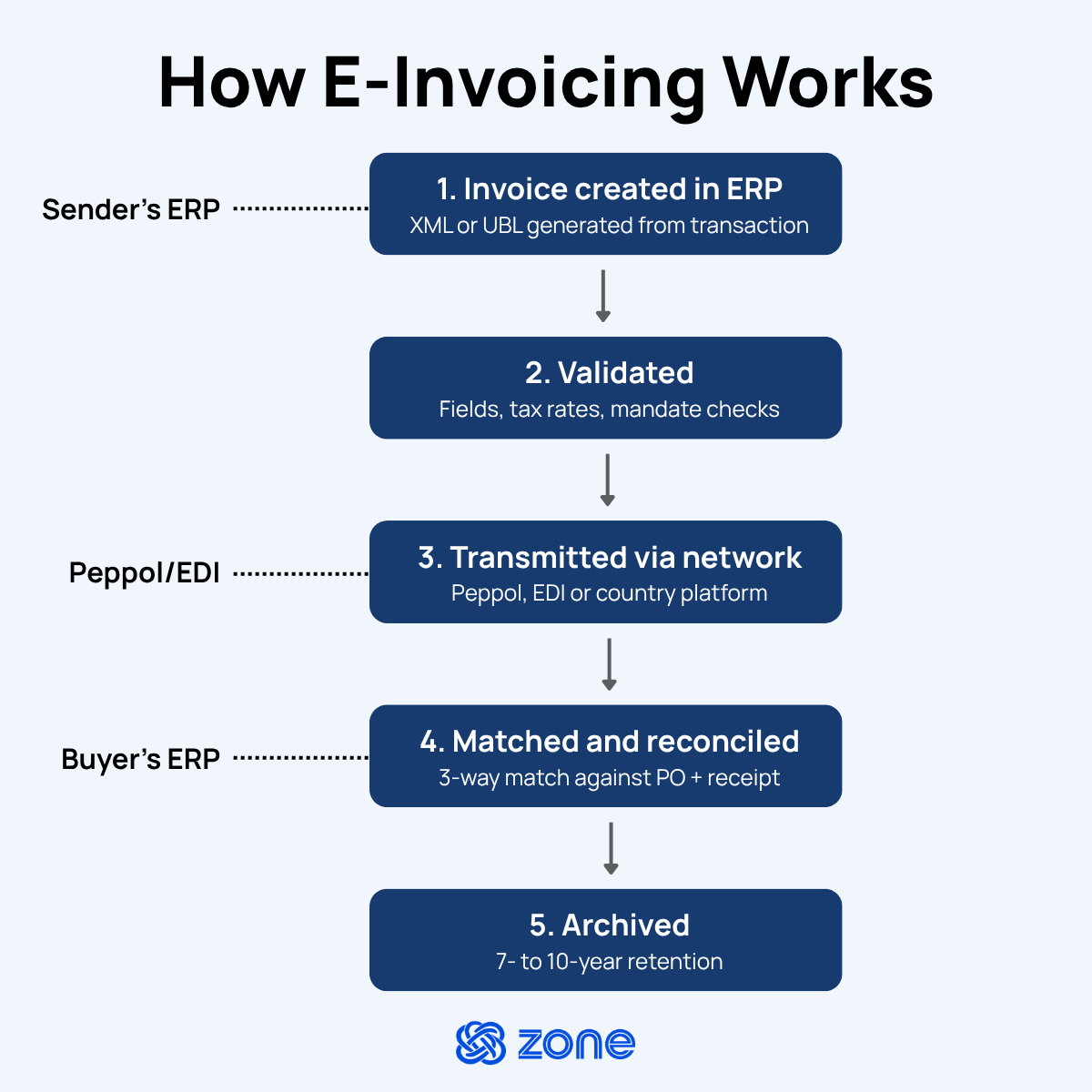
Electronic invoicing replaces manual invoice creation and delivery with an automated, end-to-end digital process. From the moment an invoice is generated to the point it’s archived for compliance, every step happens electronically, which reduces errors, speeds up invoice approvals and keeps your business audit-ready.
1. Invoice creation in the ERP or AP system
E-invoicing starts inside your ERP, where invoice data is generated from completed transactions, purchase orders or service agreements. Instead of creating a document for printing or emailing, the system structures the invoice data into a machine-readable format. Every field needed for processing and compliance is captured in one step.
For finance teams using NetSuite, this can happen within existing workflows. When an invoice is ready to send, the system converts the data into the required e-invoicing format such as XML or UBL without anyone manually formatting fields or exporting files.
2. Validation against business and regulatory rules
Before an e-invoice leaves your system, it runs through validation checks against both your business rules and regulatory requirements. The system:
- Verifies mandatory fields including invoice number, amounts, tax IDs and dates
- Validates tax calculations against current rates
- Runs compliance checks for country-specific e-invoicing mandates
- Flags errors with specific correction prompts
This step catches errors before they become problems. Missing VAT IDs, incorrect tax rates or incomplete vendor information get flagged immediately, not after the invoice has been rejected by the recipient's system or a tax authority.
3. Secure transmission through e-invoicing networks
Once validated, the e-invoice is transmitted through a secure network like Peppol or via Electronic Data Interchange (EDI) protocols. These networks act as trusted intermediaries, routing invoices to the correct recipient based on registered participant IDs while maintaining data integrity throughout transmission.
The network handles all the technical complexity including encryption, authentication and delivery confirmation. Your ERP sends the invoice to the network's access point and the network delivers it to the recipient’s system within seconds.
4. Automatic matching and reconciliation
When an e-invoice arrives in the recipient’s AP system, it’s automatically matched against existing purchase orders, delivery receipts and supplier invoices in a process called 3-way matching.
If the invoice has correct and matching information, the system:
- Completes the match against the purchase order and goods receipt
- Flags any discrepancies for quantity, price or terms
- Routes exceptions to the right person
- Triggers payment processing for matched invoices
Finance teams aren’t manually comparing invoice line items to purchase orders or hunting down receiving documents. The system handles it automatically and only exceptions require human attention.
5. Archiving and compliance storage
After an e-invoice is processed and paid, it’s archived with full traceability. Every step from creation through validation, transmission, approval and payment is logged and stored to meet regulatory retention requirements.
E-invoicing systems maintain these records in their original structured format. The required retention period is typically seven to 10 years, depending on jurisdiction. Tamper-proof records with digital signatures and timestamps make retrieval during audits straightforward.
Traditional vs. electronic invoicing
How e-invoicing works in NetSuite
NetSuite includes an Electronic Invoicing SuiteApp (Bundle ID: 436209) that provides a framework for generating, sending, receiving and converting e-documents. The SuiteApp supports both outbound and inbound processing of e-documents, using templates that map NetSuite transaction fields to XML or JSON formats.
The Electronic Invoicing SuiteApp provides a framework for automating e-document processing, but it doesn’t include native support for any country-specific requirements or e-document standards. Your team has to build or source the templates, configure the sending methods and manage compliance validation separately.
Here’s how e-invoicing flows through NetSuite, step by step:
- A transaction is created in NetSuite. This could be a sales invoice, vendor bill, credit memo or cash refund. The system generates an XML or JSON e-document from the transaction record using an assigned e-document template.
- The e-document template maps NetSuite fields to the structured format your jurisdiction requires. You can create custom country-specific e-document templates and packages using the SuiteApp, but each template has to be built to the correct standard for your region, whether that's Peppol BIS, FatturaPA, KSeF or another format.
- Before sending, the e-document goes through validation. The SuiteApp checks for required fields and format compliance, but country-specific tax validation and mandate checks depend on how the template and sending method are configured.
- The e-document is transmitted. You can send e-documents individually or in bulk through the sending method assigned to the transaction. For networks like Peppol, you need either a direct access point connection or a certified intermediary to handle the transmission.
- On the inbound side, the administrator creates an inbound e-document template that maps the data elements of the incoming XML e-document to the corresponding NetSuite transaction fields when converted. Received e-documents are converted into vendor bills inside NetSuite.
- The SuiteApp tracks received, converted, generated and sent e-documents through an audit trail on the E-Document subtab of a transaction record.
The SuiteApp is free for one country. To send e-documents to multiple countries and convert received e-documents from other countries, you need to purchase a license.
Implement e-invoicing compliance in NetSuite with ZoneCapture
E-invoicing mandates are expanding. And while NetSuite handles transaction records, it doesn’t connect to mandated networks or generate the structured formats each jurisdiction requires. ZoneCapture e-invoicing closes that gap directly inside NetSuite as a native SuiteApp, so compliance doesn’t mean adding portals, middleware or separate workflows your team has to maintain.
- Send and receive structured e-invoices without leaving NetSuite. Both inbound vendor bills and outbound sales invoices are handled within your existing AP and accounts receivable workflows.
- Process e-invoices and PDFs in one queue. Structured invoices and vendor PDFs land in the same review stream for matching, approval and reconciliation, so your team isn't running two parallel processes.
- Add countries without rebuilding. As mandates expand across Europe, Asia-Pacific and beyond, new regions and formats are supported without reworking your invoice processes. Coverage today includes Belgium, Germany, France and more.
- Keep a NetSuite-native audit trail. Every e-invoice is logged, timestamped and searchable on the transaction record. Regulatory checks pull from the same data your finance team works in every day.