
A purchase request comes through Slack. Someone tags finance, someone else replies with a budget check from last quarter’s spreadsheet, and the vendor gets added to NetSuite manually – sometimes days after the spend decision was already made. By the time the invoice arrives, finance is recording what happened, not managing what’s happening. That’s the pre-purchase order gap, and closing it is what procurement automation software attempts to do.
The pre-PO gap is the stretch between when a spend decision actually happens and when it becomes visible to finance as a purchase order. Traditional procurement tools have nothing to say about that gap because they only activate once a PO exists. Intelligent procurement automation is built specifically to close it.
Key highlights:
- Intelligent procurement automation shapes spend decisions at the request, vendor and approval stage, before they become transactions.
- The pre-PO gap is where control is lost. AI in procurement gives finance earlier visibility and fewer month-end surprises by capturing intent before it becomes spend.
- For most teams on NetSuite, the biggest procurement control gap sits upstream of the ERP, in everything that happens before a PO is created.
- Closing the pre-PO gap means moving intake, vendor onboarding and approval workflows ahead of the ERP, so clean, pre-approved data flows into NetSuite before transactions are committed.
What is intelligent procurement automation?
Intelligent procurement automation is procurement software that uses AI to automate decision-making and data extraction at the intake and approval layer – before spend enters the enterprise resource planning (ERP) platform.
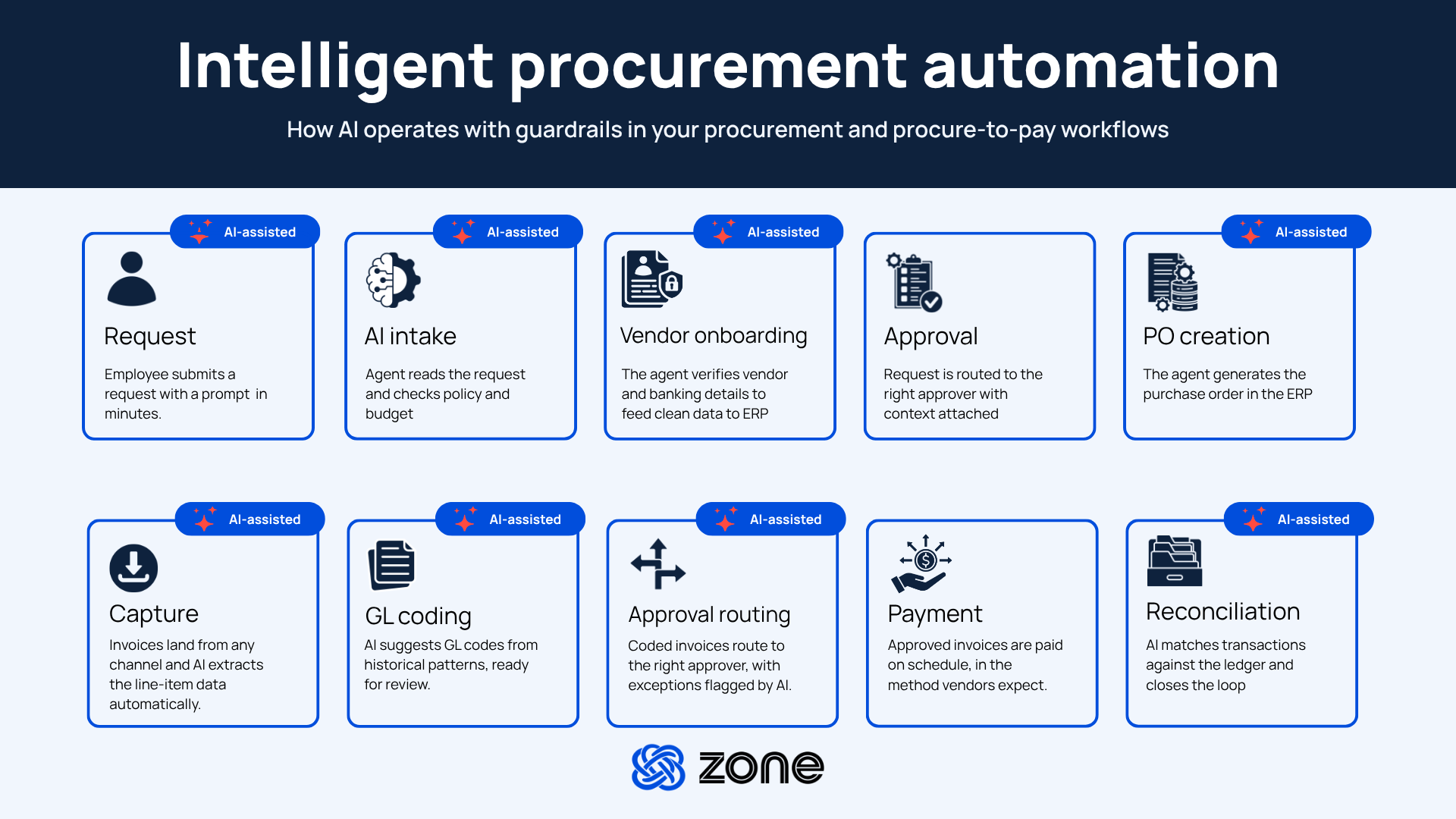
Traditional procurement automation software applies rules to transactions that have already been initiated. It automates PO creation, routes approvals through static rules and matches invoices to purchase orders. Intelligent procurement automation adds a layer that includes natural-language intake, AI-assisted contract review, budget impact analysis at the request stage, vendor onboarding and adaptive approval routing that responds to historical patterns rather than hard-coded hierarchies.
The distinction matters most at the earliest step. When a spend decision is made informally via Slack, email or a verbal sign-off, it arrives in NetSuite as a committed liability. Finance can track it, code it and reconcile it, but the decision itself happened outside any control structure. Intelligent procurement automation captures that decision before it happens and gives finance the visibility to act on it.
Traditional procurement automation vs. intelligent procurement automation
Common procurement issues finance teams face
For most mid-market NetSuite teams, the procurement problems are upstream of the ERP – in the pre-PO gap – and make matching invoices to POs a difficult, manual effort of chasing down approvers and department heads. Here’s what it looks like for many finance teams:
- Spend visibility arrives too late: By the time an invoice lands in the AP workflow, the spend decision is weeks old. Finance records the transaction but had no input into whether it was justified.
- Vendor onboarding is ad hoc: New vendors are added informally, bank details collected over email and NetSuite vendor records created without structured approval. The vendor master accumulates duplicates and incomplete records.
- Approval hierarchies don’t match reality: Static approval rules get misconfigured when org charts change. Approvals route to the wrong person, stall and get resolved with a manual override that leaves no audit trail.
- Maverick spend is discovered after the fact: Off-contract purchases and unapproved vendors show up in spend reports after the month is closed. Procurement can identify the pattern but can’t prevent it without controls at the intake stage.
Core capabilities of intelligent procurement automation
Intelligent procurement automation is a set of connected capabilities that each close a specific control gap. Here’s what each does in practice.
AI-driven purchase requisition and approval
Natural-language intake captures vendor, budget and GL context at the request stage. A requestor describes what they need in a prompt; the system interprets intent, surfaces relevant approved vendors, checks available budget against actuals and routes the request through the approval hierarchy configured to match the actual org structure rather than a static rule set.
Predictive spend analysis and anomaly detection
Requests that deviate from vendor history, budget patterns or approval norms get flagged before they’re approved. A request to a vendor with no prior relationship and an amount above the requester’s typical spend pattern surfaces a review flag rather than routing straight to approval. Spend that falls outside contract terms gets identified at the request stage, not when the invoice arrives.
This is the procurement control point where maverick spend gets caught before it becomes a transaction, rather than appearing in a quarterly spend analysis after the damage is done.
Smart vendor recommendations and scoring
Before a new vendor is requested, the system surfaces existing approved vendors that meet the requirement. Reducing duplicate vendor creation and unauthorized vendor additions starts here with a step that asks “have you checked the approved supplier list?” before intake proceeds. For new vendors, risk scoring during onboarding covers sanctions screening, bank detail validation and documentation completeness before the vendor is activated in NetSuite.
Autonomous three-way matching
At the AP execution stage, AI matches invoices against POs and receipts without manual comparison — handling line-level matching across multiple subsidiaries and currencies natively inside NetSuite. ZoneCapture handles this step in the Zone platform, completing the automation loop from intake to invoice. Procurement intake is where spend is shaped; invoice capture is where it’s settled.
Where AI in procurement still needs a human
AI-assisted procurement reduces manual work, but it isn’t a substitute for judgment at every step. A few places where a human still needs to be in the loop:
- Anomaly flags aren’t verdicts. A vendor with no prior relationship or a request above someone’s typical pattern gets surfaced for review, not auto-rejected. Treating every flag as confirmed risk creates as much friction as having no detection at all.
- Vendor risk scoring narrows the list, it doesn’t finalize it. Sanctions screening and documentation checks catch known risk categories. They don’t replace a compliance review for a vendor relationship that matters.
- Adaptive approval routing needs a defined hierarchy to adapt from. If the underlying org structure and thresholds aren’t accurate, the system will learn and reinforce the wrong pattern just as efficiently as the right one.
- Contract extraction surfaces obligations, it doesn’t interpret them. Flagging a renewal date or a termination clause still requires someone who understands the actual business relationship to decide what to do with it.
AI narrows what a person has to look at, but it doesn’t remove human judgment where needed.
Benefits of intelligent procurement automation for NetSuite teams
For teams running on NetSuite, the benefits of intelligent procurement automation compound because the tool operates upstream of the ERP and feeds it clean, pre-approved data rather than requiring a separate reconciliation step. Approved requests become POs in NetSuite, vendor records created through the intake portal populate the NetSuite vendor master and approval history lands there fully timestamped, so finance works from one system of record instead of stitching two together.
- Finance sees spend before it’s committed: Budget visibility at the request stage means overruns can be caught before they’re locked in.
- Cleaner vendor master: Structured onboarding prevents duplicate records and informal vendor creation. Every vendor in NetSuite has a complete, verified record.
- Fewer AP exceptions: Invoices arrive pre-approved, pre-coded and attached to a PO with a complete audit trail. The handoff to AP is a confirmation, not a reconstruction.
- Reduced maverick spend: Every purchase request goes through an intake workflow, so off-contract purchases are identified at the source rather than discovered in a spend report.
- Audit-ready records: Every request, approval and vendor change is timestamped and centralized inside NetSuite. There’s no separate system to reconcile for audit purposes.
- Lean teams can manage more scale: A small team can run global procurement without adding headcount, because the routine intake and routing work is automated.
Do you actually have a pre-PO gap? A quick self-check
Before implementing anything, it’s worth confirming the problem is real for your team. Answer yes or no:
- Can you name, right now, how many days typically pass between a spend decision being made and a PO showing up in NetSuite?
- In the last quarter, did any vendor get paid before a formal vendor record existed in NetSuite?
- If a manager went on leave tomorrow, would approvals for their team stall, or would the system route around them automatically?
- Could you produce, without pulling a report by hand, a list of every purchase made outside an approved vendor or contract this month?
Three or more “no” answers is a strong signal the pre-PO gap is costing your team time and visibility, not just a theoretical inefficiency. If you answered yes to all four, you likely have a lighter-weight problem, and a full intelligent procurement layer may be more than you need right now.
Getting started: intelligent procurement automation implementation
Implementing intelligent procurement automation is faster than most teams expect, particularly when the tool connects directly to the ERP you already run.
- Map your current intake process. Where do purchase requests actually start today? Slack, email, a shared spreadsheet? The gaps in your current process define the configuration priorities.
- Define your vendor onboarding requirements. What documentation, approvals and validations are required before a vendor is activated in NetSuite? Document these before configuring the portal.
- Configure approval workflows. Map the actual approval hierarchy by amount, department and vendor type before go-live. Approval routing is only as accurate as the org structure it reflects.
- Connect to NetSuite. With a NetSuite-connected tool, this step is configuration rather than integration work. POs, vendor records and approval history flow into NetSuite through a direct connection.
- Enable AI features progressively. Start with intake and approval routing, then add AI-assisted contract review and anomaly detection as the team builds confidence in the workflow.
How ZoneProcure powers intelligent procurement for NetSuite teams
Intelligent procurement automation, in practice, means a single structured front door for all corporate spend requests, with cross-functional approvals, budget visibility and vendor management before any PO or transaction touches NetSuite. ZoneProcure is built for exactly that workflow, operating upstream of NetSuite and feeding it clean, pre-approved data.
ZoneProcure lets your team:
- Stop fixing spend decisions after the fact. Natural-language intake captures vendor, budget and GL context at the request stage, so nothing reaches finance as a surprise liability.
- Approve spend based on actuals, not assumptions. Approval routing checks live budget data and historical patterns before a request moves forward, not after it’s already committed.
- Catch maverick spend before it’s a transaction. Requests that fall outside vendor history or contract terms get flagged for review at intake, before they show up in a spend report.
- Clean vendor records without the manual effort. Duplicate checks run before a new vendor is created, so the vendor master stays accurate without someone cleaning it up later.
The result is a vendor master that stays clean, an approval record that holds up to audit and a spend picture finance can see before the month ends. ZoneProcure connects tightly to NetSuite, so vendor records created in ZoneProcure sync to the NetSuite vendor master and approved purchase requests become PO records without a data export.
Zone & Co strategically uses AI to research and draft articles, but the final version is shaped by people. Our team carefully reviews content with multiple human-in-the-loop steps in the process to ensure accuracy, relevance, tone and alignment with readers’ interests.