
Cash visibility is the ability to see how much cash the business has, where that cash sits and what’s likely to change next based on incoming and outgoing activity. For controllers, maintaining cash visibility comes down to one practical problem: the data they need is never all in one place at the same time. Bank balances sit in portals. Enterprise resource planning (ERP) platform data reflects transactions that were reconciled days ago, accounts receivable (AR) aging tells part of the story and accounts payable (AP) commitments tell another. By the time someone assembles a current picture, it’s already stale.
Fixing and improving cash visibility means connecting the data and workflows that already exist into a single, trusted operating view, and making sure that view stays current through the processes that feed it.
Key highlights:
- Cash visibility means having an accurate, current view of cash on hand, cash in motion and the operational drivers behind change.
- It’s difficult to achieve real-time cash visibility when bank data, ERP data and timing assumptions aren’t aligned across entities and workflows.
- Finance teams improve clarity fastest when they reduce reconciliation lag, connect AP and AR activity to cash position and use exception-based review.
- Zone & Co helps teams turn fragmented finance data into clearer, faster decision-making with NetSuite-native reconciliation, reporting and data infrastructure.
What cash visibility really means
Cash visibility is having a current, accurate and complete picture of the business’s cash position: what’s in the accounts, what’s already committed, what’s expected in and what’s expected out within a defined time horizon.
A static cash balance is a backward-looking number. It reflects what cleared, not what’s pending, committed or at risk of timing mismatch. Cash flow visibility goes further, covering not just the current balance but the expected movement of cash through operating activities. Strong cash visibility connects both the current position and the near-term trajectory in a way that supports real decisions.
Most visibility gaps start at bank reconciliation, where bank activity and ERP records are supposed to align. When reconciliation runs on a monthly or batch schedule, the reported position is always behind actual activity.
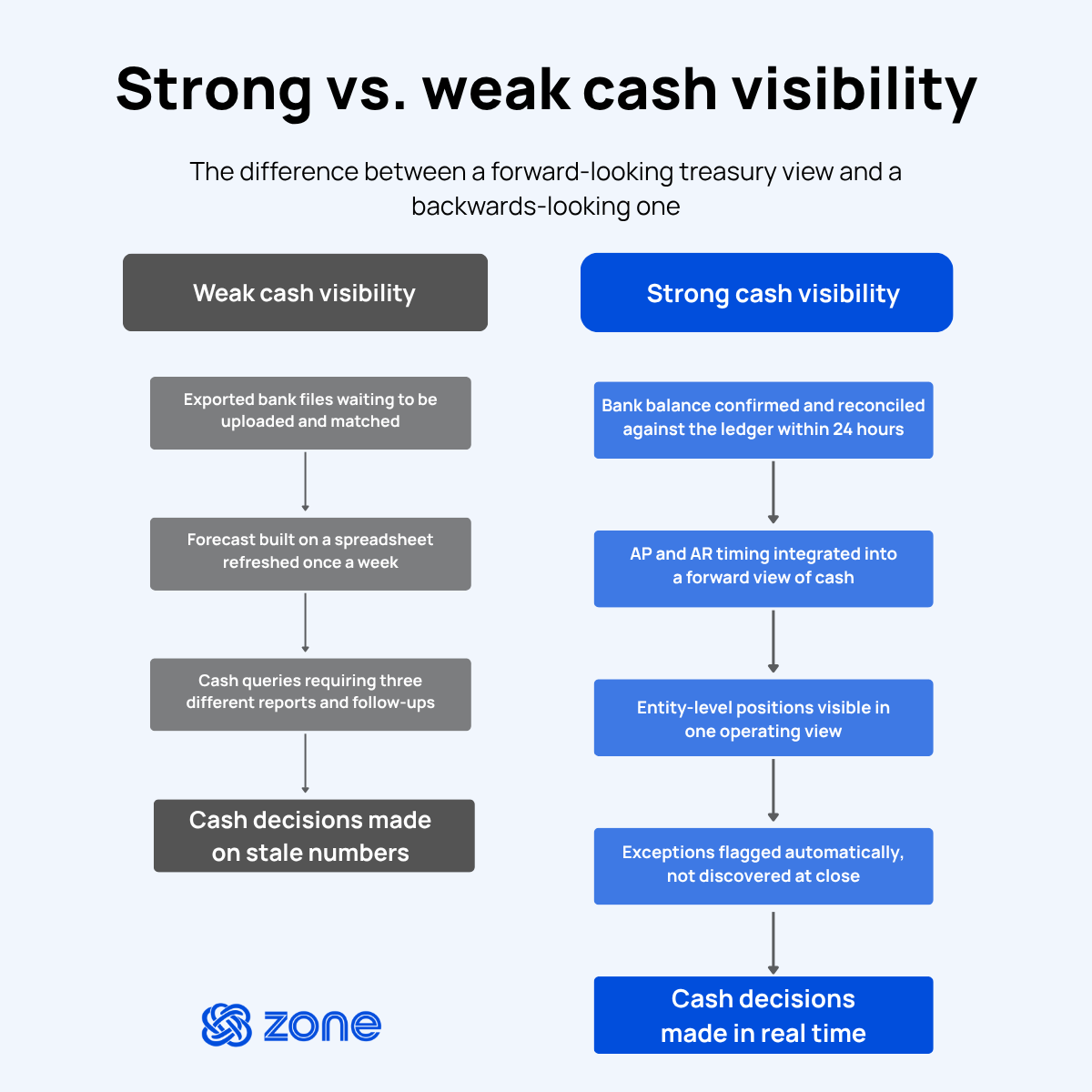
Here’s what the difference looks like in practice:
Strong cash visibility
- Bank balance confirmed and reconciled against the ledger within 24 hours
- AP and AR timing integrated into a forward view of cash
- Entity-level positions visible in one operating view
- Exceptions flagged automatically, not discovered at close
Weak cash visibility
- Exported bank files waiting to be uploaded and matched
- Forecast built on a spreadsheet refreshed once a week
- Cash queries requiring three different reports and a follow-up email
6 blockers that create cash blind spots
Poor cash visibility is usually a stack of operational disconnects between systems, teams and the timing of actual events and when those events get recorded, matched and reviewed. Each disconnect reduces the freshness and reliability of the reported position.
1. Disconnected bank and ERP data
A controller pulling a cash position on a Friday afternoon is often looking at three different numbers at the same time: the bank portal balance from this morning, an ERP saved search reflecting transactions through Wednesday and a spreadsheet built last month that nobody has updated since.
The problem is that bank activity, ERP records and manual updates live in separate places with different refresh cycles and no automatic reconciliation among them. Until those sources are connected and the ERP reflects bank activity on a current schedule, a reliable real-time cash position stays an ambition.
2. Lagging reconciliations
Reconciliation is the mechanism that confirms a cash balance is real. When it runs on a monthly or batch cycle, the certified cash position is always a snapshot of the past. Teams might have access to raw balance data, but without reconciled confirmation, that data carries uncertainty.
When batch reconciliation runs monthly, the cash position a leader sees on the 12th could reflect transactions from the 1st. Any movements between those two points – returned payments, unusual debits, unapplied credits – remain unconfirmed until the next cycle runs. The frequency of reconciliation determines how fresh and trustworthy the cash picture can be. Reconciliation lag creates visibility lag – and visibility lag creates decision lag.
3. Multi-entity and multi-currency complexity
Managing thousands of monthly transactions across multiple countries, more than 20 bank accounts and several payment service providers (PSPs) creates exactly this kind of fragmented picture.
Foreign currency revaluations, intercompany flows and virtual accounts add further complications. Every new entity or PSP adds another reconciliation surface area that has to be managed, matched and reported separately before it can contribute to a consolidated position.
4. Manual AP and AR timing gaps
Even when the bank balance looks right, the forward cash picture can be materially wrong when AP and AR timing is disconnected from the position view. A controller whose AP system processes payments on Tuesdays and Thursdays but whose cash position is updated daily is always working with an incomplete picture. The gaps look like:
- Invoice approvals sitting in queues delay payment execution by days or weeks
- Payment runs processing on a batch schedule create windows where committed spend isn’t reflected
- Unapplied cash sitting in clearing accounts overstates available funds until someone resolves it
- Collections pending but not yet received leave the AR contribution to cash undercounted
5. Spreadsheet rework and version sprawl
The most common response to a disconnected visibility environment is more spreadsheets. Exports get copied into workbooks. Formulas get built to bridge between formats. Someone emails an updated version on Monday, someone else works from the previous one on Tuesday and by Wednesday there are three separate files with different numbers and no clear record of which one is current.
Beyond the coordination cost, spreadsheet-driven visibility introduces formula risk: a broken reference, a wrong paste or a miscalculated foreign exchange (FX) rate that nobody catches until a downstream report surfaces an unexpected number.
6. Weak forecast governance
A cash forecast is only as reliable as the data feeding it. When input assumptions live in personal spreadsheets, updates depend on individuals remembering to refresh their own sections and there’s no governed schedule for when the model reflects current actuals, the forecast becomes a liability rather than a tool.
The issue is that finance teams can build technically sophisticated forecast models and still produce unreliable outputs if the AP, AR, payroll and treasury data arriving is stale, inconsistently refreshed or disconnected from the ERP. Forecast accuracy starts with the freshness of the underlying workflow data, not the sophistication of the model sitting on top of it.
How to improve cash flow visibility without adding more spreadsheets
The steps below describe what connected, ERP-native visibility looks like in practice and where the highest-impact changes tend to be.
Centralize bank and ERP data into one trusted operating view
The starting point is consolidating the data that defines cash position into a single view finance can trust: bank activity, reconciled ERP records, entity context and the timing of expected inflows and outflows, all in one place, on a defined refresh schedule.
- Before: A controller checks the bank portal, runs a NetSuite saved search, opens a cash spreadsheet and tries to reconcile three different numbers manually before answering a cash query. Every question requires assembly before it has an answer.
- After: Bank activity feeds into the ERP on a scheduled basis, reconciled balances reflect the same transactions as the bank and cash queries can be answered from one confirmed source without manual aggregation.
Automate reconciliation as an always-on visibility layer
Reconciliation frequency determines how current the confirmed cash position can be. Teams that reconcile monthly get a clean picture once a month. Teams that automate on a daily schedule get a position that stays current with actual bank activity.
- Before: A monthly batch cycle runs, clears the backlog and produces a confirmed balance for that moment. For the other 29 days, the cash position carries unresolved uncertainty about returned payments, unusual debits and unapplied credits.
- After: Bank reconciliation automation matches bank and credit card activity against NetSuite records on a scheduled basis using configurable matching logic. When a transaction matches, it posts. When it doesn’t, it surfaces as an exception for review. The confirmed position stays fresh enough to support daily operating decisions, not just monthly reports.
Connect AP and AR timing to the cash position
AP and AR greatly shape cash flow and visibility. Invoice approval timing affects when payments go out. Collection cycles affect when cash comes in. Unapplied cash sitting in clearing accounts creates phantom positions that look like available funds until someone applies them.
- Before: AP and AR are managed in isolated workflow queues. The cash position reflects cleared balances only. Near-term outflows from approved invoices and pending collections have no place in the picture until they hit the ledger.
- After: AP automation in NetSuite connects invoice timing, approval routing and payment scheduling back to the cash view. Finance can see what’s been approved, what’s scheduled for payment and what’s still pending, giving the cash position a forward dimension rather than just a backward-looking one.
Move from manual refreshes to governed data refresh cycles
Manual refreshes break when the person responsible is out, busy or uncertain which file is current. Governed refresh cycles define when data updates, who owns the update and what version counts as current.
- Before: A report gets exported on Monday, emailed to the team and worked from for the rest of the week. By Thursday, two people have added their own adjustments and nobody is sure which version reflects current actuals.
- After: Automated NetSuite data extracts, faster exports and refreshes and reduced monthly manual report-request work. All source data pulls on a defined schedule, downstream reports reflect the same version at the same point in time and finance works from the current view by default.
Review exceptions, not every line item
Visibility doesn’t require reviewing every transaction. It requires knowing which ones need attention.
- Before: An analyst scans hundreds of unmatched transactions manually, looking for the handful that actually require action. Most of the time spent is on transactions that would have confirmed themselves.
- After: Routine activity matches and posts automatically. Breaks, variances, unusual movements and timing changes surface as exceptions for targeted review. A team working through 50 flagged items takes minutes. The same team working through 500 unfiltered lines takes hours. The goal is a workflow where ordinary activity confirms itself and extraordinary activity gets the attention it needs.
Which KPIs prove that visibility is actually improving
Visibility improvements are easy to claim and hard to measure if the right metrics aren’t in place before changes are made. Teams should measure the quality of the visibility environment, not just whether a dashboard exists.
The metrics below signal that visibility is genuinely improving:
How Zone helps finance teams get to clarity faster
Cash visibility problems are different across businesses. Some teams have reconciliation lag. Some have disconnected bank feeds. Some have clean reconciliation but a reporting stack that still runs on manual exports. The right starting point depends on where the biggest blind spot is.
ZoneReconcile addresses the reconciliation layer directly, automating bank and credit card matching inside NetSuite and replacing manual upload-and-match cycles with a scheduled, exception-first process. For teams where reconciliation lag is the primary cash visibility problem, it's the fastest path to a more current and more trusted position.
Zone’s reporting and data solutions address the downstream view: how quickly finance can see what the confirmed position means for decisions, how reliably reports refresh and how much manual assembly sits between source data and a working dashboard. When the blind spot is in reporting speed or data freshness, that’s where the improvement starts.
Both paths run inside NetSuite, where the audit trail, the access controls and the financial data already exist. The goal is a connected set of workflows that keeps cash position data current, confirmed and visible without requiring a manual refresh every time someone needs an answer.
Book a demo today to evaluate where cash visibility is breaking and which Zone workflow can solve it fastest.