<script type="application/ld+json">
{
 "@context": "https://schema.org",
 "@type": "FAQPage",
 "mainEntity": [
   {
     "@type": "Question",
     "name": "How does account reconciliation software improve efficiency?",
     "acceptedAnswer": {
       "@type": "Answer",
       "text": "<a href="https://www.zoneandco.com/articles/tips-for-improving-your-bank-reconciliation-process">Account reconciliation software improves efficiency</a> by replacing manual transaction matching and exception management with automated matching logic, configurable tolerance rules and structured routing workflows. Teams that previously spent two to three days clearing exceptions manually across multiple bank accounts can reduce that work significantly when matching logic handles high-confidence transactions automatically and only surfaces genuine exceptions for human review. The efficiency gain scales with transaction volume: the higher the volume, the more time the automation recovers."
     }
   },
   {
     "@type": "Question",
     "name": "What is a fully automated reconciliation software for accountants?",
     "acceptedAnswer": {
       "@type": "Answer",
       "text": "No reconciliation software is fully automated in a way that eliminates human judgment at close. The strongest tools automate high-confidence <a href="https://zoneandco.com/glossary/smart-transaction-matching">transaction matching</a>, exception routing and status tracking, while keeping approvals, policy exceptions and posting decisions in the hands of finance team members. ZoneReconcile automates the matching and exception management layer inside NetSuite while requiring structured preparer and approver sign-off before any item posts to the ledger, which is the right architecture for teams that need both speed and audit readiness."
     }
   },
   {
     "@type": "Question",
     "name": "What are two software tools for bank account reconciliation?",
     "acceptedAnswer": {
       "@type": "Answer",
       "text": "Two commonly evaluated tools for bank reconciliation are ZoneReconcile, which operates natively inside NetSuite and connects directly to bank feeds and PSP data, and Trintech, which offers a standalone reconciliation platform with broader ERP integration options. The right choice depends on your ERP environment: for finance teams on NetSuite, a native tool eliminates the integration layer and keeps all reconciliation activity connected to the general ledger."
     }
   },
   {
     "@type": "Question",
     "name": "What should finance teams evaluate before investing in account reconciliation software?",
     "acceptedAnswer": {
       "@type": "Answer",
       "text": "Finance teams should evaluate four things before committing: how the software handles their specific transaction sources, including banks, PSPs, cards and intercompany; whether the exception routing and approval workflow fits their close process; how the audit trail connects back to the ERP; and what implementation actually involves for their entity count and currency mix. A tool that looks clean in a demo but requires significant configuration or integration work to match your environment will add recurring time to your close process, not remove it."
     }
   }
 ]
}
</script>

How to choose the best account reconciliation software for multi-entity closes

Zone & Co Team
Learn More
Decorative header image for Zone & Co article on usage-based billing in Salesforce RCA and NetSuite, featuring overlapping circles on a navy background with the Zone logo.

Finance teams handling multi-entity closes are asking sharper questions about account reconciliation software because the volume, complexity and audit expectations around it have changed. More entities, more payment rails, more currencies and tighter close windows mean that spreadsheet-driven workflows and disconnected tools are creating genuine risk, not just inefficiency.

When close cycles are tight and the general ledger needs to be clean across 10 subsidiaries, the margin for error tightens.

Key highlights: 

  • Multi-entity close creates reconciliation complexity that scales with transaction sources, currencies and intercompany relationships.
  • Four evaluation criteria determine whether reconciliation software will hold up at close: multi-currency support, intercompany matching, exception routing and bank/PSP connectivity.
  • Standalone tools that sit outside the ERP introduce integration risk that shows up during close, not during the demo.
  • Zone & Co’s account reconciliation platform runs natively inside NetSuite and removes the middleware layer that standalone tools require.

Why account reconciliation is complex for multi-entity organizations

When a business operates a single entity with one bank account and a predictable transaction volume, reconciliation is manageable. When that same business expands to multiple subsidiaries – each with their own banks, payment service providers and intercompany balances – the reconciliation surface area grows in ways that most general-purpose software can’t handle.

The complexity is the combination of volume and variance. A controller managing a multi-entity close is working across bank feeds that arrive on different schedules, card programs with different statement formats, payment service provider (PSP) settlements that don’t map neatly to the general ledger and intercompany eliminations that require matching across books.

The median annual close cycle is 18 days, according to the American Productivity and Quality Center. This is slower than it needs to be and riskier than finance leaders realize. Account reconciliation software automates time-consuming parts of the close process, shortening it and untangling multi-entity line matching and intercompany reconciliation.

Dig deeper: 7 warning signs it’s time to automate reconciliation in your ERP

What to look for in account reconciliation software

The foundations of what multi-entity and single-entity finance teams need are similar: import, match and post transactions. But similarities usually end there. What multi-entity teams need to ask when evaluating account reconciliation software is: How does the software handle currency differences at the entity level, how does exception routing work when a match fails, and how deeply does the product connect to your ERP data without requiring a middleware layer?

Here are four main features to look for when comparing account reconciliation software models.
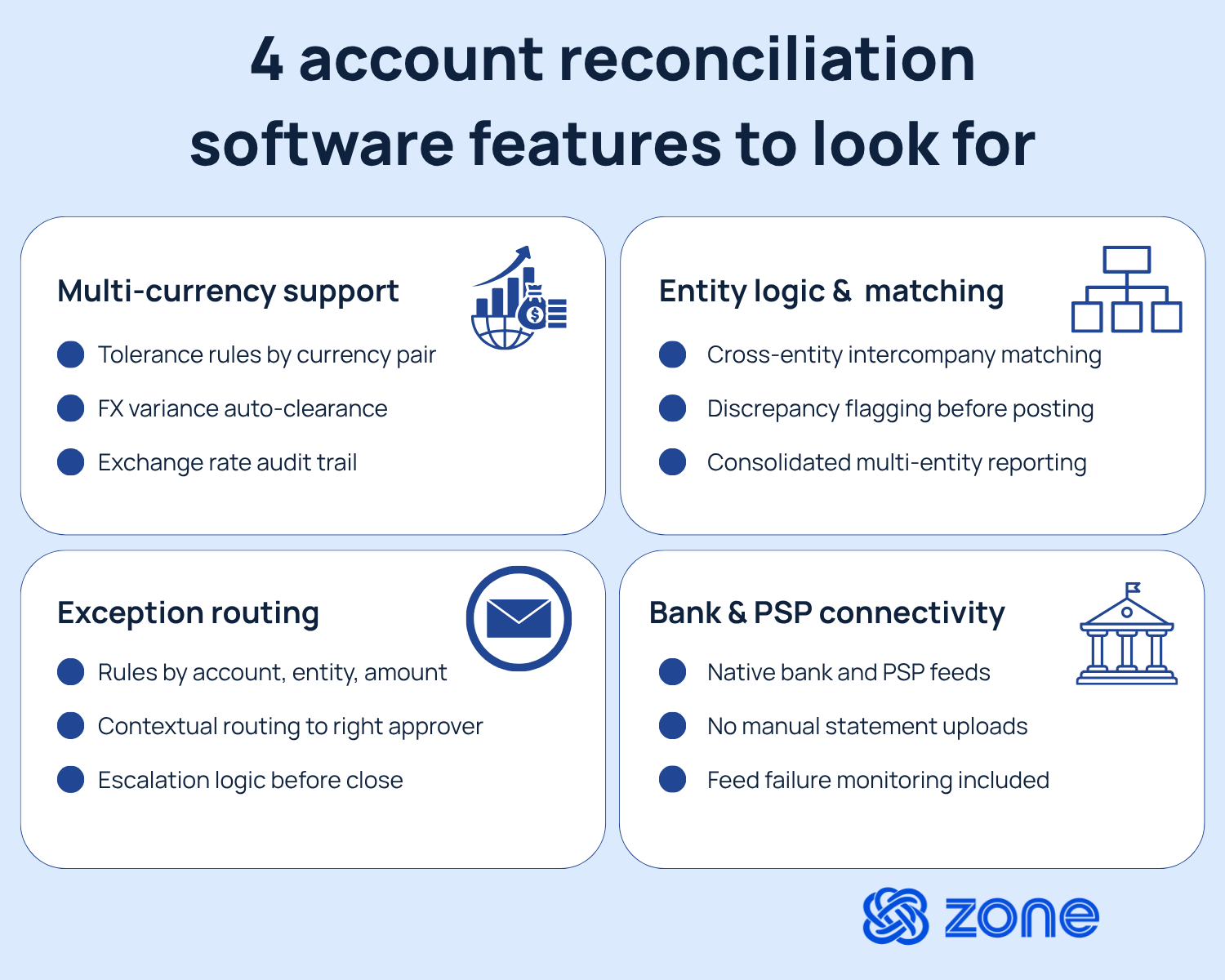
Infographic showing 4 account reconciliation software features to look for: multi-currency support, entity logic and matching, exception routing, and bank and PSP connectivity, each with three supporting bullet points.

Multi-currency support

Multi-currency and foreign exchange rates are one of the most common sources of manual exception work in multi-entity reconciliation. A payment cleared in EUR needs to be reconciled against a ledger balance recorded in GBP, and the exchange rate applied at posting may differ from the rate used at settlement. Software that treats multi-currency transactions as an edge case will create more work, not less.

Strong multi-currency support means the software:

  • Applies tolerance rules by currency pair so minor FX variances clear automatically
  • Maintains a clear audit trail showing the rate applied and the source of that rate
  • Handles realized and unrealized FX gains and losses without manual journal entries

Entity logic and intercompany matching

Intercompany reconciliation is where most multi-entity close processes lose time. Matching a payable in one subsidiary to a receivable in another requires the software to hold both sides of the transaction, map it to the right entity and raise issues before posting. When that logic doesn’t exist in the tool, the workaround is usually a spreadsheet maintained by one person who becomes a single point of failure at month-end.

Evaluate whether the software supports:

  • Defined intercompany relationships with automatic matching across the organization
  • Exception flagging when one side of an intercompany transaction is missing
  • Reporting across entities without extra steps

Exception routing

How well a reconciliation tool handles exceptions often determines whether it actually reduces close cycle time or just digitizes manual processes. When a match fails, whether due to amount variance, timing difference or missing counterparty data, the software needs to route that exception to the right person with the right context.

Effective exception routing includes:

  • Configurable routing rules based on account type, entity, amount threshold or variance type
  • Status tracking that shows when an exception was raised, who owns it and how long it’s been open
  • Escalation logic that surfaces aged exceptions before close

Bank and PSP support

Most banks now offer direct feed connectivity, and the major PSPs publish transaction-level data via API. Account reconciliation software that requires manual statement uploads, or that only connects to a limited set of financial institutions, is a poor fit for finance teams with complex payment stacks.

Direct connectivity removes the lag and formatting inconsistencies that create exceptions in the first place. When transaction data arrives automatically, in a standardized format, the matching logic has cleaner inputs and exception rates fall. Ask vendors specifically which banks and PSPs they connect to natively, what happens when a feed fails and whether feed monitoring is included.

“We manage thousands and thousands of transactions every month, from various countries across multiple channels. This means that we are dealing, not only with a high volume of transactions, but complex ones which include foreign currency, revaluations, adjustments, and processing fees.” – Kate Callender, CFO at BLUNT Umbrellas
Read the story

Top account reconciliation software platforms

Account reconciliation software options span ERP-native tools, standalone platforms and close management suites – each with a different integration model and a different set of tradeoffs. Here’s how the leading options compare.
Reconciliation solution ERP integration Main features Best for
ZoneReconcile Built natively inside NetSuite – no middleware layer, no connector
  • Bank, PSP and card matching
  • Configurable exception routing
  • Intercompany matching across entities
  • Full audit trail in NetSuite
  • Direct bank connectivity
Mid-market to enterprise businesses running NetSuite with multi-entity, multi-currency close requirements
BlackLine Integrates with SAP, Oracle, NetSuite and other ERPs via connector
  • Automated transaction matching
  • Close checklist workflows
  • Journal entry automation
  • Risk-rated account certification
  • Broad ERP support
Large enterprises with complex, multi-ERP environments
Trintech (Cadency / Assemble) Standalone platform; integrates with major ERPs via API or flat-file connector
  • High-volume transaction matching
  • Intercompany reconciliation
  • Role-based approval workflows
  • Close status dashboards
Mid-market to enterprise teams with mixed ERP environments or ERP-agnostic requirements
FloQast Sits outside the ERP; connects to NetSuite, Sage Intacct, QuickBooks and others
  • Close checklist and task management
  • Preparer/reviewer sign-off
  • Slack and email integrations
  • Month-end dashboards
Small to mid-market accounting teams that prioritize close management and workflow visibility over deep transaction matching
Adra by Trintech Standalone platform with pre-built connectors to common ERPs
  • Automated bank and account reconciliation
  • Exception management
  • Standardized reconciliation templates
  • Audit-ready sign-off documentation
  • Close task tracking
Mid-market finance teams seeking a dedicated reconciliation tool with lighter implementation requirements
Numeric Sits outside the ERP; integrates with NetSuite, Sage Intacct and QuickBooks
  • AI-assisted reconciliation
  • Month-end close checklist
  • Preparer/reviewer approval workflows
  • Real-time close status visibility
Growth-stage and mid-market companies that need modern close management tooling

The reconciliation features that matter at close

Evaluating account reconciliation software at the feature level is useful, but the features that matter at close are different from the features that matter at setup. A tool that’s fast to configure but slow to run – or one that surfaces clean dashboards but buries the detail needed for sign-off – creates problems that only become visible under close pressure.

The reconciliation tasks to stress-test before you commit include:

  • Matching logic depth: Can the software handle one-to-many and many-to-one matches, or only one-to-one? High-volume transaction environments regularly produce split settlements and consolidated postings that require more sophisticated matching rules.
  • Tolerance management: The ability to define and adjust variance thresholds by account, entity or transaction type is a sign of a product designed for real close workflows, not demo environments.
  • Posting control: Reconciliation doesn’t end at matching. The software needs to support structured posting workflows with preparer and approver separation, so the audit trail reflects who cleared each item and when.
  • Exception history: A reconciliation exception that gets cleared without documentation is an audit finding waiting to happen. The software should retain a complete history of each exception: the original mismatch, the adjustment applied and the approver who signed off.
  • Drill-back to source: When an auditor or senior finance leader needs to understand why a balance moved, the fastest path is a direct link from the reconciled item back to the originating transaction in the ERP. Tools that break that link or require a separate lookup add time and create reconciliation gaps.

Take a self-guided tour to discover how ZoneReconcile streamlines bank, card and PSP connectivity for a faster reconciliation in NetSuite.

How to compare tools without overbuying

Finance teams often enter software evaluations with a feature checklist and leave with a contract for capabilities they won't use for two years. While comparing solutions ask yourself this question: Does this tool match how my close actually works today, with enough configurability to grow without a reimplementation?

The table below organizes the decision across four areas that matter most.

Evaluation area What to look for Red flags
Implementation
  • Configurable in weeks, not months
  • ERP-native or pre-integrated
  • Clear data mapping documentation
  • Long professional services engagement
  • Custom integration required
  • No sandbox environment
Visibility
  • Real-time status across entities and accounts
  • Exception queue visible to all relevant approvers
  • Close progress trackable without offline reports
  • Reporting built in a separate module
  • No consolidated view
  • Status requires manual update
Posting
  • Structured preparer/approver workflow built in
  • Posting logs retained and exportable
  • Audit trail connected to the ERP record
  • Posting handled outside the tool
  • No separation of duties
  • Audit trail in a separate log file
Control evidence
  • Exception resolution documented with reason code and approver
  • Policy enforcement built into matching rules
  • Configurable sign-off thresholds
  • Controls added as workarounds
  • Policy enforcement relies on user discipline

Automate close for multiple entities with built-for-NetSuite account reconciliation software

You know you need to automate your reconciliation and close processes, but automated reconciliation tools that sit outside of your ERP and rely on connectors and syncs create complexity.

When automation and AI is inside the ERP, 87% of broad AI adopters are confident in its capability, according to Zone & Co’s AI in Finance study. A standalone, automated reconciliation tool that sits outside the ERP requires data to move in and out of the general ledger on a schedule, through a connector that creates its own points of failure and its own audit issues.

Here’s how some of Zone’s AI financial lifecycle solutions make end-of-month and end-of-year close easier:

  • ZoneReconcile reduces manual matching, exception work and reconciliation delays before the close is finalized. By keeping reconciliation activity inside NetSuite, teams can manage bank, card and PSP reconciliation closer to the ledger.
  • ZoneReporting builds on that foundation by giving controllers and finance leaders clearer visibility into close results, entity performance and reporting outputs from the same NetSuite environment.

See how ZoneReconcile and ZoneReporting streamline NetSuite workflows for multi-entity close by booking a demo today.

FAQs

  • How does account reconciliation software improve efficiency?
    • Account reconciliation software improves efficiency by replacing manual transaction matching and exception management with automated matching logic, configurable tolerance rules and structured routing workflows.
    • Teams that previously spent two to three days clearing exceptions manually across multiple bank accounts can reduce that work significantly when matching logic handles high-confidence transactions automatically and only surfaces genuine exceptions for human review. The efficiency gain scales with transaction volume: the higher the volume, the more time the automation recovers.
  • What is a fully automated reconciliation software for accountants?
    • No reconciliation software is fully automated in a way that eliminates human judgment at close. The strongest tools automate high-confidence transaction matching, exception routing and status tracking, while keeping approvals, policy exceptions and posting decisions in the hands of finance team members.
    • ZoneReconcile automates the matching and exception management layer inside NetSuite while requiring structured preparer and approver sign-off before any item posts to the ledger – which is the right architecture for teams that need both speed and audit readiness.
  • What are two software tools for bank account reconciliation?
    • Two commonly evaluated tools for bank reconciliation are ZoneReconcile, which operates natively inside NetSuite and connects directly to bank feeds and PSP data, and Trintech, which offers a standalone reconciliation platform with broader ERP integration options.
    • The right choice depends on your ERP environment: for finance teams on NetSuite, a native tool eliminates the integration layer and keeps all reconciliation activity connected to the general ledger.
  • What should finance teams evaluate before investing in account reconciliation software?
    • Finance teams should evaluate four things before committing: how the software handles their specific transaction sources (banks, PSPs, cards and intercompany), whether the exception routing and approval workflow fits their close process, how the audit trail connects back to the ERP and what implementation actually involves for their entity count and currency mix.
    • A tool that looks clean in a demo but requires significant configuration or integration work to match your environment will add recurring time to your close process, not remove it.

7 minute read

Get a Personalized Demo Today

Start a conversation with an expert who asks thoughtful questions and shows you how Zone & Co can solve your unique problem.

Book a demo