
Every morning, a treasury analyst at a multi-entity company opens NetSuite, pulls three subsidiary cash reports, downloads two bank statements that were never auto-imported and rebuilds the daily position in a spreadsheet. By the time the CFO asks about available liquidity at 9 a.m., the answer already reflects last night’s data. The intraday transfer that cleared an hour ago is not in the picture. Neither is the accounts payable (AP) run that went out this morning.
This problem is position lag, which is the gap between when cash actually moves and when that movement shows up in the position. Every stale feed, manual export and cross-entity spreadsheet contributes to the lag, and a position that lags reality by half a day is a position finance can’t fully trust. A daily cash position that stays current is less about chasing true real-time numbers and more about closing that lag to the point where the number is safe to act on.
Key highlights:
- Cash positioning is a current view of available cash across all bank accounts, entities and currencies, distinct from cash flow forecasting, which projects future inflows and outflows.
- The real enemy of a daily cash position is position lag, which is the delay between a cash event happening and it appearing in your numbers.
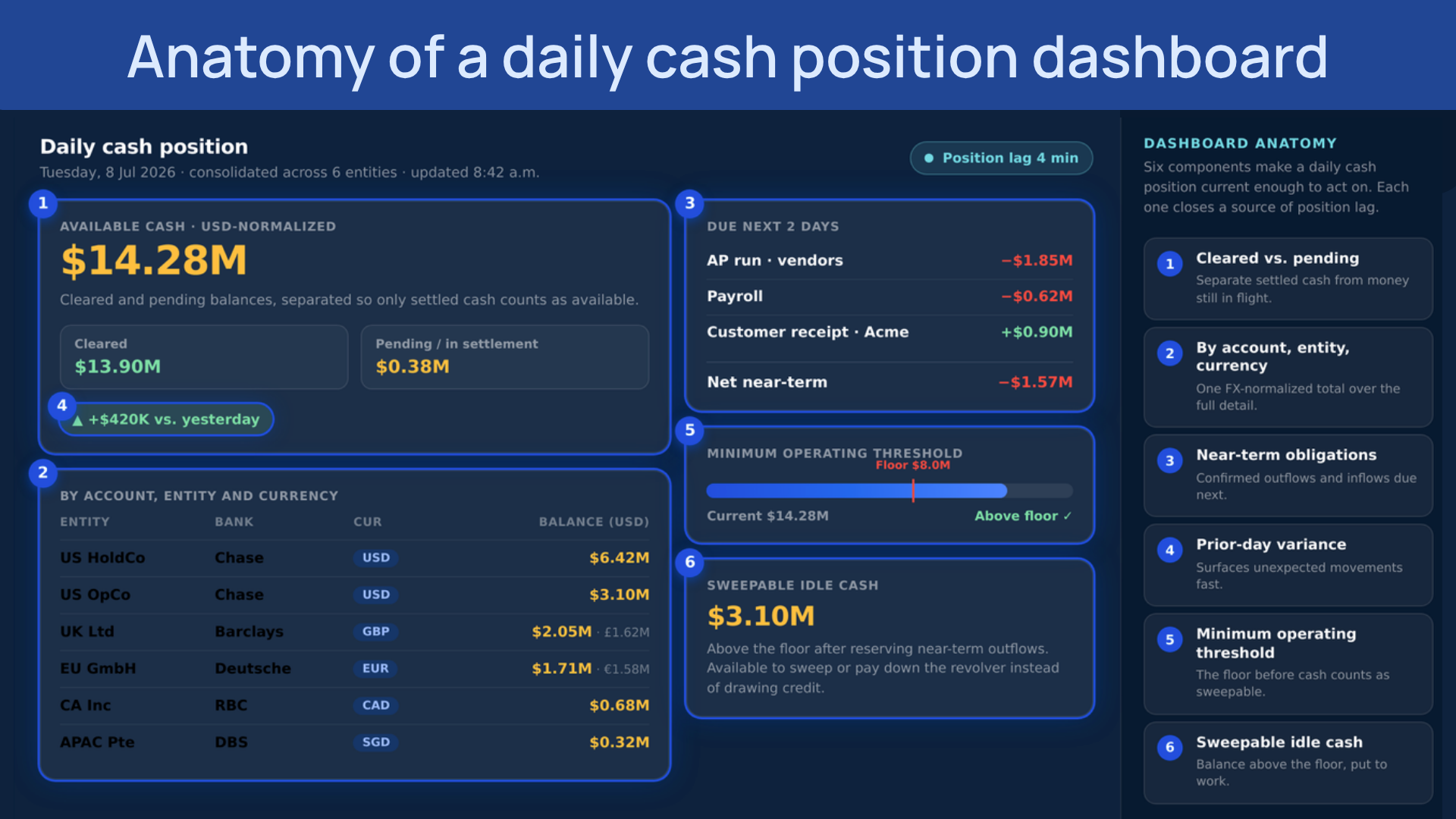
- A useful daily cash position dashboard shows cleared versus pending balances, position by account, entity and currency, near-term obligations and variance against the prior day.
- ZoneReconcile automates transaction matching and bank feed imports inside NetSuite, and ZoneLiquidity extends that foundation into a forward-looking cash position with an AI scenario planning agent.
What is cash positioning?
Cash positioning is the process of determining a company’s available cash balance at a specific point in time, across all bank accounts, entities and currencies. It answers one question: How much cash does the organization actually have access to right now?
It is worth separating this from cash flow forecasting, because the two get conflated. Cash positioning is a present-state view of the balances that exist in confirmed, reconciled accounts today. Cash flow forecasting is a future-state view of where cash will be over the next 30, 60 or 90 days, based on accounts receivable (AR) expectations, AP obligations and historical patterns. Both are required for complete treasury visibility and they need different data, processes and tools. The current position is the foundation forecasting is built on. When the position is unreliable, every projection downstream inherits that unreliability.
Cash positioning vs. cash flow forecasting
The following comparison highlights the key operational differences between these two treasury functions.
Position lag: Why your cash position is wrong by mid-morning
Position lag is the time between a cash event occurring and that event appearing in your cash position. Let’s say a wire clears at 8:15 a.m. but the feed does not import until tomorrow. An AP run goes out at 9 a.m. but the position still shows the pre-run balance. Each delay is small on its own. But stacked across accounts, entities and manual steps, they add up to a position that describes the recent past rather than the present.
Every weakness finance teams hit with cash positioning traces back to lag. Lags can come from:
- Stale bank feeds
- Subsidiary reports exported an hour before the position is assembled
- Spreadsheets that take hours to build
Naming and identifying where your cash positioning lags are helps because it turns a vague sense that the numbers feel off into a specific thing to measure and reduce. The goal is not a perfect real-time number. Bank timing, cut-off windows and settlement realities make true real-time impractical for most teams. The goal is a position current enough to act on with confidence, where the lag is short, known and consistent rather than variable and invisible.
Why cash positioning matters for NetSuite finance teams
For a CFO or controller running NetSuite across multiple entities, a lagging cash position has direct consequences for payment decisions, credit line usage and intercompany transfers.
- Payment timing depends on the actual available balance. Paying a vendor early to capture a discount only works when the balance you are looking at is current, not yesterday’s reconciled figure. Decisions made on lagging data cost real money.
- Multi-entity treasury needs a consolidated view. Individual entity positions hide the full liquidity picture, and intercompany balances can mask a shortfall in one entity while another sits on idle cash that could cover it.
- A current position reduces unnecessary credit line draws. Teams working from stale reports draw on revolving credit when cash is actually available, paying interest that a current position would have avoided.
- A reconciled daily position supports audit and period-end. It creates a timestamped record that stands up at close and in treasury reporting, which a hand-built spreadsheet with undocumented sources and methods struggles to do.
How to build a daily cash position that stays current
A daily cash position works the same way regardless of which enterprise resource planning (ERP) platform you run. The mechanics come down to what goes on the dashboard, where you build it, how and when you update it and what it gives you back. Answer those with position lag in mind and the position stays current enough to trust.
What goes into a daily cash position dashboard
A useful dashboard shows more than a single cash total. At minimum it includes:
- Cleared versus pending balances, so available cash is separated from money still settling
- Position by account, entity and currency, with a single FX-normalized total on top for the consolidated view
- Near-term known obligations and expected receipts which is the confirmed outflows and inflows due in the next day or two
- Variance against the prior day, which surfaces unexpected movements fast.
- A minimum operating cash threshold – the floor each entity needs before cash counts as sweepable
- Sweepable idle cash, which is the balance above that floor that could cover a shortfall elsewhere or pay down a revolver
The test for any line on the dashboard is whether it changes a decision. If a number doesn’t inform a payment, a transfer or a draw, it is clutter.
Where to build it
The right home for a cash position is wherever your reconciled bank data and your AP and AR data already live, which for most finance teams is the ERP. Building it there keeps the position close to the source and shortens lag, because every export to a separate tool or spreadsheet adds a copy that starts going stale the moment it is made. A spreadsheet can work for a single entity with one or two bank accounts. Across multiple entities, currencies and banks, a spreadsheet becomes the largest single source of lag in the process.
How and when to update it
A daily cash position should refresh on a set rhythm and on demand. Most teams run a morning position once overnight feeds and reconciliations have landed, then refresh after major intraday events like a large AP run or an inbound customer payment. Two things that keep the position honest are a fixed daily cadence, so it is always rebuilt at the same point in the workflow, and a named owner responsible for it. A position that updates only when someone remembers is a position nobody trusts by Thursday.
The mistakes that can make a dashboard untrustworthy
A cash position dashboard can look complete and still be wrong. The common ones:
- Mixing book balance with bank balance. The ERP book balance and the actual bank balance stay different numbers until reconciliation closes the gap, and a position built on the wrong one overstates available cash.
- Ignoring value dates and float. A deposit that shows today may not be available until it settles, so treating posted balances as available inflates the position.
- Skipping FX normalization. Adding balances across currencies without converting to a single reporting currency produces a consolidated total that means nothing.
- Updating too infrequently. A position refreshed once and reused all day only stays accurate for about an hour.
- No named owner. When responsibility is shared, the position stops being maintained and lag creeps back in.
Get these right and the payoff is fewer surprise credit draws, safer payment timing, idle cash put to work across entities and a current answer whenever the CFO asks.
Why a manual daily cash position breaks down at scale
Building that same position by hand inside NetSuite is where lag creeps in. The steps look straightforward, but as companies grow, it’s hard to maintain an accurate cash position.
Consolidating bank account data
Bank data reaches NetSuite through API-based feeds that pull transactions on a schedule, or file-based imports that someone downloads and uploads manually. File imports depend on a person running them, so the feed breaks the day that person is out. API feeds fail too, for reasons like bank security changes, credential expiration and maintenance windows. Either way, one unreliable feed leaves that account stale until someone notices. In a multi-bank environment, one stale feed is often the normal state, and it is pure position lag.
Mapping payables and receivables timing
Overlaying AP scheduled payments and AR expected receipts on the confirmed bank balance produces the net position: available cash after known outflows and inflows. Native NetSuite has no single view that combines bank balances, payables and receivables on one screen, so the AP aging and AR aging get pulled separately and combined by hand. For a team managing 10 entities, that is 10 AP aging reports, 10 AR aging reports and 10 bank balance pulls stitched into a spreadsheet that is already behind by the time it is built.
Assembling the dashboard
A working daily position shows available cash by account and entity with the day’s expected inflows and outflows overlaid. Building that natively means custom saved searches for each account and entity, a consolidation layer across subsidiaries and a manual refresh to keep the numbers current. For a single-entity, single-bank structure, native reporting handles it. Across multiple entities, currencies and bank relationships, the manual assembly adds more lag than a treasury function can absorb.
Cash positioning limitations in NetSuite
The honest assessment of NetSuite’s out-of-the-box cash positioning tools is that they give you the components, not the position. The typical manual workaround looks like this:
- Daily bank balances pulled from each account by hand, with no consolidated view.
- Feeds checked every morning to confirm they were imported before anyone trusts the numbers.
- A multi-entity position assembled in Excel from separate subsidiary reports.
- AP and AR overlaid manually to estimate the net position.
- A position that is behind by mid-morning, with decisions made on last night’s data.
The fix for these lags requires removing the manual steps to keep the position close to the source data, so it stays current instead of drifting further behind as the day goes on.
Stop rebuilding your cash position every morning
Most cash positioning problems start with a feed that didn’t import overnight, a subsidiary report exported an hour before the position gets built or a transfer that cleared after the last refresh. By the time the CFO asks about available liquidity, the number is outdated.
ZoneReconcile and ZoneLiquidity close that freshness gap. They run directly inside NetSuite, turning reconciled bank data into a consolidated cash position before decisions get made, not after. Every balance, matched transaction and known obligation is pulled into one current view, so finance can see what’s available, what’s committed and what’s coming due without rebuilding anything in Excel.
What ZoneReconcile and ZoneLiquidity help you achieve in your cash process:
- Stop checking whether the feed ran every morning: ZoneReconcile imports bank feeds automatically from 12,000+ institutions, keeping every account current without a manual download.
- Reconcile once, trust the number all day: Configurable transaction matching inside NetSuite means the position is built on reconciled data, not raw imports or half-matched transactions.
- See every entity’s cash in one place: ZoneLiquidity surfaces a consolidated, FX-normalized position across all accounts, entities and currencies inside NetSuite, with no spreadsheet aggregation.
- Stop drawing credit on cash you already have: A 30-day liquidity view surfaces idle cash and near-term obligations, so you cover shortfalls from within before touching the revolver.
- Test the decision before you make it: Zoe by Zone’s scenario planning agent models delayed payments, renegotiated terms or changing spend patterns without rebuilding the model.
And Zone’s automated treasury solution doesn’t operate in isolation. It’s the natural next step of Zone & Co’s quote-to-cash and AP automation platform, for an AI-powered automated reconciliation and it draws on the same clean NetSuite data that flows through billing, invoice capture, approvals and payment execution.
Book a demo with a treasury specialist and join the ZoneLiquidity waitlist.
Zone & Co strategically uses AI to research and draft articles, but the final version is shaped by people. Our team carefully reviews content with multiple human-in-the-loop steps in the process to ensure accuracy, relevance, tone and alignment with readers’ interests.