
A controller opens month-end toggling between the bank portal, NetSuite and a spreadsheet of unmatched lines, with an inbox of approvals that stalled while someone was on leave. AI in accounting promises to clear that pile, and a lot of it delivers. But not every task is a fit. Some are built for AI. Others still rely on human judgment.
The tasks built for it tend to be the high-volume, rule-bound ones. Artificial intelligence in accounting reads documents, codes transactions, flags anomalies and drafts narratives – then hands the result to a person. In a 2026 Zone & Co survey of 565 finance professionals, 57% say AI has already beaten expectations, while the other 43% are more measured. Which group you land in often comes down to where you point AI first. These are seven workflows that we believe are right for early AI adoption.
Key highlights:
- AI in accounting means using machine learning and generative models to read documents, code and match transactions, flag anomalies and draft commentary.
- AI that runs outside your records, approvals and audit trail produces work no one can trace, and the correction work often lands back on the finance team.
- Strong controls keep a person on every decision that carries compliance or audit implications, while holding important data in the ERP and keeping each AI action traceable to its source.
- The fastest, most defensible path runs AI inside NetSuite. ZoneAI and the connected Zone workflows operate against the live records and maintain the audit trail.
Where finance teams should start with AI in accounting
Start where three things are true: the volume is high, the rules are clear and a person can check the result fast. That’s the work AI handles well. Judgment and final sign-off stay with a person.
Good candidates for automation:
- Reading invoices, receipts and statements, then proposing the general ledger (GL) coding for a person to confirm
- Matching transactions across bank feeds, sub-ledgers and the general ledger
- Flagging duplicates, outliers and entries that break a historical pattern
- Drafting the first version of a variance note or a close summary
Work that stays with the team:
- The final approval on a payment batch or a journal entry
- The big-dollar calls and any treatment that sets a precedent
- Policy exceptions, related-party judgment and the audit sign-off itself
In our survey, finance teams reported the clearest wins in structured work: reporting and analysis (53%), forecasting (39%) and approvals (37%), where the process is defined and the output is easy to check.
When you choose the right entry point for AI-assisted finance, the work moves faster and the evidence stays where a reviewer can find it. Choose the wrong one, and the tool automates the decision and loses the trail, which can speed up the close but slow down the audit.
7 AI use cases for finance teams
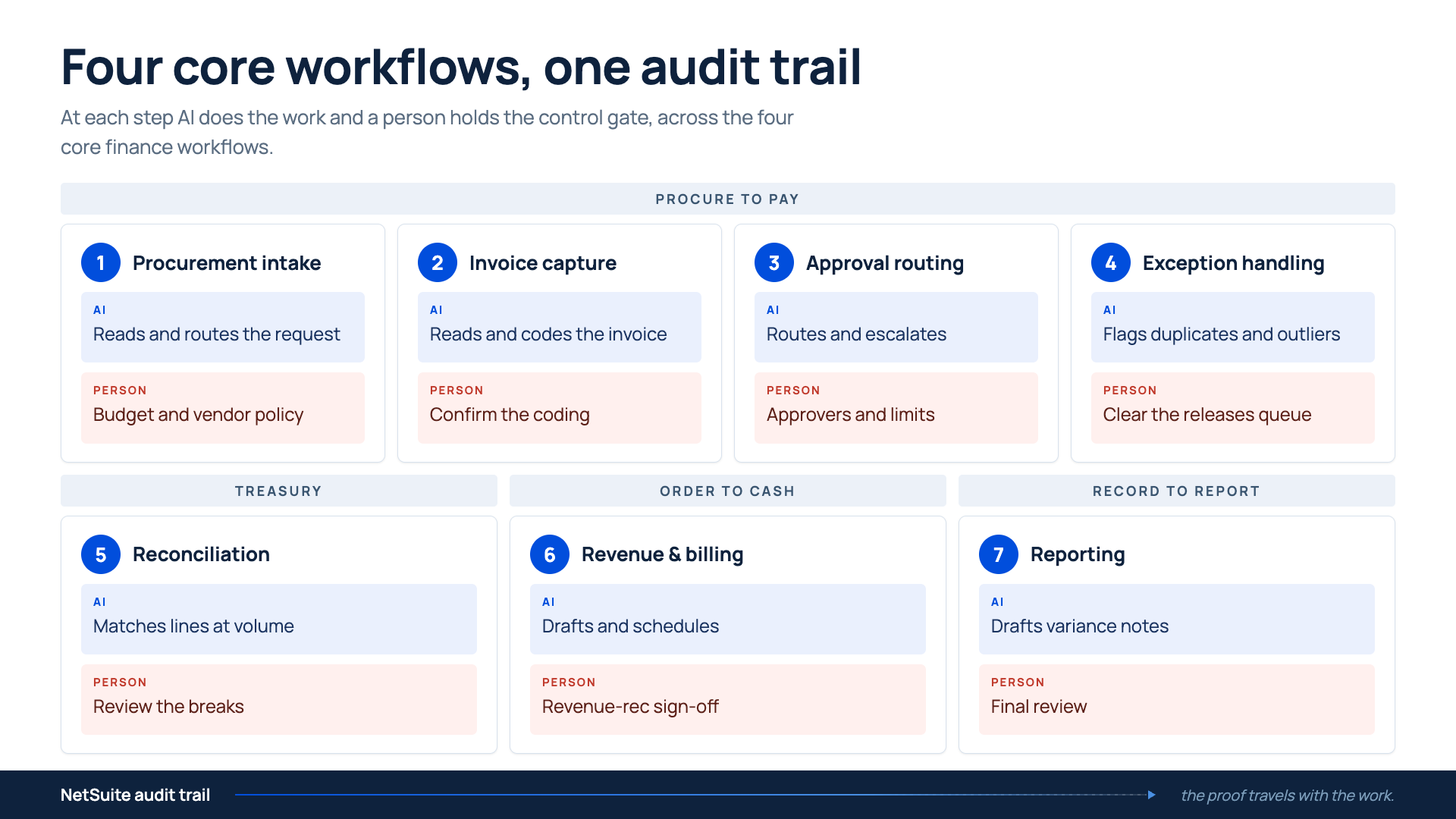
These are the seven places where we’ve seen the most benefit from early AI adoption in finance. What spans them all is high-volume, rule-bound work a person can check fast.
1. Procurement intake
Procurement intake provides an early point for AI, and it runs two checks on every request: is it in budget, and is the vendor approved? It starts when someone requests a purchase from a supplier you’ve never used. AI reads the request and routes it for approval. A familiar supplier routes straight to its approved record; a new one gets flagged for vetting before the spend goes further.
While AI helps create controls in procurement, the budget and vendor policy stay manual, because catching an off-contract purchase here is far cheaper than discovering it three steps later at payment.
2. Invoice capture and coding
Invoice coding is the highest-volume, most repetitive work on the accounts payable (AP) desk, which makes it a natural early target. The new vendor’s first invoice arrives in a layout your system has never seen. AI reads the document, pulls the vendor, amount, tax and line items, then proposes the GL coding and matches it to the purchase order to streamline invoice processing. A clerk reviews a filled-in record and the original invoice side-by-side.
Keep the confirmation step manual: a person approves the coding, and the system stores who approved it. That unfamiliar layout, or a line that won’t match the purchase order, drops to a person and is flagged as low-confidence. That doesn’t happen when capture runs outside the ledger. A coded invoice can move forward with no source document attached, and the proof an auditor needs gets lost in the process.
3. Approval routing
The rule for who approves invoices rarely changes, so routing is a low-risk use case for AI. When a coded invoice needs a sign-off, AI can route it to the right approver based on amount, department and policy. It sends the reminder and escalates appropriately based on set thresholds. If the approver is on leave, the request routes to their backup.
Done well, the approval history travels on the transaction. Done outside the enterprise resource planning (ERP) system, you get a fast “yes” in a chat thread and a record that can’t show who signed off – or why.
4. Exception and duplicate handling
Payment errors fall into a few predictable types, and that’s the kind of clean pattern AI is built to catch. Most are duplicates, wrong bank details or amounts that drift from the contract. AI compares each item against historical data and contract terms, then flags any that deviate from the pattern before the payment is released. A month later, that vendor’s invoice comes back with a new number, and AI catches the near-duplicate that an exact-match check would overlook.
5. Reconciliation matching
Reconciliation is matching at volume – from bank lines to sub-ledger to general ledger – and AI is strong with matching work. When vendor payments clear and appear on the bank statement, AI matches the high-confidence lines and groups the rest into a review queue, with a reason for each discrepancy. It can even clear foreign-exchange rounding and partial payments that once required manual matching.
The controller spends the close on the 20 mismatches that need judgment, while the 2,000 clean matches happen on their own. It’s best to keep this function inside NetSuite. If not, every deviation becomes a hunt across your systems to rebuild what happened.
6. Revenue and billing
Everything so far has followed money going out. Revenue is the same discipline on the way in: what gets recognized, and when, based on the customer contract. This makes the mechanical part a clean early candidate for AI in finance. AI reads the contract, proposes the schedule and flags where billed amounts and recognized revenue drift apart. The recognized number traces to the renewal, usage tier or mid-term change behind it.
7. Reporting and variance narratives
Month-end reporting eats hours and often means pulling the same figures and writing the same commentary every period. AI for reporting workflows assembles the numbers and drafts a first-pass variance note that includes what moved, by how much and against what. The review stays human so someone still confirms that the figures tie to the ledger and that the explanation holds.
A drafted reason can sound right and still be wrong. AI might say vendor spend increased because usage went up, but finance needs to confirm the invoice, approval, payment and account detail support that explanation. When you keep the work inside the ERP, the narrative can trace back to the records behind it.
Where AI breaks outside ERP context
Every use case above shares the assumption that AI for accounting can see the record, the permission and the history behind each transaction. Take that context away and the same model that looked sharp in a demo is no longer explainable and trustworthy.
A single agent can handle a discrete finance task well. The trouble starts when its output lands outside the records, approvals and audit trail that finance answers for. Four breaks show up again and again.
- Two copies of the truth: A bolt-on tool keeps its own copy of your data and syncs it back on a schedule. Between syncs, the tool and the ledger disagree, and someone has to reconcile the two.
- A trail that stops at the boundary: The AI made a decision in its own system. NetSuite shows the result with no record of the input, the model version that produced it or the person who approved it. At the audit, the result is there but there’s no record of how it got there.
- Permissions re-created or skipped: NetSuite already defines who can see, approve, edit and release finance work. A separate AI tool has to recreate those rules. If they don’t match, approvals, data access or segregation of duties can break before anyone notices.
- An investigation across five tabs. When a flagged item links to nothing, resolving it means opening the bank portal, the sub-ledger, the email thread and the contract to rebuild context the system should have kept.
Why auditable AI is crucial in enterprise finance
Run a new vendor’s invoice through a standalone tool. It reads it, codes it and pushes the result into NetSuite overnight. The next morning, the amount is right, but the PO match happened in the tool, the confidence score lived in the tool and the approver clicked “approve” in the tool. NetSuite only shows the posted bill. When an auditor or your CFO asks why the invoice was coded to that GL account and who checked it, the answer sits in the tool they can’t see, or in a screenshot nobody kept. The work was fast. Defending it takes a week.
The same pattern showed up in our survey. The finance professionals we surveyed provided some insight when we asked them to name the top overhyped AI finance tools. At the top of the list were general AI help bots (32%), report generation (29%) and cash reconciliation (29%). These types of tools often look capable in a demo but stumble on the exception-heavy work that finance actually runs. The cause is often a lack of context.
AI in generic mode, with no view of your chart of accounts, approval thresholds or exception rules, produces outputs that are often plausible, but sometimes wrong. When AI falls short, the cost lands on the finance team: 43% of those we surveyed said the main result was extra work to correct or reconcile what the tool got wrong.
AI in accounting is worth adopting when you can trace what it did. Speed you can’t audit becomes a liability the first time someone asks how a number was produced. That’s why the strongest path runs AI inside NetSuite, against the live records, permissions and workflows finance already uses. Each action stays closer to the source, approval and audit context a reviewer checks first. That’s the difference between AI that helps speed up the close and AI that leaves your team cleaning up after it.
How to evaluate AI in accounting for auditability
A polished demo only shows the result. Your evaluation needs to show the trail. Ask these five questions before you compare features, pricing or implementation timelines.
- Where does the data live? Is it inside your ERP, or in a copy the tool syncs back? Keeping AI in your ERP keeps one version of the truth – and 87% of our survey respondents had high confidence in it. AI outside your ERP adds a reconciliation you didn’t have before.
- Can you trace every action? For each AI decision, you want a path back to the record, the input it read and the person who confirmed it. If the trail stops inside the vendor’s system, so does your audit defense.
- Does it honor your permissions? The roles, approval limits and segregation of duties you already maintain in NetSuite can govern the AI, too.
- Where is the human control point? Every decision that carries compliance, audit or legal weight needs a person who confirms it and a record that they did.
- Does evidence travel? Capture, approval, payment, reconciliation and reporting are one chain. Evidence that moves with the transaction beats evidence trapped in six separate tools.
The answer to all five is the same: run the AI where the records, permissions and audit trail already live. That’s what built for NetSuite means in practice. It’s why Zone builds AI directly into the NetSuite workflow.
If you’re evaluating a finance AI tool, ask for a demo that runs one live transaction through it from start to finish. Pick an invoice your team questioned last month, push it through capture, coding and approval, then ask to see the full history – the way an auditor would. A controlled tool shows the input it read, the rule it applied and the person who confirmed each step, all on the record.
Score a tool against the five criteria above before you have the pricing conversation. A tool that passes gives you speed – but not at the expense of the information you’ll need at audit.
Put AI to work where the controls already are
Adopt AI in accounting one workflow at a time. The numbers back it up: our study showed that teams running AI in a single, defined workflow are nearly twice as likely to report positive ROI as those experimenting with pilots. Your best use case depends on where the work hurts most today.
- If invoices pile up and coding eats your team’s mornings, capture and approvals provide a solid entry point. ZoneCapture reads and codes the document, ZoneApprovals routes it with the history attached.
- If the close is where your team loses time, ZoneReconcile clears the high-confidence matches and ZoneReporting drafts the variance note off figures that tie to the ledger.
- If spend control is the gap, ZoneProcure catches the off-contract purchase at intake, before it becomes an invoice.
- ZoneAI runs across all of it, against the live NetSuite records, permissions and audit trail.
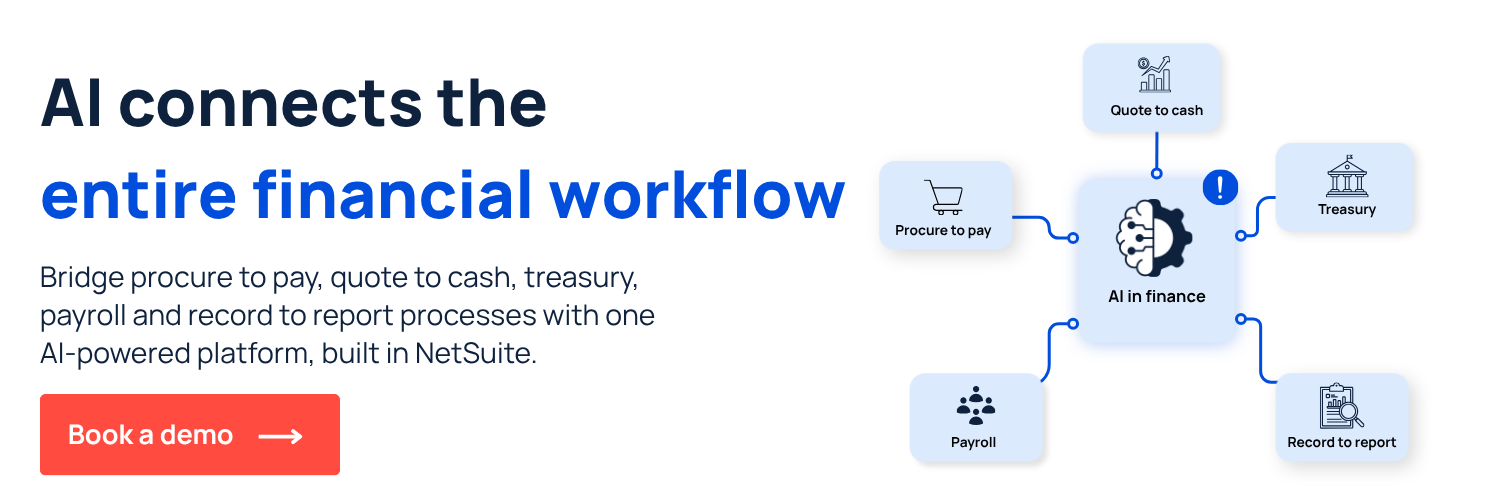
When you use AI to connect your financial workflows in NetSuite, evidence travels across the chain. A purchase request becomes a coded invoice, an approval, a payment, a reconciled line and a reported number, with each step carrying the proof you need. That’s how a finance team scales without adding headcount.
Book a demo today to see how AI-assisted work stays traceable from request to reported number inside NetSuite.