
It’s the last day of the month, and a controller is rebuilding the procurement trail by hand. The purchase order sits in one tool, the receipt in an email and the invoice in a PDF – all of it outside the general ledger (GL). So she matches what was ordered to what arrived to what got paid, line by line, because each piece of the trail lives in its own system.
For most mid-market finance teams, procure-to-pay runs as a dozen handoffs like that, across email, spreadsheets and an enterprise resource planning (ERP) system. The gap between committing to spend and finance seeing it creates several issues like unauthorized spend, late payments, missed early-payment discounts and a month-end close lost to reconciling procurement records to the GL.
That sequence, from the first order to the reconciled payment, is the procure-to-pay (P2P) process. A procurement platform brings those steps onto shared records, either in one tool or several connected ones. This guide covers what good P2P looks like, how to choose a procurement platform, where automation helps most and what running it in and with NetSuite changes.
Key highlights:
- Procure-to-pay runs as nine steps, from requisition through reconciliation, and a break at any one of them slows down reporting and close.
- The process tends to bottleneck near the beginning with a requisition raised informally or an approval that lives in an email chain with no record of who signed off or when.
- When procurement runs with NetSuite, the purchase record and the GL are the same record, so there’s no separate procurement data to reconcile back at month-end.
- ZoneProcure anchors Zone’s NetSuite-native procurement platform, controlling spend at the front while the connected workflows carry capture, matching and payment.
What is procure-to-pay (P2P)?
Procure-to-pay is the end-to-end business process that runs from identifying a purchasing need through to paying the vendor for it. A complete procure-to-pay process includes requisition, approval, purchase order (PO) issuance, order acknowledgment, receipt of goods or services, invoice capture, three-way match and payment, with reconciliation closing the loop back to the GL.
Picture a SaaS company with 50 active vendors, around 200 invoices a month and a three-person accounts payable (AP) team. When each of those steps lives in its own tool, that team spends its month chasing approvals, keying invoice data and matching documents by hand. When the steps connect, the same team reviews the exceptions and lets the clean transactions flow.
P2P vs. source-to-pay
Procure-to-pay and source-to-pay describe different spans of the same supply relationship. P2P is the operational half: requisition through payment. Source-to-pay (S2P) adds the strategic work upstream, the sourcing, vendor selection and contract negotiation that happen before a requisition ever exists.
For most mid-market companies, P2P is the place to start. Getting requisition, approval, matching and payment running cleanly returns control and time now, and it produces the clean spend data that sourcing decisions later depend on.
The full procure-to-pay process, step by step
Here’s how the cycle runs from end to end, and where each step tends to break when it runs across disconnected tools. The nine steps below move from the first request to the reconciled ledger.
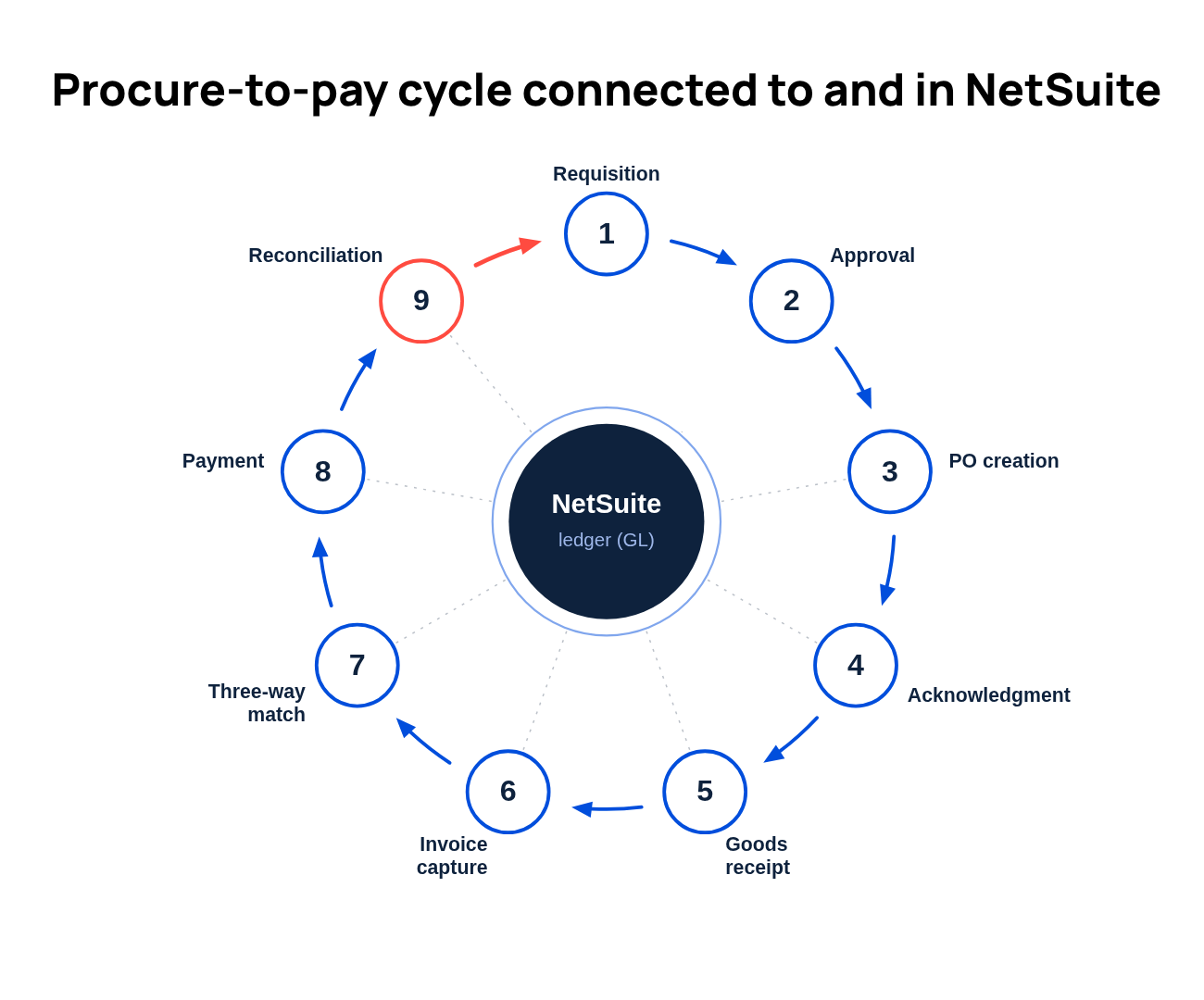
1. Purchase requisition
A purchase requisition is the internal request to buy, raised before any commitment to a vendor. It’s the point where finance can check the spend against the planned budget before it happens. If it’s skipped or done informally over email, then the first time finance sees the purchase is when the invoice arrives and the money is already committed.
2. Requisition approval
Approval routes the request to the right people based on amount, department and vendor, then records the decision. Done well, the approver, the timestamp and the basis for the sign-off all stay on the record. Done over email, you get a fast yes in a reply thread and no audit trail, no escalation when an approver is on leave and no view of what’s sitting in the queue.
3. Purchase order creation
The purchase order is the formal commitment to the vendor, generated from the approved requisition. When it auto-generates from the approved request, the PO carries the same line detail and coding the requisition already captured. When someone rekeys it by hand, you introduce data-entry errors and delay, and the PO can drift from what was actually approved.
4. Order acknowledgment and vendor communication
Acknowledgment is the vendor confirming receipt of the PO and the terms. It’s the step teams skip most, and the one that quietly prevents disputes. When you confirm the delivery date and quantity now, a discrepancy gets resolved before the invoice arrives. Skip it, and mismatches show up late, when they’re harder to chase.
5. Goods or services receipt
Receipt records that what was ordered actually arrived, in the ERP, against the PO. It’s the document the three-way match depends on. A missing receipt stops the match from running automatically. AP either holds the invoice or pays it on trust, and the control the match provides goes missing.
6. Invoice receipt and capture
Invoice capture turns the vendor’s bill into a coded transaction that’s ready to match. Capture eats more AP hours than any other step, making automation a priority here.
- Before: Your AP team opens each invoice, reads it and keys the vendor, amount, dates and line detail into NetSuite by hand, then files the original somewhere a reviewer has to go find later.
- After: Optical character recognition (OCR) and AI read the invoice, the fields pre-populate in NetSuite with the source document attached and only the exceptions route to a person.
7. Three-way match and invoice validation
The match confirms that the PO, the receipt and the invoice agree before payment. A two-way match checks the invoice against the PO; a three-way match adds the receipt, so you’re paying for what you ordered and what arrived.
When matching runs against live NetSuite records, the system clears the exact matches, applies your tolerances to the near matches and routes the discrepancies to a reviewer with the variance in view. When it runs outside the ERP, every exception becomes a hunt across systems to rebuild what happened.
8. Payment processing
Once the invoice is approved and matched, payment scheduling takes over. The best P2P teams optimize the method (ACH, wire or check), the timing and any catch any early-payment discounts. Scheduling payment on the matched record keeps it tied to the approval and the PO behind it. When payment runs on its own, off the matched record, a stale or unmatched invoice can slip through. The discount window often closes before anyone notices it was open.
9. Reconciliation
Reconciliation confirms the payment against the bank and ties the whole chain back to the GL. When procurement, matching and payment all wrote to NetSuite, there’s nothing to manually reconcile back, because the records are already the ledger. When they live in separate tools, the close team inherits a pile of entries someone has to match by hand and explain.
Common P2P process challenges
The same few gaps cause most of those break points, and each one ends as a problem finance owns with close and reporting.
- Informal requisitions and maverick spend: When buying happens without a requisition, finance finds out at the invoice. Off-process purchases skip the budget check and the approved-vendor list, and they’re a common source of budget overruns in mid-market companies.
- Email approvals with no trail: An approval in a reply thread can’t show who signed off, under what authority or when. At audit, the payment is there but the basis for it is gone.
- Purchase orders created after the fact: When the PO is cut after the invoice arrives, it’s often reverse-engineered to fit what was already bought, which defeats the control the PO exists to provide.
- Invoice data-entry errors: A hand-keyed amount or vendor ID that doesn’t match the PO sends the invoice to an exception queue, creating a matching failure that could have been avoided and now becomes manual cleanup.
- Siloed tools and the reconciliation gap: When procurement data doesn’t feed cleanly to the ERP, it won’t match the GL until someone reconciles the two by hand. That monthly reconciliation is the bottleneck a disconnected process leaves behind.
How procure-to-pay automation solves bottlenecks
Most of these failures start before an invoice exists, which is why P2P automation pays off most when it covers the complete process, from the initial request through to payment.
- Procurement intake: AI reads the request and captures the vendor, budget and GL coding, then routes it, sending a known vendor to its approved record and flagging a new one for vetting. This allows finance to see the commitment when it's made, catching off-process purchases when they originate.
- Vendor onboarding: A self-service portal hands tax and banking documentation to the vendor, and AI runs duplicate and compliance checks as the record is created. Your NetSuite Vendor Master stays clean from the start, detecting duplicates and missing documentation before they reach payment.
- Budget-aware approval: Before a request becomes a purchase order, routing clears it by amount, department and budget, with live Actual vs. Budget on the approval screen. The approver signs off against what's left to spend.
- Requisition-to-PO conversion: Generating the PO from the approved requisition removes a rekeying step and keeps the commitment aligned to what was approved.
- Invoice capture (OCR and AI): Reading and coding invoices by hand is one of the biggest time sinks in accounts payable, so capture returns the most hours soonest. AI extracts the fields and attaches the source document, freeing your team to focus on the exceptions that need judgment.
- Three-way match: When the PO, receipt and invoice agree, automated matching approves the invoice on its own and sends only the mismatches to a person. It cuts the repetitive line-by-line checking, and because every match is logged, control is tighter than a manual spot-check.
- Approval routing: Rule-based routing sends each request to the right approver, delegates it when they’re out and records every decision on the transaction. Because the routing rules are stable, this is safe to automate, and it builds a clean audit trail in the process.
- Payment scheduling: Scheduling against matched invoices captures discounts on time and keeps payment tied to the approval behind it.
Front-of-process control helps you catch unauthorized spend at the request, before it reaches an invoice. Finance teams report gains further along the process too. The 565 professionals we surveyed for Zone’s AI Impact vs. Hype in Finance 2026 report cited approvals and workflows (37%) and AP invoice processing (29%) among the top places AI delivered the most tangible benefits. Both are high-volume and rule-bound, the kind of work a person can still check fast.
Choosing a procurement platform for NetSuite
Where the automation connects to NetSuite changes how much of the benefit survives to the close. For a NetSuite team, the meaningful distinction isn't just whether a procurement tool integrates with NetSuite – most do, at some level. It's how tightly it connects to NetSuite. A loosely connected tool syncs data on a schedule and keeps procurement in a separate system you reconcile against NetSuite at close. A tightly connected platform writes directly to NetSuite records, so procurement data and GL data stay in sync as transactions happen, not after.
Standalone procure-to-pay software has clear strengths. If you run several ERPs, or procurement sits with a team that needs deep travel-and-expense features, a broad standalone suite can be the better fit. But when P2P is your primary use case and NetSuite is your system of record, a procurement platform built to connect tightly to NetSuite wins. The data, the controls and the audit trail stay in one place, the close works from one system and an audit pulls from a single trail.
How to implement P2P automation
Once you’ve chosen the approach, a sequenced NetSuite procurement rollout keeps the change manageable. Work through these five steps in order, and automate the highest-pain step first before taking on the rest.
- Document the current process and find the top three failure points. Map how a purchase moves today and mark where it stalls, whether with the informal requisition, the email approval or the matching exception.
- Define approval tiers and GL coding standards. Decide who approves what at which thresholds and how spending codes to the GL. Automation will follow these rules exactly, so pin them down before you turn it on.
- Evaluate native vs. integrated procurement platforms for your NetSuite setup. Score each option against the considerations above, weighting reconciliation burden and audit trail if NetSuite is your system of record.
- Start with requisition and approval before invoice automation. Controlling spend at the front, where it’s cheapest to catch an off-process purchase, returns control faster than starting at the invoice. Capture and matching follow once the requisition and approval gates are in place.
- Measure baseline metrics first. Record processing time, cost per invoice and on-time payment rate before you change anything, so the improvement is a number you can put in front of your CFO.
P2P automation metrics to track
Baseline a few measures before you start, so you can show what changed and where to tune next. Track these NetSuite procurement metrics across the whole cycle, from requisition to payment.
- Invoice processing time: The hours from invoice receipt to posted, the clearest read on capture and matching gains.
- Cost per invoice: Fully loaded processing cost, the number that translates time saved into budget.
- PO cycle time: Requisition to issued PO, a measure of how fast the front of the process moves.
- Percentage of spend under management: The share of spend running through the approved process is the clearest read on spend visibility and the inverse of maverick buying.
- Early-payment discount capture rate: Discounts taken against discounts available, which can reduce money left on the table when payment timing slips.
- Invoice exception rate: The share of invoices that fall out for review is a signal of upstream data quality.
- Days payable outstanding (DPO): How long you take to pay is a working-capital lever once payment timing is in your control.
- Percentage of purchases on PO vs. off-PO: The cleanest single read on whether the process is actually being followed.
If you watch only one number, watch that last one. When the share of on-PO purchases climbs, more spend is passing through the requisition and approval steps, maverick buying is shrinking and the other metrics tend to improve with it.
How ZoneProcure automates the full P2P cycle with NetSuite
Hitting those numbers is easier when NetSuite procurement runs in one place. Zone’s procurement platform orchestrates procure-to-pay end to end – procure, capture, approve, pay, reconcile, report – with ZoneProcure at the front controlling spend before it happens. AI handles the pattern-matching; your team keeps the judgment calls.
The way it fits depends on where your process hurts most today:
- If spend gets committed before finance sees it, ZoneProcure runs intake, vendor onboarding and budget-aware approval up front, so a purchase clears those checks before it’s committed and off-process buying loses its opening.
- If invoices and matching eat your team’s month, ZoneCapture reads and codes each invoice into NetSuite so the three-way match runs against live records, while ZoneApprovals automates the approval routing with a full audit trail.
- If the close is where the gaps show up, running the cycle in NetSuite means procurement, matching and payment already wrote to the ledger, so reconciliation has less to rebuild.
Think back to the controller at month-end, rebuilding the procurement trail by hand from records scattered outside the ledger. With Zone, she runs that same cycle connected to and in NetSuite. The trail builds itself, from requisition to reconciled line. And the audit trail stays attached to every step.
Book a demo to see how ZoneProcure controls spend before it happens – and keeps every step traceable to the ledger inside NetSuite.


.avif)