
It’s Monday morning, and before you can answer a single question about cash, you have to log into five bank portals across Australia, the U.K. and North America. You export each balance into the same spreadsheet you’ve kept for two years, and half the numbers move before you’ve finished. The consolidated cash position everyone treats as fact was true at 8 a.m., but stale two hours later.
Global treasury management is the work of managing cash, liquidity and financial risk across every entity and currency you operate in. NetSuite OneWorld handles the entity structure, eliminations and currency revaluation. What it doesn’t do is give teams a consolidated real-time view of cash across those entities, which is why the spreadsheet still exists. Here’s where NetSuite falls short on multi-entity cash visibility, and how teams build it without a standalone treasury management system (TMS).
Key highlights:
- Consolidated real-time cash position across entities is the piece most growing companies still assemble by hand.
- The hardest part of managing treasury during global expansion is the bank connectivity layer, because every new country adds new banks, feed formats and reconciliation work.
- A clear consolidated cash position depends on clean reconciled bank data underneath it. Until each entity’s bank activity is matched inside NetSuite, the aggregated number is only as good as the last manual refresh.
- Zone & Co solves global treasury management with ZoneReconcile, which automates multi-entity bank reconciliation inside NetSuite, and ZoneLiquidity, which builds consolidated cash positioning and AI-assisted forecasting on that reconciled foundation.
What is global treasury management?
Global treasury management is how finance manages cash, liquidity and financial risk across multiple countries and entities. It’s everything single-entity treasury does, plus intercompany cash management, multi-currency cash positioning, cross-border payment controls and bank relationships across jurisdictions.
All of it depends on knowing where cash actually is, across every entity, at any given moment.
Treasury challenges when expanding globally on NetSuite
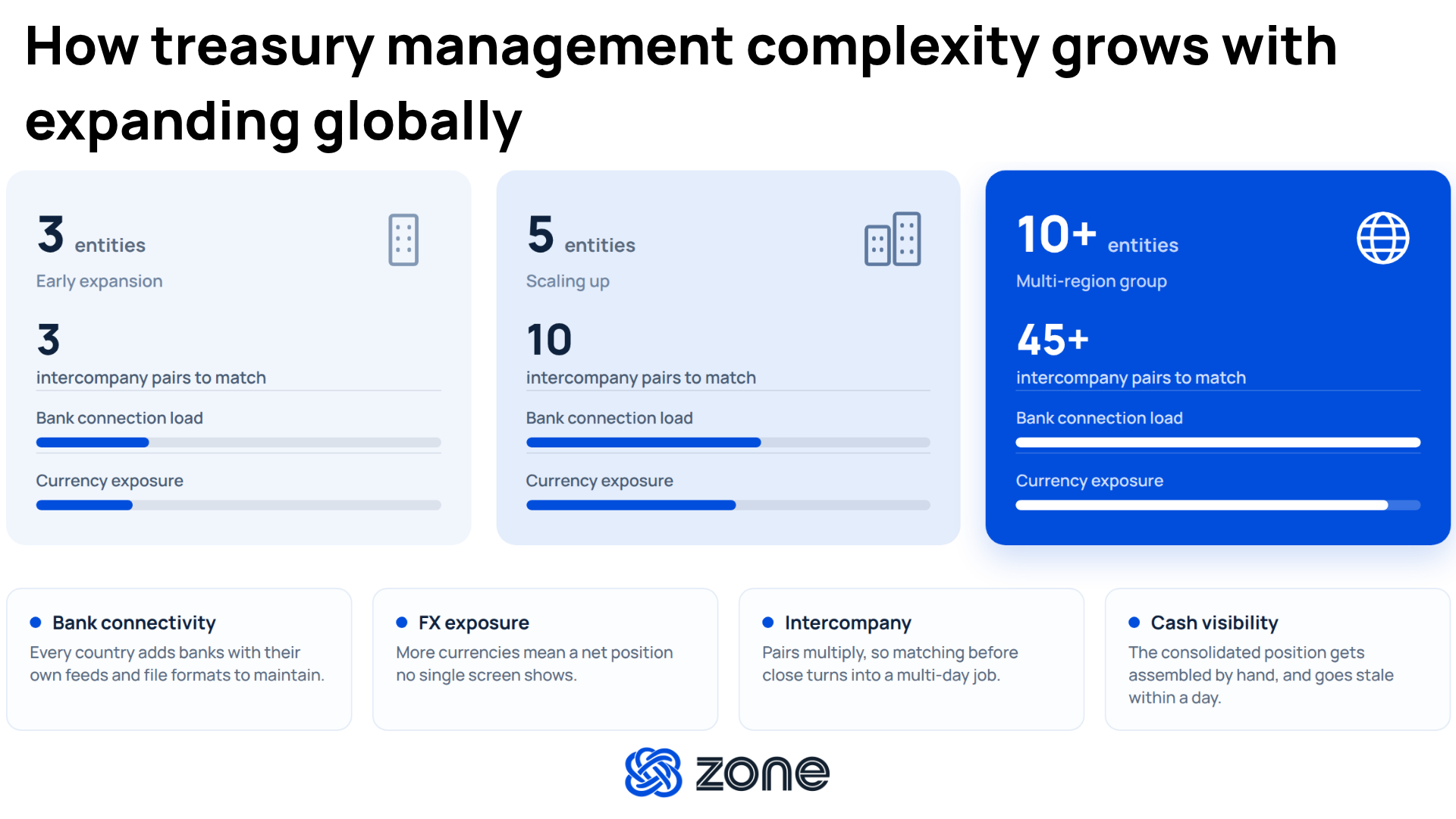
Global expansion creates treasury complexity that grows faster than the finance team does. Each new market adds banks, currencies and intercompany relationships, and the CFO still needs to tell the board how much cash the group holds and where. International cash management gets harder with each new market.
These four challenges are the ones NetSuite teams hit most often as they expand globally:
Bank connectivity fragmentation
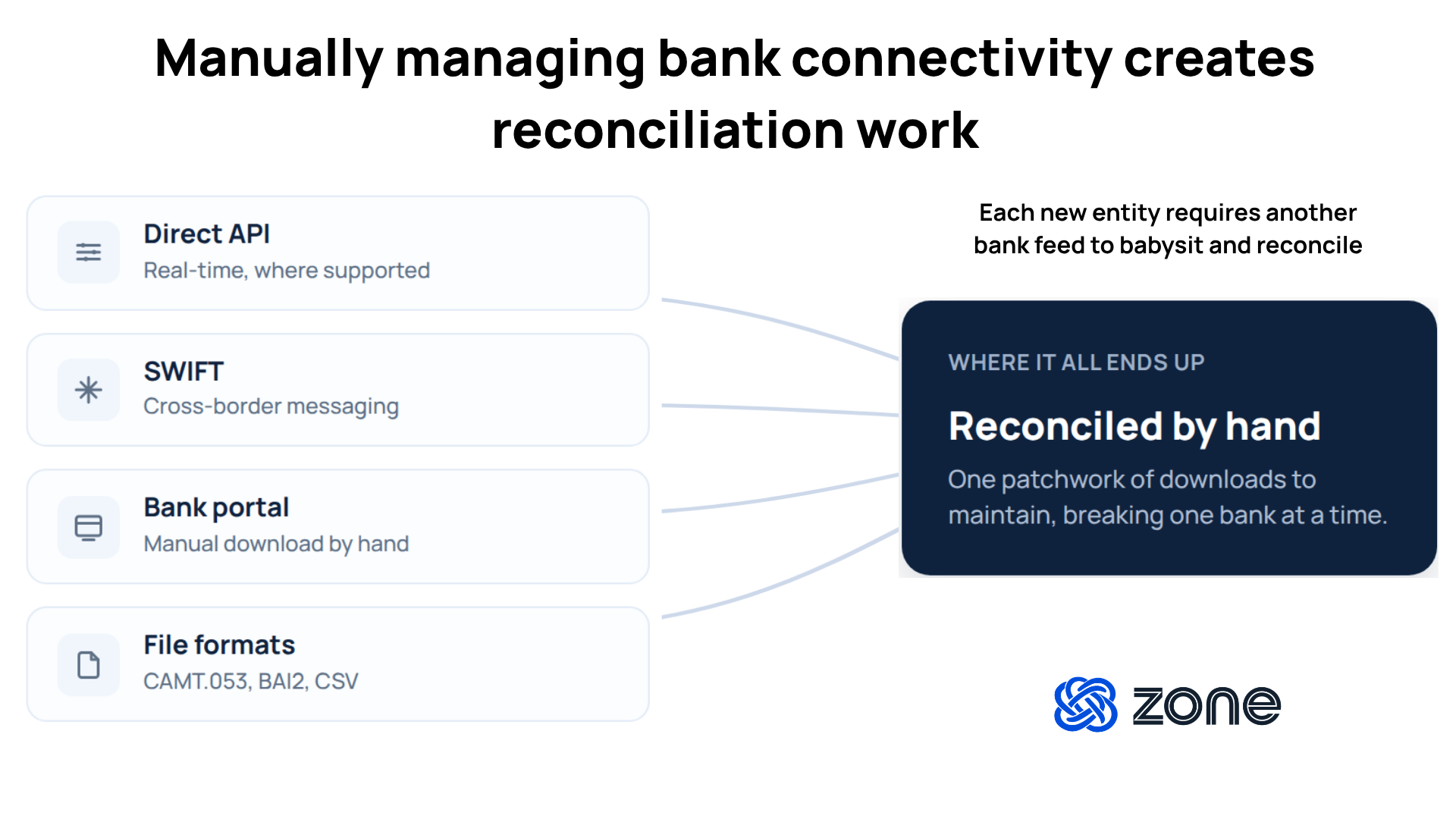
Each new country brings banks that connect differently. Some offer a clean API, some route through SWIFT and some only export from a portal. Additionally, file formats can differ. One market sends CAMT.053 statements, another posts BAI2 files overnight and a third hands you CSV. NetSuite’s out-of-the-box bank connectivity only reaches so far, so your team ends up maintaining a patchwork of download-and-upload processes, one per institution.
When a bank changes its file layout or an export fails overnight, the reconciliation for that entity stalls. Every hand-maintained connection is one more place the morning cash number can go wrong without anyone noticing.
Multi-currency revaluation and FX exposure
NetSuite revalues currency natively, so the accounting side of multi-currency is handled. The harder question is which subsidiary is holding which currency and what your net position looks like across the group. Picture a group holding Australian dollars, sterling, euros and U.S. dollars across four entities.
Your net exposure is a single number, but no screen shows it. Someone has to pull the balances together before the group foreign exchange (FX) risk is even visible, and because that number is assembled by hand, it’s usually days old by the time anyone reads it.
Intercompany reconciliation at scale
Intercompany activity grows faster than the entity count. Every pair of entities that trades with each other, through management fees, shared service charges or cost allocations, creates matching entries that both sides have to agree on before anything consolidates cleanly. When a staff accountant misses one, like a fee the parent books in December and the subsidiary books in January, it becomes a mismatch to chase at close.
Across dozens of pairs, running those mismatches down can add days before reporting even starts. OneWorld automates the eliminations at consolidation, but the matching that feeds them stays manual and doesn’t scale with growing transactions.
Consolidated cash visibility across entities
Ask a multi-entity NetSuite team where their cash is, and most can tell you per entity but not in aggregate. Each subsidiary’s cash is visible inside its own context, but creating the group total is a manual job someone has to sit down and do. When a subsidiary needs an intercompany transfer to cover payroll, the size of that transfer gets decided against a position that was assembled yesterday.
A day-old number can make the difference between funding the right amount and moving cash you didn’t need to move. But pulling every entity’s cash into a single, current view by hand gets slower with every entity you add. That’s where reliable cash positioning dashboards in NetSuite can help.
Multi-entity treasury management in NetSuite
At the enterprise level, treasury work usually runs through a treasury management solution that sits above the enterprise resource planning (ERP) and specializes in cash, payments and risk. Mid-market companies on NetSuite most likely don’t need a separate TMS. A well-configured OneWorld instance plus a native treasury SuiteApp reaches the outcomes corporate treasury management is really after, without a second system to maintain.
What OneWorld does out of the box
OneWorld covers the accounting side of multi-entity treasury well. Natively, it gives you:
- A multi-entity chart of accounts with intercompany journal entries
- Currency revaluation and multi-currency bank accounts
- Subsidiary consolidation for reporting, with intercompany eliminations in the group statements
Each subsidiary carries its own base currency and local reporting, and consolidation rolls them up into group statements, removing the intercompany activity as it goes. For a company that moved off separate ledgers and spreadsheets, this is what turns a two-week consolidation into a two-day one.
Where OneWorld stops is the live treasury layer that sits on top of the ledger. This is what you won’t get with out-of-the-box NetSuite OneWorld:
- Direct bank feed connectivity to most international banks, which OneWorld leaves to manual file imports
- A consolidated real-time cash position across subsidiaries
- Configurable matching logic for intercompany transactions at close
- AI-assisted cash forecasting across the consolidated entity structure
- Bank feed management that holds up as business expands into new countries with new entities
The ERP records what happened to your cash accurately, but it doesn’t give treasury teams a live, consolidated read of where cash is right now and where it’s heading.
When you need a TMS
For most mid-market NetSuite teams, a separate platform is overkill. With a native treasury SuiteApp, you can get bank connectivity, real-time consolidated cash, intercompany matching and forward-looking forecasting inside NetSuite without the cost, implementation time or sync layer of a standalone system.
The cases where a dedicated TMS actually earns its keep are narrow:
- Formal hedge accounting programs with documentation and effectiveness testing requirements
- Multilateral netting across many entities
- In-house bank structures where intercompany lending is a core treasury function
- Regulated treasury operations with reporting a general-purpose ERP can't meet
If you don’t need those capabilities, a SuiteApp inside NetSuite will support your global treasury management goals as your organization expands.
How to build global cash visibility inside NetSuite
When building global cash visibility on NetSuite, each step depends on the one before it. The forward view is only as trustworthy as the reconciled data underneath it, and that reconciled data is only as good as the bank feed setup underneath that. Skipping ahead usually means rebuilding later.
Step 1: Get every bank feed into NetSuite on a defined schedule
Replace per-country manual imports with direct connections wherever a bank supports them. That means:
- Mapping account structures so activity lands in the right subsidiary automatically
- Handling whatever format each bank uses (API, SWIFT MT940, CAMT.053, BAI2, CSV) without a person in the middle
- Setting a refresh cadence that matches how often treasury actually needs to act on the numbers
- Onboard new subsidiaries by configuring bank connections inside your existing setup, instead of running a new integration project for every marke
Step 2: Automate transaction matching, including PSP breakdowns
Once bank feeds are configured and solid, the matching has to run at volume. Automating transaction matching will make one of the biggest impacts on the time it takes to get real-time cash visibility.
- Build rules that handle common cases (settled amounts net of fees, FX variations, timing differences) instead of eyeballing them
- Break payment service provider (PSP) settlements into their gross sales, fees and currency adjustments before matching to the ledger
- Auto-generate journal entries from the matched activity so the ledger and the bank stay aligned
Step 3: Reconcile intercompany activity as it happens, not at close
Intercompany matching grows faster than the entity count and it’s where most close delays hide. To stop it from bottlenecking consolidation:
- Match paired entries between subsidiaries as they post, not weeks later
- Flag mismatches while the source transactions are still fresh enough to correct
- Let OneWorld’s consolidation eliminations run against clean, matched data
Step 4: Build a consolidated cash and FX view across entities
With reconciled data in place, the aggregated position becomes a report you pull, not a spreadsheet you assemble:
- Roll every entity’s reconciled bank balance into a single group view that refreshes automatically
- Show net position by currency across all entities so FX exposure is visible without pulling balances by hand
- Identify netting opportunities across subsidiaries before deciding what to actually hedge
Step 5: Layer AR and AP for a forward-looking cash position
The forward view is what OneWorld can't do on its own, and it depends on everything above:
- Combine reconciled bank data with open accounts receivable (AR), accounts payable (AP) and scheduled activity
- Project consolidated cash forward across the entity structure over a defined horizon, whether it’s 30, 60, 90 days or a 13-week model
- Model scenarios against that position, such as a delayed customer payment or an unexpected supplier outflow, before the cash movement is needed
Step 6: Set sweep rules with your banks against a trustworthy position
Sweep rules are typically configured with your banks, not in your ERP. What makes them work is the position underneath them. So a rule that says “top up U.K. operating below £500K” is only as good as the group cash view telling you £500K is the right floor.
With reconciled, consolidated data in NetSuite, cash movement can be rules-driven instead of decision-by-decision:
- Set thresholds with your banks for top-ups (pull funds in when a balance drops below a floor) and drawdowns (move excess out above a ceiling)
- Choose a concentration structure, like one-way sweeps up to a master account or two-way flows between parent and subsidiaries
- Post every sweep movement back into NetSuite immediately so booked and available balances don’t drift, and the next threshold decision runs against current data
Stop assembling global cash. Manage it automatically in NetSuite
With intelligent multi-entity bank reconciliation, your base for managing and seeing cash in Netsuite grows stronger. Instead of five bank portals and manual spreadsheet work, your time can be better spent on strategy, analysis and forecasting.
Zone & Co’s treasury management solutions with ZoneReconcile and ZoneLiquidity give global teams an AI-powered treasury layer built on their own reconciled data, without a separate system to maintain.
ZoneReconcile, your reconciliation foundation inside Netsuite, lets your team:
- Stop maintaining a bank feed per country: ZoneReconcile connects directly to more than 12,000 banks, cards and payment providers across every major format, so adding new subsidiaries is a few clicks away.
- Match faster than transactions land: Custom rules handle PSP settlements, FX variations and timing differences automatically, including breaking payouts into gross sales, fees and currency adjustments before they hit the ledger.
- Reconciled activity, in the ledger the same day: Journal entries generate from matched activity on one screen inside NetSuite, so bank and book stay aligned without a second data movement.
ZoneLiquidity, the forecasting intelligence layer, gives you:
- One current view, every entity, every currency: ZoneLiquidity rolls every entity’s reconciled bank activity into a single consolidated view inside NetSuite that refreshes on demand, with drill-down to the source transactions behind any figure.
- A forecast that reflects your actual cash history: The forecast engine uses a foundation-model approach to time-series forecasting, grounded in your own reconciled cash history, so the forward view stays anchored to the ledger.
- The “what ifs” without rebuilding the model: Zoe by Zone’s Scenario Planning Agent simulates shifts in collections, procurement or payment timing against the live consolidated position, so the impact on group cash lands in minutes, not days.
Meet with us to see ZoneReconcile in a demo environment and join the ZoneLiquidity waitlist.
Zone & Co strategically uses AI to research and draft articles, but the final version is shaped by people. Our team carefully reviews content with multiple human-in-the-loop steps in the process to ensure accuracy, relevance, tone and alignment with readers’ interests.