
It’s the third day of close. Someone on your team is working late asking, "why doesn’t this tie out?” The file on the shared drive is “final_FINAL_v3_ACTUALFINAL.xlsx.” Three approval requests are sitting unread in someone’s inbox. The Controller knows exactly which ones. The CFO has a board pack due Friday.
This is what happens when the close process hasn’t kept pace with the business. A 10-day close that should be five days is a reporting accuracy problem, an audit exposure problem and, eventually, a retention problem. The team that runs your close is also the team that builds your board pack, supports your audit and keeps the business’s financial data trustworthy. When they’re stuck in a manual reconciliation loop every month, something gives.
Key highlights:
- The NetSuite month-end close is the structured process finance teams use to verify, reconcile and lock the books at the end of each accounting period.
- Most close delays trace back to the same three culprits: manual reconciliations, slow approval routing and financial data that lives across too many disconnected systems.
- A close that runs long puts accurate data out of reach when it matters most – during board reporting, audit prep and forecast cycles.
- Zone & Co creates built-for-NetSuite solutions that automate the workflows most likely to extend your close and increase your team’s risk exposure.
What is the month-end close in NetSuite?
The NetSuite month-end close is the structured process of verifying transactions, reconciling accounts, routing journal entry approvals and locking the accounting period so financial reports accurately reflect the state of the business. For most finance teams, it runs between three and 10 business days, depending on organizational complexity and how much of the process is automated.
Controllers typically own the close schedule and carry the accountability when it’s delayed. The friction points are familiar: reconciliations that depend on manually exported data, approval workflows that stall in someone’s inbox and sub-ledgers that fall out of sequence with the general ledger. Left unaddressed, each one adds days to the close and reduces the time available for analysis, review and reporting.
How to speed up your NetSuite month-end close
A five-day close is achievable in NetSuite. The difference between that and a 10-day close usually comes down to five fixable process gaps.
1. Automate manual reconciliations that slow down the close process
Picture the first day of close. Someone has already exported three bank feeds into a spreadsheet, color-coded the tabs and is now matching transactions line by line. An hour in, there’s a $312 discrepancy and the trail goes cold somewhere in a mid-month batch upload. This’s what unautomated reconciliation looks like – and for Controllers managing high transaction volumes, it’s the single biggest source of close delay.
Automating payment reconciliation inside NetSuite means the system matches transactions against bank statements continuously, flags exceptions automatically and gives your team a live view of outstanding items without the manual export cycle. Reconciliations that previously consumed a full day compress to an exception review queue. For most mid-market finance teams, automating payment reconciliation can take two to three business days off the close.
- Build transaction matching rules in NetSuite to auto-clear items that meet defined criteria, so only genuine exceptions reach your team.
- Configure exception queues that surface unmatched items by aging, amount or account so reviewers know exactly where to focus.
- Schedule automated bank feed imports so your reconciliation data stays current throughout the month, not just at period end.
- Use reconciliation dashboards to give Controllers a real-time view of outstanding items across all accounts during the close.
2. Streamline approval workflows to avoid delays in financial updates
A journal entry submitted on day one of close, but it’s still pending after four days The approver was traveling, then in back-to-back meetings. Now that reminder email is buried. By the time it’s approved, the close calendar is off schedule.
Manual approvals create a category of delay that looks invisible on any close tracker because the work appears to be moving. A NetSuite approval workflow automates the routing, fires escalation alerts when deadlines approach and gives Controllers a real-time view of every outstanding approval – without a single follow-up email. The CFO gets a close that runs on a predictable schedule and the Controller stops being the one who chases.
- Define tiered routing rules that direct approvals based on transaction type, amount threshold or department, reducing mis-routes and unnecessary escalations.
- Set automated escalation triggers that reassign approvals not actioned within a defined window, so a single unavailable approver can’t hold up the entire close.
- Enable mobile approvals so senior approvers can act from anywhere – a two-minute approval on a phone doesn’t become a two-day delay.
- Surface all pending approvals in a centralized close dashboard so the Controller can see exactly where the bottleneck is at any point in the cycle.
3. Centralize data to prevent silos that slow down close activities
For finance teams operating across multiple systems, the close starts with a data collection exercise. Data is living across the CRM, HR platforms and third-party tools, so someone has to chase down the CSVs and get them ready for review.
Centralizing financial operations in an enterprise resource planning (ERP) system like NetSuite replaces that assembly job with real-time visibility inside one platform. Consolidation becomes a continuous process rather than a manual rebuild at period end, and the risk of a mismatched intercompany balance reaching the board pack drops significantly.
- Audit your close process to identify every system your team exports data from manually – the number is usually higher than anyone expects.
- Standardize your chart of accounts across entities so intercompany eliminations run cleanly and don’t require manual reconciliation each period.
- Set up automated intercompany transaction matching to remove the manual consolidation work that typically adds two or more days to multi-entity closes.
4. Improve visibility to avoid last-minute surprises
Small, invisible variances that occurred throughout the month show up as glaring problems during close. And once they reach the board pack, they’ve become a conversation the CFO didn't want to have.
Real-time close dashboards in NetSuite give Controllers a live view of open items, outstanding approvals and period-to-date variances throughout the month. When issues are visible as they arise, the team addresses them progressively. The final days of close become a confirmation process, not a discovery session.
- Build a close management dashboard that tracks task completion status by owner and due date, so the Controller has a single view of where the close stands at any moment.
- Configure automated variance alerts that flag transactions above a defined materiality threshold for review before they compound.
- Run a structured mid-month checkpoint to clear outstanding items in week two.
- Use saved searches to surface unposted transactions, unapproved journals and unreconciled accounts in one place, so nothing sits invisible until day seven.
5. Plan for cross-entity complexity to streamline consolidation
Organizations with multiple entities probably understand the frustration of processing multiple closes at the end of the month. When subsidiary balance sheets are late and currency translations add complication, it can grind the close to a halt.
Building the close calendar around the consolidation schedule from the start gives each entity a defined deadline and gives the corporate team enough runway to run eliminations before reporting deadlines. NetSuite's multi-subsidiary features handle much of this natively, when the configuration and process are designed to use them.
- Build a close calendar that sequences subsidiary closes with explicit lead time built in for consolidation.
- Automate intercompany elimination entries for recurring, predictable transactions so the corporate team isn’t manually unwinding the same entries every period.
- Use NetSuite’s built-in currency revaluation tools to remove manual FX adjustment work at period end and reduce the risk of translation errors in consolidated financials.
- Assign a single owner for the consolidation process with accountability for the final close timeline, so delay has a clear escalation path.
NetSuite month-end close checklist
Use this checklist to track progress through each close cycle and find the delays common with your current process.
Key benefits of a faster month-end close for finance teams
When the close goes from taking 10 days to five, the accounting team gets their evenings back and the CFO gets accurate data five days earlier. A faster close cycle improves accuracy, visibility and the credibility of the finance function with every stakeholder who relies on its numbers.
- Faster financial reporting and decision-making: Two fewer days between period end and locked books means the CFO is making budget decisions with actual numbers, not estimates that haven’t been reconciled yet.
- Greater accuracy and fewer last-minute adjustments: Automated invoice processing and matching catch discrepancies before they compound. Teams that automate data entry and validation see fewer reconciling items and spend less time unwinding errors that originated two weeks earlier.
- Better cash flow visibility and forecasting: A cleaner, faster close feeds directly into more reliable cash flow analysis. When AR, AP and bank reconciliations close earlier and more accurately, the CFO’s cash position reporting reflects what’s actually happening in the business.
- Stronger compliance and audit readiness: Every approval, journal entry and reconciliation gets logged automatically with timestamps, user IDs and supporting documentation. When auditors request a sample, the Controller pulls it from the system in minutes rather than spending a week reconstructing an approval chain from email threads.
- Lower workload and reduced team burnout: Nearly 75% of accountants experienced burnout symptoms, according to research from chartered accountants benevolent association in the U.K. When automation handles the matching, chasing and reformatting, Controllers retain the people who know the business best – and those people spend their time on analysis rather than data assembly.
How automation improves the month-end process in NetSuite
The finance teams with the fastest closes aren’t working harder at the end of the period. They’ve changed when the work happens. Automation in NetSuite distributes close activity across the full month so that by day one of the official close, most of the heavy lifting is already done.
Continuous close workflows reduce end-of-period pressure
A continuous close moves reconciliation and review out of a compressed end-of-period window and distributes them across the month. Exceptions get handled when they arise. Sub-ledgers stay current. By day one of the official close, the Controller confirms rather than discovers.
For CFOs, this changes the risk profile of every reporting cycle. The last-day scramble that produces “final_FINAL_v3_ACTUALFINAL.xlsx” and the errors that sometimes travel with it into the board pack becomes a symptom of a process problem that’s already been solved.
Automated matching and validation improve data accuracy
Automated 3-way matching – comparing purchase orders, goods receipts and supplier invoices before payment – catches discrepancies before they reach the general ledger. When matching runs automatically, teams review only exceptions. For AP-heavy organizations, that’s a significant reduction in manual review volume and a meaningful reduction in the risk of a misposted transaction surviving to the trial balance.
Automated validation rules flag missing cost centers, out-of-policy amounts and duplicate entries at point of entry before the close, not during it.
See how Guzman y Gomez instantly reports their month-end close in Excel with Solution 7 by Zone.
Real-time data synchronization eliminates reporting lag
Reporting lag is a close problem before it’s a reporting problem. When a transaction posts in one system and takes 24 hours to appear in another, the trial balance the Controller is working from isn’t the current one. Automated synchronization across NetSuite modules and connected systems means the numbers in play during the close are the actual numbers – not yesterday’s export.
For multi-entity organizations and CFOs who need consolidated visibility, real-time synchronization means reports can be generated on demand rather than assembled manually after each subsidiary closes. The corporate finance team stops waiting and starts reviewing.
Exception-based workflows reduce manual intervention
Exception-based workflows define the criteria that trigger human attention – amount thresholds, unusual account coding, missing documentation – and let everything that meets standard criteria process automatically. The result is a focused review queue made up of transactions that genuinely require human judgment.
When the only items reaching a senior reviewer are the ones that actually warrant attention, the quality of that review improves – and the risk of something material slipping through drops.
System-driven audit trails simplify compliance and review
Audit prep used to mean a week of backward archaeology: tracking down approval chains, exporting email threads, hoping the supporting documentation is where someone thinks it is.
When approval workflows and reconciliation processes run inside NetSuite, the audit trail builds as the work happens. Every action is logged – who approved what, when and against which document. Auditors review directly in the system. The Controller stops spending a week before each audit compiling evidence of work that was already done.
Simplify month-end with NetSuite solutions from Zone & Co
Zone & Co builds purpose-built solutions embedded directly in NetSuite: the platform your finance team already works in every day. For Controllers who want to shorten the close and CFOs who need more reliable reporting earlier in the month, the impact comes from automation that’s connected to your data, embedded in your workflows and visible to your whole team.
Solution 7 connects live NetSuite data directly to Excel, giving Controllers real-time access to actuals, variance analysis and month-end reports without manual exports, reformatted files or version control chaos. It’s built for finance teams that need close reporting speed without changing the Excel-based processes the CFO's office already relies on.
Key capabilities that directly address month-end close friction include:
- Live NetSuite data in Excel, updated automatically without manual exports
- Pre-built financial report templates that pull directly from NetSuite sub-ledgers
- Multi-entity consolidation reporting with real-time currency translation
- Automated variance analysis that updates as the close progresses
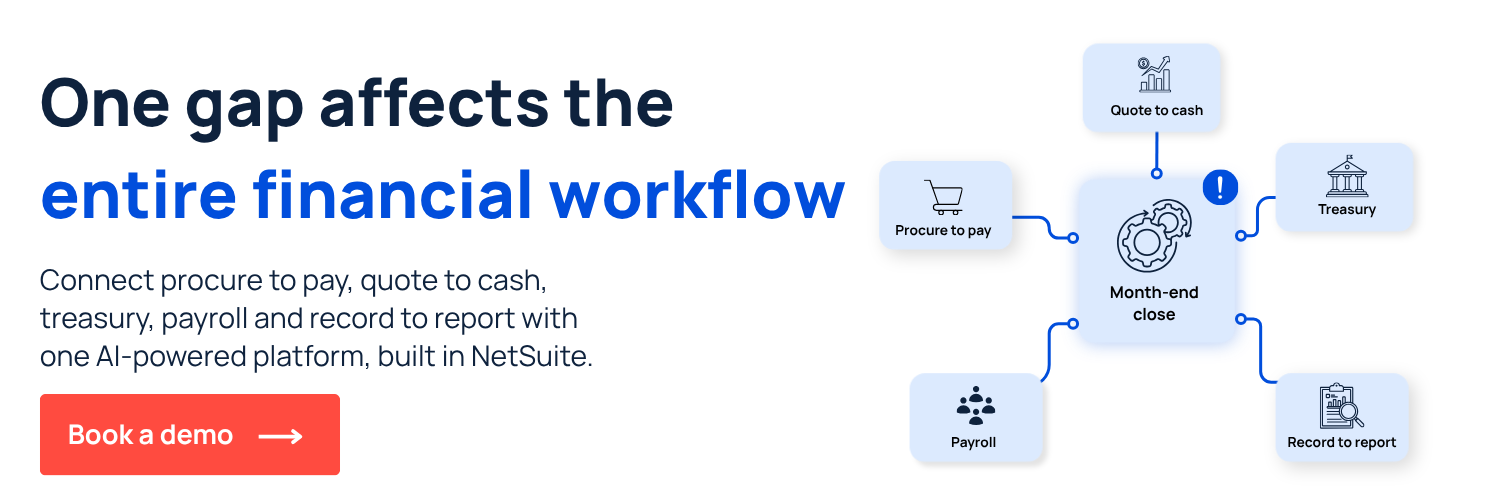
Zone’s platform covers AP automation, approvals, reconciliation and intercompany management – the full lifecycle to bring intelligent agency to your numbers.
Book a demo today and see how Zone & Co streamlines your NetSuite month-end close workflows.