
Every prepayment, annual subscription and multi-year contract creates a deferred revenue entry your team has to build, amortize and release on schedule. In NetSuite, that means managing revenue recognition rules, amortization schedules and close-period timing for each contract. Someone on the finance team can handle that by hand at low volume, but once amendments and renewals stack up, it becomes unmanageable to do manually.
Here’s how to book deferred revenue in NetSuite, how amortization works, the mistakes that cause month-end close problems and how billing automation keeps your schedules accurate.
Key highlights
- A deferred revenue journal entry debits cash and credits a liability account for payment received before delivery.
- Amortizing deferred revenue moves it into earned revenue over the delivery period, usually straight-line or by milestone under ASC 606 performance obligations.
- In NetSuite, deferred revenue stays a liability on the balance sheet until revenue recognition rules release it to the income statement. How you set up those rules decides whether recognition runs cleanly at close.
- ZoneBilling links billing events to revenue recognition schedules inside NetSuite, so deferred revenue amortizes correctly even when contracts change mid-term.
What is deferred revenue?
Deferred revenue is cash received before the service or product is delivered. In deferred revenue accounting, that amount sits on the balance sheet as a liability because the company still owes a future obligation to the customer. It doesn't move to the income statement until delivery happens.
The terms “deferred revenue” and “unearned revenue” mean the same thing. An unearned revenue journal entry follows the same debit/credit structure as a deferred revenue entry, and both record cash received for obligations not yet fulfilled.
For example, say a SaaS company sells a 12-month annual subscription for $12,000. On day one, the company receives $12,000 in cash but has delivered zero months of service, so the full amount is booked as deferred revenue on the balance sheet.
Each month, $1,000 moves from deferred revenue (liability) to recognized revenue (income) as the company delivers the service. After 12 months, the deferred revenue balance for that contract is zero and the income statement reflects the full $12,000.
Deferred revenue vs. accrued revenue
Deferred revenue and accrued revenue are accounting opposites.
- Deferred revenue means cash is in hand but the service hasn’t been delivered yet, so it’s recorded as a liability.
- Accrued revenue means the service has been delivered but cash hasn’t been received yet, so it’s recorded as an asset.
Here are the key differences between the two:
For example, a company with a customer who pays $6,000 upfront for six months of consulting records that deferred revenue, which is a liability. But a consulting firm that completes $3,000 of project work in October but doesn’t get paid until November records it as accrued revenue, which is an asset.
Both require adjusting entries at period end, and both are common sources of close-period errors when tracked manually. Misclassifying one as the other distorts both sides of the financial statements, which is why auditors check for it.
Where deferred revenue sits on the balance sheet
Deferred revenue on the balance sheet is classified as either a current liability or a non-current liability, depending on when it will be recognized. Revenue expected to be earned within 12 months is current. Revenue that won’t be recognized for more than 12 months is non-current.
The current versus non-current split matters for financial reporting, loan covenant compliance and investor reporting. Misclassifying deferred revenue between the two distorts working capital metrics and can trigger covenant violations on debt agreements.
How to record a deferred revenue journal entry
Recording a deferred revenue journal entry involves two entries. The first posts when cash arrives and the full amount is deferred, and the second repeats each period as revenue is earned. Here’s the actual debit/credit structure for both:
Entry 1: Initial booking (cash received, revenue deferred)
This entry happens at invoice or payment. The company has received $12,000 but hasn’t delivered anything yet, so the full amount is a liability.
Entry 2: Monthly recognition (revenue earned)
This deferred revenue adjusting entry repeats each period as the service is delivered, reducing the liability on the balance sheet and moving the earned portion to revenue on the income statement. For a 12-month subscription at $1,000/month, this entry posts 12 times.
Deferred revenue journal entry examples by billing model
The journal entry structure stays the same across billing models, but the recognition pattern changes based on how and when delivery happens.
- Annual SaaS subscription: A good example of SaaS billing is $12,000 prepaid, recognized as $1,000 per month over 12 months on a straight-line basis. This is the most common deferred revenue SaaS pattern and the simplest to manage in NetSuite’s billing platform. The journal entries are predictable and the schedule rarely changes mid-term.
- Multi-year contract with escalating terms. For instance, a $120,000 subscription over three years with annual price increases can complicate deferred revenue. Under ASC 606, the total contract value may need to be allocated by standalone selling price (SSP) and recognized evenly across the contract term rather than matching the billing schedule. Manual tracking becomes particularly difficult here.
- Project-based / milestone billing. A company might carry out a $50,000 project billed upfront, with revenue recognized at milestone completion (25%, 50%, 75%, 100%). The deferred revenue balance decreases in steps as each milestone is achieved and accepted, not on a monthly cadence. This requires documentation of completion, which adds an approval layer that straight-line billing doesn’t have.

How deferred revenue amortization works in NetSuite
Deferred revenue amortization in NetSuite is managed through revenue recognition rules and deferred revenue schedules that define when and how the liability converts to earned revenue. NetSuite’s Advanced Revenue Management (ARM) module handles both.
Setting up revenue recognition rules in NetSuite
NetSuite revenue recognition starts with defining rules that control how deferred revenue amortizes. The available methods include straight-line (equal amounts per period), exact days (prorated based on actual days in each period) and percentage-based (manual allocation across periods).
Most SaaS contracts use straight-line. Using exact days is important when periods have different lengths and the amounts need to be precise, which comes up in quarterly reporting. Percentage-based is common for milestone and project billing.
These rules attach to revenue elements, which link billing transactions to revenue arrangements. A revenue arrangement groups one or more elements under a single contract, and each element carries its own recognition rule.
When a billing event creates a transaction, NetSuite ARM uses those rules to build the recognition schedule. If the billing event and the revenue schedule are misaligned, deferred revenue won't move to the income statement on the right timeline.
Building a deferred revenue schedule
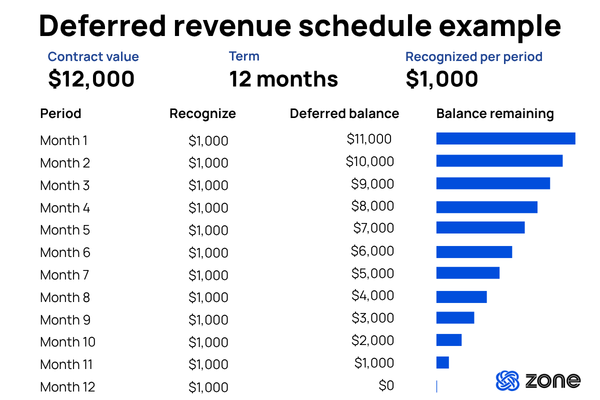
A deferred revenue schedule in NetSuite is a period-by-period amortization plan attached to a revenue element. Each line shows the period, the amount to recognize and the remaining deferred balance. For the $12,000 annual subscription example, the schedule would show 12 lines at $1,000 each, with the deferred balance declining from $12,000 to zero.
Native NetSuite ARM creates these schedules, but managing them manually across hundreds of contracts with mid-term amendments gets labor-intensive quickly. Each amendment can require a revised schedule, and missing one means the deferred revenue balance falls out of sync with the schedule.
Common deferred revenue mistakes in NetSuite
These errors show up most often during close and audit. Catching them early saves rework.
- Misaligned billing and revenue dates. The billing event and the revenue start date don't match, creating a gap in the amortization schedule. The deferred revenue balance is correct on paper but the recognition timing is off by days or weeks.
- Contract amendments that don't flow to revenue. A mid-term upgrade or downgrade changes the billing but the revenue schedule doesn't get updated. This creates a deferred revenue mismatch at close that requires manual investigation and correction.
- Manual journal entries that drift. Teams booking deferred revenue entries by hand each period. This works at 50 contracts. At 500, entries get missed, amounts get rounded and the GL balance no longer ties to the contract detail. These gaps are a common source of revenue leakage.
- Current vs. non-current classification errors. Deferred revenue not properly split between current and long-term liability distorts the balance sheet and potentially triggers covenant issues.
When to stop managing deferred revenue manually in NetSuite
Not every team needs to automate deferred revenue management. The decision depends on contract volume, billing complexity and how much close-period time the revenue schedule consumes.
Less than 50 contracts: Manual works
For a team with 50 or fewer active contracts, straight-line recognition only, no mid-term amendments and one entity, manual deferred revenue entries is manageable. A controller who knows the contracts can build and maintain the revenue schedules in native NetSuite ARM without automation. The risk at this stage is key-person dependency, not process failure.
50–200 contracts: Manual works, but it’s fragile
At 50 to 200 contracts, the manual process starts to strain. The book includes a mix of straight-line and milestone recognition, with occasional amendments like upgrades, downgrades and early terminations.
The revenue schedules still get built by hand, but financial close takes longer each quarter, and one missed amendment means restatement risk. Most teams at this stage start reconciling the general ledger to a spreadsheet because they don’t fully trust the revenue schedule detail in NetSuite.
200+ contracts: Manual is costing you time and accuracy
At 200+ contracts, with usage-based, subscription and project billing in the same book, manual revenue management becomes a bottleneck. Amendments from sales are frequent, and the company may span multiple entities or currencies.
At this volume, the deferred revenue balance is too large and too dynamic to verify manually every close. The question is how much close-period time you’re spending on work the system could handle.
ASC 606 and deferred revenue: What NetSuite teams need to know
ASC 606 and its international equivalent, International Financial Reporting Standards 15 (IFRS), changed how deferred revenue recognition works. Both standards apply to companies reporting under U.S. Generally Accepted Accounting Principles (GAAP) and IFRS respectively, which means most NetSuite teams with international customers or investors need to comply with one or both.
Under ASC 606, revenue is recognized when performance obligations are satisfied, not when cash is received or an invoice is sent. ASC 606’s five-step model dictates teams to identify the contract, identify performance obligations, determine the transaction price, allocate the price to each obligation and recognize revenue as each obligation is fulfilled.
For NetSuite teams, ASC 606 matters most with complex contracts. A deal that bundles a software license, implementation services and annual support has three separate performance obligations. Revenue for each component is allocated by standalone selling price and recognized on its own schedule.
That means the deferred revenue balance for a single contract can have three recognition patterns running in parallel, each needing its own schedule in NetSuite ARM.
A controller can build one three-component revenue arrangement. Building and maintaining 200 of them with mid-term amendments is a different job entirely.
How ZoneBilling automates deferred revenue in NetSuite
ZoneBilling automates the connection between billing events and revenue recognition schedules inside NetSuite ARM.
When a contract is created, amended or renewed, ZoneBilling updates the revenue arrangement and deferred revenue schedule automatically. The deferred revenue balance on the balance sheet stays accurate without manual journal entries.
- Automate deferred revenue schedules. ZoneBilling creates and maintains revenue plans inside NetSuite ARM, so each billing event flows to the right recognition schedule without manual setup.
- Handle amendments without breaking rev rec. Contract changes like upgrades, downgrades, renewals and cancellations flow through to updated revenue arrangements automatically, keeping deferred revenue aligned with delivery.
- Stay ASC 606 compliant. Performance obligation management, revenue allocation across bundled components and dynamic plan adjustments keep recognition compliant as contracts evolve.