
The money’s in the bank. The payment cleared this morning, the amount lines up with an open balance – but the cash still sits unapplied because the remittance arrived via email without naming an invoice. So someone on your accounts receivable (AR) team opens the customer record and works back through the open invoices by hand, picks the one that looks right and moves on.
The cash gets applied, but no one can tell you why it landed where it did. Multiply that by a few hundred payments a week across banks, cards and payment service providers (PSPs), and your close inherits a pile of matches it can’t explain.
Cash application software matches incoming payments to open invoices, routes the ones that need judgment and posts the cash to your enterprise resource planning (ERP) system. This article shows where AI speeds the matching and posting, where to consider keeping rule-based controls and why running the work inside the ERP builds trust in the result.
Key highlights:
- Cash application software clears the clean matches on its own and routes the rest to a review queue, so your team spends its time resolving the payments that need judgment.
- Cash goes unapplied when remittance is missing, a payment is short or one settlement covers many invoices – and every hour it sits unapplied overstates your accounts receivable aging.
- AI speeds cash application by reading messy remittance, suggesting matches and ranking exceptions by risk, while finance sets the rules that decide what posts on its own.
- ZoneReconcile, ZoneReporting and ZonePayments give teams cash matching, aging visibility and payment context in NetSuite, while keeping the audit trail attached.
What is cash application software, and why does it matter for month-end close?
Cash application is the step when teams match a payment that landed in the bank to the invoice it pays, then post it. Cash application software does that matching and posting for you and queues the payments it can’t resolve cleanly for a person to review. Done well, cash application automation software also records why each payment matched the invoice it did, so the decision holds up later.
Close control is what turns this from an AR chore into a finance question. Until a payment is applied, the cash has arrived, but the receivable still shows open. Your accounts receivable aging overstates what’s outstanding, your collections team chases balances that customers have already paid and the close waits on a reconciliation that ties out only after the cash is applied. The faster and cleaner the matching, the less of that noise reaches your close.
The root causes of unapplied cash
Unapplied cash rarely comes from one issue. It builds up in the gaps between how customers pay, what remittance they send, what the bank reports and how your ERP posting rules read it. Every gap carries the same cost: cash you can see in the bank that your books still show as owed.
It’s also where AI can make things worse if you bolt it on without controls. When AI underdelivers, 43% of finance teams in Zone’s report say the result is more work to correct or reconcile data. Whether unapplied cash issues stem from AI or not, here’s where they typically show up.
Remittance gaps
Payments often arrive with too little detail to identify the invoice. A customer pays without an invoice number, uses an abbreviated account name or sends the remittance separately from the cash. To find the missing details by hand, your AR team searches emails, calls customers and compares open balances, and the cash stays unapplied while the money sits in the bank.
Short pays
Short payments carry context for deductions, disputes, credits, fees or a customer-side error. When the system routes the exception with the supporting detail attached, finance sees the reason, the approval path and the accounting impact – and posts it with the explanation intact. When that detail is missing, posting either waits or goes through half-explained.
Bundles
Some customers pay many invoices in one settlement. Automated matching compares the settlement to the open invoices for you. The team reconciles totals across invoices and remittance files, and it gets harder when one invoice is missing, partly paid or netted against a credit. A good workflow supports many-to-one and one-to-many matching so the team stays out of spreadsheets.
Picture a distributor who wires one payment for twelve invoices, with a remittance file that lists purchase order numbers your system doesn’t carry. Two of those invoices were partly credited last month. For your team, that single wire can eat an afternoon: matching the totals, chasing the link from each PO to its invoice, explaining the two credits to whoever asks at close.
Partial settlements
Partial settlements create ambiguity: the payment might be legitimate, disputed or tied to a credit memo. Finance needs exception handling that separates an expected partial payment from one that needs follow-up. Unresolved partials are exactly what distorts your AR aging and collections view, which is why partial-payment logic ties straight back to aging accuracy.
What cash application software automates
With cash application software, automation can vary by function. Some manual steps go away, some become exception-based and others keep the controls completely in finance’s hands.
Matching rules
Automated matching compares each incoming payment against open invoices, customer records and remittance details. Highly capable systems handle exact matches, tolerance-based matches for small variances and configurable logic for partial or bundled payments.
The strongest setups provide:
- Invoice number, customer name and payment reference matching
- Tolerance thresholds for small variances
- Multi-invoice settlement matching
- Bank, card and PSP transaction support
Exception queues
The goal with exception queuing is to point reviewers at the payments that need judgment and let the software clear the rest. A good queue flags missing remittance, unmatched payments, short pays, duplicate references and policy holds – and shows each one with enough context to act. That context helps teams move quickly from finding the problem to resolving it.
ERP posting
Matching only helps if the result lands in your system of record cleanly. Matched payments, unapplied cash and exceptions need to flow into close reporting without exports, re-entry or delayed syncs. When you match cash outside the ERP, you still have to reconcile it back in later. Matching where the records already live keeps the posting and the audit trail together.
Visibility
Controllers need a live view of matched cash, unapplied cash, exceptions and the aging impact. That’s where cash application software connects to your accounts receivable aging, because every unapplied payment leaves a receivable open for cash you’ve already collected. If you treat cash application as a posting function alone, your aging report can quietly drift from reality
How AI improves cash matching and posting
With cash application software, automation handles the clean matches. AI is what moves the messy ones: payments with incomplete remittance data, unfamiliar formats or patterns that a rule alone can’t explain. These exceptions are time-consuming to manage. They’re also where finance teams tend to be most cautious.
In Zone’s “AI Impact vs. Hype in Finance 2026” report, 29% of finance professionals named cash reconciliation as one of the most overhyped AI use cases. It’s an understandable concern. A clean match is easy to trust. An AI-suggested match for a messy scenario needs evidence.
As you think about the capabilities below and the role you want AI to play in cash matching and posting, ask yourself a few key questions. Does the AI speed the work? Do your controls still decide what posts? Does the evidence stay close enough for a reviewer to trust the match?

1. AI reads inconsistent remittance data faster
Customer payment details rarely arrive in one clean format. They show up in email attachments, bank files, portal exports and PSP settlement reports. AI extracts the invoice references, amounts, customer identifiers and payment notes from those inconsistent formats, so a match candidate is ready before anyone opens a spreadsheet.
- Remittance extraction from structured and semi-structured data
- Recognition of invoice references across inconsistent customer formats
- Less manual lookup before a match is proposed
2. AI improves match suggestions, but rules still matter
AI suggests likely matches when payment details are incomplete. Finance sets the rules for when a payment can post on its own and when it needs review. The strongest cash application automation software pairs AI suggestions with configurable matching rules, so AI narrows the decision and your controls decide what’s acceptable.
3. AI prioritizes exceptions by risk and urgency
Exceptions vary in weight. A missing reference on a small payment is one thing; a large unapplied payment that distorts your AR aging or close reporting is another. AI ranks exceptions by amount, customer, age, payment type or past matching patterns, so the high-impact ones reach a reviewer first. For a controller, that prioritization protects the close timeline and keeps a high-impact exception from getting buried behind low-impact noise.
4. AI supports faster posting with reviewable evidence
The strongest AI use case here is faster posting with details you can review: why a match was suggested, which records it compared and what rule or confidence threshold was applied. When the logic, the approval history and any overrides stay visible, posting speed and audit readiness travel together. Ask vendors to show you that the evidence stays attached to the transaction, where a reviewer or auditor can find it.
5. AI helps finance teams learn from repeat patterns
Recurring customer payment behavior reveals matching patterns worth keeping. Automated cash application software can use those patterns to sharpen future suggestions, especially for customers who pay in predictable bundles or use consistent remittance notes. The payoff is fewer repeat reviews for payments your team has already seen and resolved before.
Tools for reducing cash application delays with automation and AI
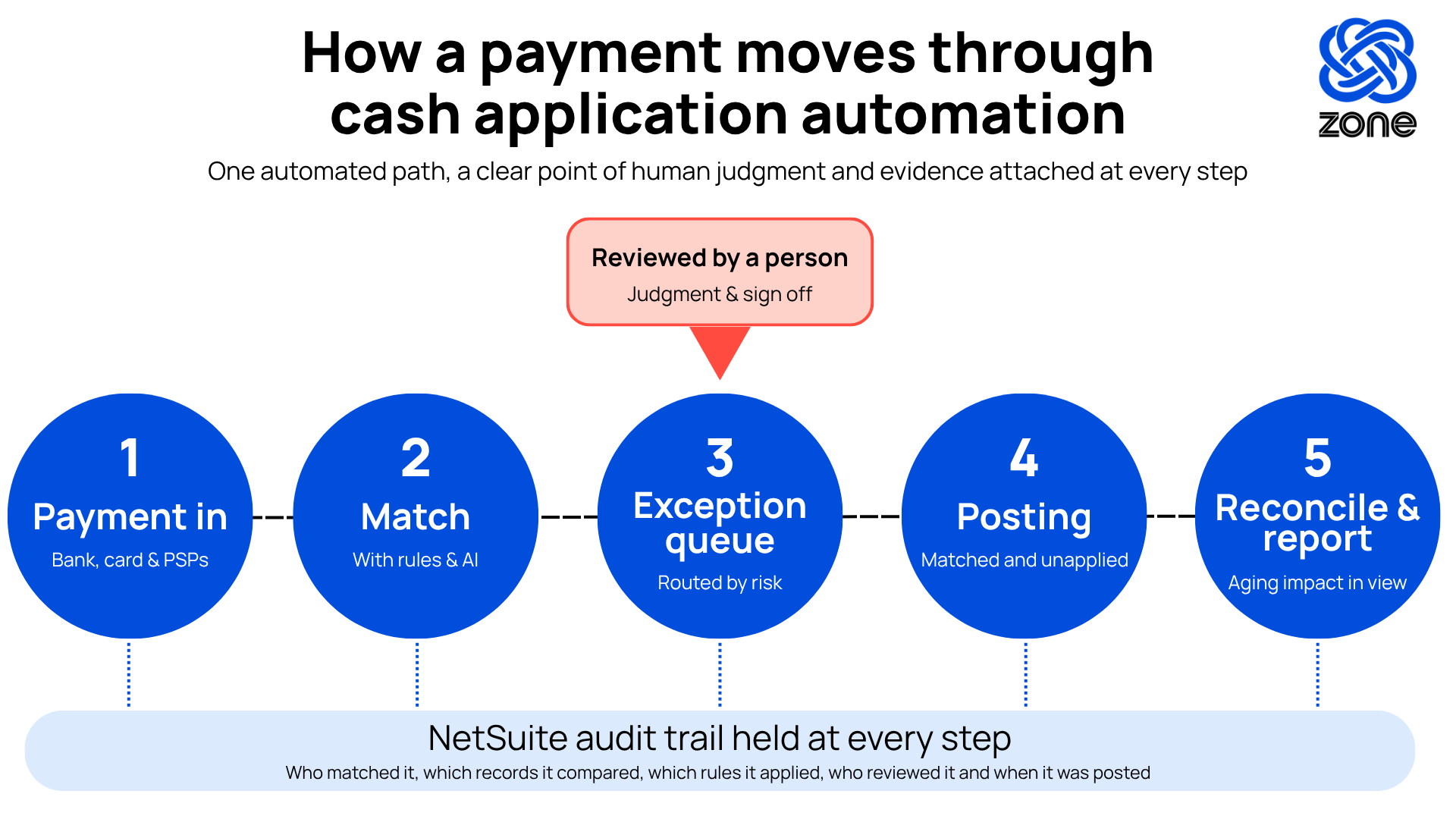
Each of those gaps has a category of tool aimed at it. The distinction is worth keeping in mind: a point tool automates one step, while an ERP-native workflow removes the re-entry and the reconcile-back gap between steps.
The advantages of ERP-native solutions are efficiency, accuracy and proof. A tool that only automates one step still has to hand the result to the next system, where evidence can get lost. But a workflow that lives in the ERP keeps matching, posting and reporting on the same records – so the speed you gain at matching isn’t replaced by new work at close.
What finance teams should look for in cash application software
Choosing cash application software is a workflow decision. The right system cuts manual effort and tightens controls at the same time. The wrong one becomes another place to reconcile data back to the ERP. Five things separate the two.
1. Configurable matching rules
Finance needs matching logic it can tune by customer, payment type, tolerance and entity structure. Ask how the system handles exact matches, partial payments, bundles and recurring behavior.
- Can rules vary by customer, subsidiary, bank account or payment source?
- Can finance set tolerance thresholds without IT support?
- Can the system explain why it proposed or rejected a match?
2. Clear exception queues
A strong system puts exceptions in a working queue with context that includes customer, amount, open invoices, remittance detail, the reason for the exception and the next action. Ask vendors to show you what an unmatched payment looks like inside the workflow.
3. ERP-native posting and drill-back
Cash application works best when matched cash, unapplied cash and exceptions stay connected to the ERP records you close, report and audit from. Keep the whole thing in the system of record and there’s nothing to reconcile back. ZoneReconcile handles bank, card and PSP matching and posting inside NetSuite, with the audit trail sitting on the transaction itself.
4. Reporting that connects cash to AR aging
Controllers need to see how unapplied cash moves your AR aging, your collections conversations and your close confidence. Reporting shows what’s matched, what’s unresolved and what needs follow-up. It’s the highest-value place AI lands, too.
Among the 565 finance professionals we surveyed, reporting and analysis was cited by 53% as AI’s most tangible benefit, ahead of any single transactional workflow. Cash application feeds that reporting capability, and clean matches keep your aging honest.
5. Audit-ready controls
Every cash application decision attaches approval history, override tracking, rule changes, exception ownership and drill-back reporting to the transaction. When an auditor asks how a payment was applied six months later, that history is the answer.
Ask vendors to show you:
- Timestamped match, review and posting history
- Role-based access controls
- Reason codes for exceptions and overrides
- Reporting auditors can review without rebuilding the workflow
Reduce cash application friction with Zone & Co
Unmatched cash shows up at close as unapplied receipts, aging inaccuracies and reconciliation work that should have been done before the period ended. ZoneReconcile prevents that by running bank, card and PSP reconciliation directly inside NetSuite. No exports, no re-entry, no reconciliation step between the tool and the system of record.
What ZoneReconcile helps teams:
- Match cash where the records live. Bank, card and PSP transactions reconcile against NetSuite invoices and payments directly.
- Queue exceptions with context, not just flags. Unmatched items surface with the transaction detail attached, so the reviewer has what they need to resolve or escalate without digging through source files.
- Keep the audit trail inside NetSuite. Every match decision, manual override and exception resolution is logged automatically against the relevant record.
- Feed close with live reconciliation status. Matched, unmatched and aging-impacting activity is visible in real time, so the close team knows where the gaps are before they become period-end problems.
ZoneReconcile sits inside Zone’s broader order-to-cash and record-to-report workflows for NetSuite. ZonePayments handles payment collection and processing so cash arrives with the right transaction context already attached. ZoneReporting gives finance a live view of matched, unmatched and aging-impacting activity, so reconciliation status feeds directly into close without a separate reporting step. Together, the suite keeps every step of the cash cycle – from invoice to payment to reconciliation to report – inside NetSuite, with the evidence chain intact throughout.
Book a demo to see how ZoneReconcile matches, reviews and posts cash activity in NetSuite, keeping the evidence behind every match in view.