



.svg)



Procure-to-pay AI that improves control, not just speed.
Trusted by finance teams at 4,500+ organizations









.png)










Zone procure-to-pay workflow
Spend often starts before finance has visibility. Requests happen in Slack, email or spreadsheets, and vendors are introduced before the right checks are in place.
ZoneProcure creates a structured front door for purchase requests, vendor onboarding, budget context and pre-PO approvals, so finance can control spend before it is committed.
.avif)





AP teams waste time chasing invoices when they show up across inboxes. Then those invoices still need to be uploaded manually and bill details have to be keyed into NetSuite.
ZoneCapture automates invoice ingestion, coding and bill creation, helping teams reduce manual entry, catch issues earlier and keep invoice data connected to the ERP.

Someone misses a couple days in the office and it slows down the entire invoice approval process. Invoices sit in inboxes for weeks before someone can manually approve them – by hand.
ZoneApprovals routes bills through flexible, auditable workflows so finance can get the right sign-offs without chasing every approver.



Finance teams have to export payment files, log into bank portals, manage FX manually, track payment status in spreadsheets and then reconcile activity after the fact.
Zone AP Payments executes domestic and global vendor payments directly in NetSuite with real-time FX rates for cleaner reconciliation.


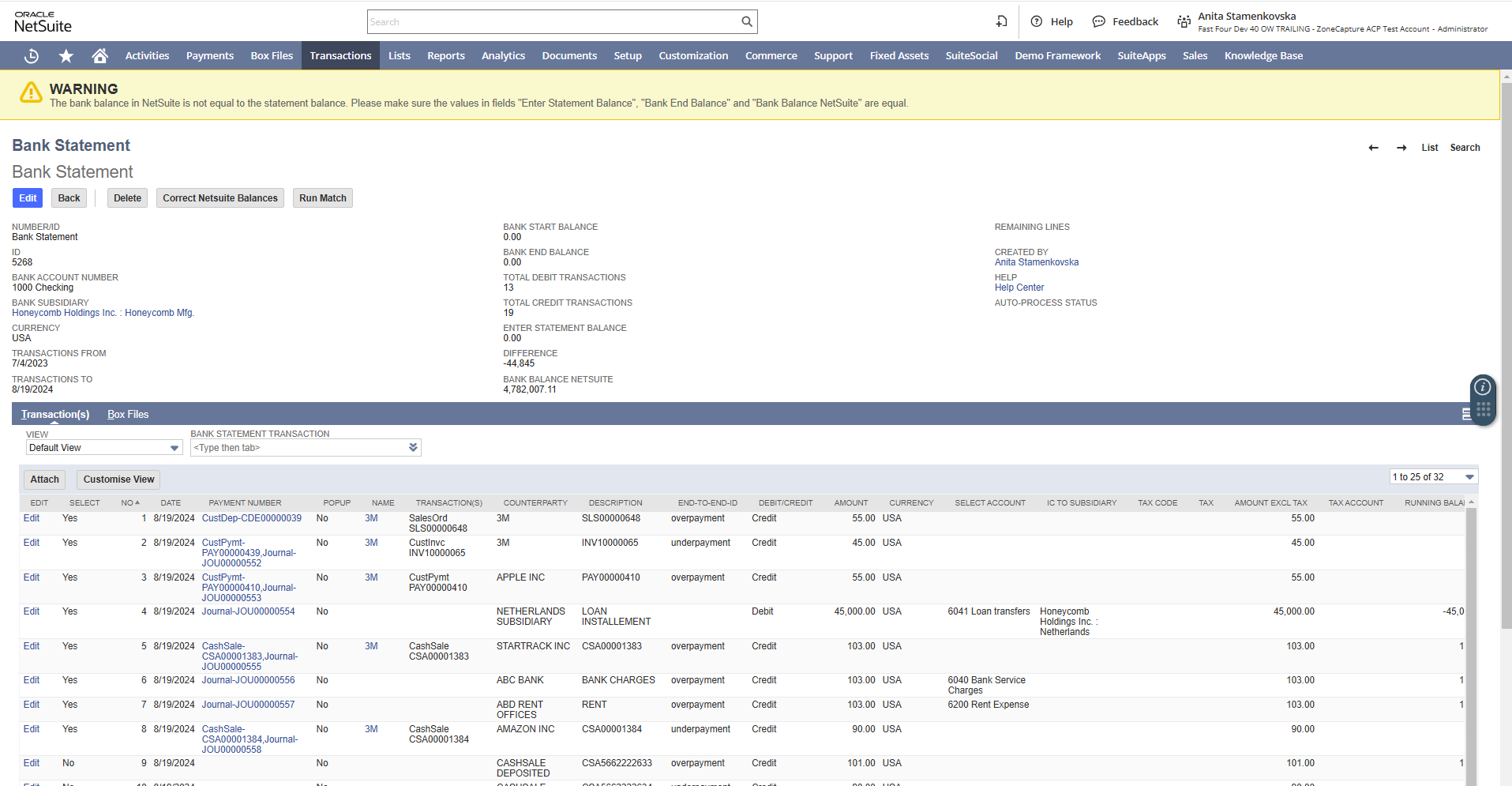
ZoneReconcile
Payment work isn’t over when money leaves the account. Finance still has to match bank activity to prove what happened in the ledger.
ZoneReconcile connects payment and bank activity back to NetSuite, reducing cleanup work and closing the loop between payment execution and financial reporting.

Built for finance teams that want control without another disconnected layer

“We explored various options, but Zone & Co was the only one offering turnkey procure-to-pay solutions fully integrated with NetSuite. It feels like using NetSuite itself, not a separate SuiteApp. Each Zone SuiteApp is an extension of the tool we already use, not an additional layer of complexity.”
“We explored various options, but Zone & Co was the only one offering turnkey procure-to-pay solutions fully integrated with NetSuite. It feels like using NetSuite itself, not a separate SuiteApp. Each Zone SuiteApp is an extension of the tool we already use, not an additional layer of complexity.”
“I reviewed all the major players in the space, and Zone’s AP automation solutions were by far the most performant. They integrate seamlessly within NetSuite and work so well, you would think they were part of core NetSuite."


.svg.avif)





Close the procure-to-pay loop
See how Zone can help your finance team control spend before it begins, automate AP execution, reconcile payments and improve visibility across the full procure-to-pay lifecycle.
Go deeper: How to pay vendors without leaving NetSuite



Frequently asked questions
What is procure-to-pay in NetSuite?
Procure-to-pay in NetSuite covers the full path from purchase request to vendor payment and reconciliation. It connects purchasing, approvals, vendor bills, payments and accounting records inside one ERP workflow.
If your team still requests products and services ad-hoc, captures invoices in one tool, chases approvals by email and reconciles payments in spreadsheets, NetSuite becomes the ledger of record – not the operating system for control. A stronger P2P setup keeps the process inside NetSuite, so finance can see what was requested, approved, billed, paid and reconciled without rebuilding the story at close.
Does NetSuite support procure-to-pay?
Yes, NetSuite supports procure-to-pay through purchasing, vendor bill management, approval workflows, payments and reporting. For finance teams with simple volumes or basic approval routing, those native capabilities can cover a lot.
A major gap appears before spending even happens. While accounts payable processes are supported in NetSuite, teams often struggle with controlling spend before it occurs. That’s where teams start adding manual workarounds with vendor requests and approvals, which ripples across the entire P2P cycle.
How do you automate procure-to-pay in NetSuite?
Procure-to-pay automation in NetSuite usually starts with the manual choke points: vendor request and onboarding, invoice capture, PO matching, approval routing, vendor payment processing and bank reconciliation. The goal is not to replace NetSuite. It is to remove the repetitive work around it.
A built-in-NetSuite setup can capture invoice data with optical character recognition (OCR), match bills to purchase orders, route approvals by rule, support email approvals for non-NetSuite users and reconcile vendor payments using matching logic. That gives finance one workflow instead of five disconnected ones.
What is the difference between procure-to-pay and AP automation?
Procure-to-pay is the full vendor spend cycle. It starts before the invoice arrives, with purchasing, purchase orders, approvals and receiving. It ends after the vendor is paid and the transaction is reconciled.
AP automation is narrower. It usually focuses on invoice capture, coding, approval and payment preparation. Automating AP alone may speed up invoice processing while leaving upstream purchase controls or downstream reconciliation untouched. If the PO, bill, payment and bank transaction still need manual stitching at month-end, finance has only solved one part of procure to pay.
How do vendor payments work in NetSuite?
Vendor payments in NetSuite typically start with an approved vendor bill. Once the bill is ready for payment, finance can create payment transactions, apply them to open bills and record the payment against the right vendor, subsidiary, bank account and GL impact.
That’s the clean version. The messier version happens when approval status, payment timing and bank activity live in separate places. Finance may know a bill was paid, but still need to prove which invoice it cleared, whether the amount matched and how it hit the bank. Vendor payments work best when approval, payment creation and reconciliation stay connected inside NetSuite.
How do you reconcile vendor payments in NetSuite?
Vendor payment reconciliation in NetSuite means matching the payment recorded in the ERP to the bank transaction that cleared. Finance checks the vendor, amount, date, reference details and any fees or adjustments before closing the loop.
The risk is the volume of “almost matches” that pile up at month-end: partial payments, bank charges, foreign currency differences or references that don’t line up cleanly. Automated matching rules can clear predictable transactions faster and surface exceptions for review. That gives finance fewer mystery items, cleaner AP visibility and a close process that doesn’t depend on spreadsheet detective work.